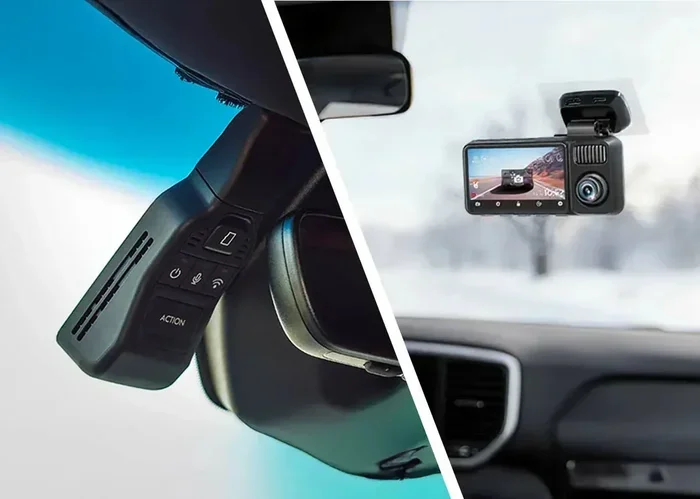
Does the Toyota Dash Cam Come With an SD Card Included
The Toyota dash cam does not always come with an SD card included. Some newer Toyota models include a pre-installed micro SD card, while others require you to purchase one separately. Understanding your specific Toyota model and year is essential to knowing whether you need to buy a memory card for dash cam recording to work properly.
You just got a Toyota with a dash cam. You are excited to hit the road and capture everything. But then you start wondering: does the Toyota dash cam come with an SD card? It is a simple question, but the answer is not always straightforward. The truth is, it depends on your specific Toyota model, the year it was made, and the trim level you chose. Some Toyotas ship with a dash cam that has a memory card already inside. Others leave you searching for one on your own.
This guide breaks it all down. You will learn exactly which Toyota models include an SD card, which ones do not, and what you need to do if yours came without one. By the end, you will know everything you need to set up your Toyota dash cam and start recording with confidence.
Let us get into it. No jargon. No confusion. Just clear, practical information that helps you get the most out of your Toyota’s built-in camera system.
Key Takeaways
- Not all Toyota dash cams include an SD card: Some models ship with a card, while others do not.
- Check your owner’s manual to confirm whether your Toyota came with a pre-installed memory card.
- Micro SD cards are the standard for most Toyota dash cam systems, typically requiring 32GB to 128GB of storage.
- Formatting the SD card correctly is important for the dash cam to record and save footage properly.
- Loop recording and parking mode are key features that depend on having a working SD card installed.
- Buying a high-quality micro SD card ensures reliable footage and fewer write errors over time.
📑 Table of Contents
- What Is the Toyota Dash Cam System?
- Does Every Toyota Dash Cam Include an SD Card?
- What Kind of SD Card Does the Toyota Dash Cam Use?
- How to Install and Format the SD Card in Your Toyota Dash Cam
- Common SD Card Problems with Toyota Dash Cams
- Why Having an SD Card Matters for Your Toyota Dash Cam
- How to Choose the Right SD Card for Your Toyota Dash Cam
- Maintaining Your Toyota Dash Cam SD Card
- Final Thoughts
What Is the Toyota Dash Cam System?
Toyota has been equipping more of its vehicles with built-in dash cams in recent years. These systems are designed to record the road ahead and, in some cases, the rear view as well. The dash cam is part of Toyota’s broader safety technology lineup. It works automatically when you start the car. You do not need to install anything extra in most cases. But the recording function depends on one small but critical component: the SD card.
The Toyota dash cam system captures video in high definition. It uses a front-facing camera mounted near the rearview mirror. Some models also include a rear camera. The system stores all of this footage on a memory card. Without that card, the dash cam cannot save anything. This is why knowing whether your Toyota came with one matters so much.
The system also includes features like loop recording. This means the camera continuously overwrites old footage with new footage. It ensures you always have the most recent video available. Parking mode is another feature. It allows the camera to keep recording even when the car is turned off. Both of these features rely on the SD card to function.
Does Every Toyota Dash Cam Include an SD Card?
The short answer is no. Not every Toyota dash cam comes with an SD card inside the box. But the longer answer is more nuanced. Here is how it breaks down by situation.
Toyota Models That Include an SD Card
Some newer Toyota models do include a micro SD card with the dash cam. This is more common in higher trim levels and recent model years. For example, certain 2023 and 2024 Toyota models that come with the Toyota Safety Sense suite may include a dash cam with a pre-installed memory card. Always check the owner’s manual or the window sticker when purchasing a new Toyota.
If you bought a used Toyota, the previous owner may have removed the SD card. In that case, the dash cam system might appear non-functional even though the camera hardware is still there. This is a common situation that catches many buyers off guard.
Toyota Models That Do Not Include an SD Card
Many Toyota models, especially older ones or base trim levels, do not include an SD card with the dash cam. In some cases, the dash cam hardware is present but the vehicle was not designed to record continuously without additional setup. In other cases, Toyota simply did not include a memory card to keep costs down.
If your Toyota does not include an SD card, you will need to purchase one separately. This is not a difficult or expensive fix. But it does mean you cannot start recording right out of the box. You need to buy the right card, format it, and install it properly.
How to Check If Your Toyota Dash Cam Has an SD Card
Checking whether your Toyota dash cam has an SD card is simple. Here is what you should do:
- Start the car and turn on the infotainment screen.
- Navigate to the camera or safety settings menu.
- Look for a dash cam or recording option.
- If the system prompts you to insert a memory card, then there is no card installed.
- If the system shows recording options and a storage status, then a card is already in place.
You can also physically check the camera unit. Most Toyota dash cams have a small slot near the camera module where the SD card slides in. If you see a card already seated in that slot, you are good to go.
What Kind of SD Card Does the Toyota Dash Cam Use?
If your Toyota dash cam needs an SD card, you need to buy the right one. Not all memory cards are created equal. Using the wrong type can lead to recording failures, corrupted files, or a dash cam that simply will not turn on.
Micro SD vs. Standard SD
Toyota dash cams almost always use a micro SD card. These are the small cards, roughly the size of a fingernail. They are the same type used in smartphones and tablets. Standard SD cards, which are larger, are not compatible with the Toyota dash cam system. Make sure you are buying a micro SD card specifically.
Storage Capacity Recommendations
The amount of storage you need depends on how much footage you want to keep. Here is a quick comparison:
- 32GB: Enough for about 4 to 6 hours of continuous recording. Good for short daily commutes.
- 64GB: Enough for about 8 to 12 hours. A solid middle ground for most drivers.
- 128GB: Enough for about 16 to 24 hours. Best for drivers who want longer coverage between deletions.
Most Toyota owners do well with a 64GB or 128GB card. This gives you plenty of space for daily driving and enough buffer for longer trips.
Speed Class Matters Too
Not all micro SD cards are fast enough for continuous video recording. Look for a card with at least a Class 10 or UHS-I speed rating. This ensures the card can write video data quickly enough to avoid dropped frames or recording interruptions. A slow card can cause the dash cam to freeze or fail to save important footage.
Pro Tip: Buy a card from a reputable brand like SanDisk, Samsung, or Lexar. Cheap, off-brand cards are more likely to fail or corrupt your footage when you need it most.
How to Install and Format the SD Card in Your Toyota Dash Cam
Once you have the right SD card, installing it is easy. But formatting it correctly is just as important. Here is a step-by-step guide.
Step 1: Power Off the Vehicle
Before touching any electronics, turn off the car and remove the key from the ignition. This protects both the camera system and the memory card from electrical issues during installation.
Step 2: Locate the SD Card Slot
The SD card slot is usually found near the camera unit, which sits behind the rearview mirror. On some Toyota models, you may need to remove a small cover to access the slot. On others, the card slides in from the side of the camera module.
Step 3: Insert the Micro SD Card
Align the card with the slot. The gold contacts should face down. Push the card in gently until it clicks into place. Do not force it. If it does not go in easily, double-check that you are using a micro SD card and not a standard one.
Step 4: Format the Card Through the Infotainment System
After inserting the card, go to the infotainment screen. Navigate to the dash cam settings. Look for a format option. The system will format the card to the correct file system. This step is crucial. Without formatting, the dash cam may not recognize the card or may fail to record properly.
Quick Tip: Always format the SD card through the Toyota infotainment system rather than on a computer. This ensures the file system is compatible with the dash cam software.
Step 5: Test the Recording
Once the card is formatted, start the car and check if the dash cam is recording. Most Toyota systems begin recording automatically when the engine starts. Look at the infotainment screen or the camera feed to confirm that video is being captured and saved to the card.
Common SD Card Problems with Toyota Dash Cams
Even with the right card, you may run into issues from time to time. Here are the most common problems and how to fix them.
Dash Cam Shows No SD Card Installed
This is the most common issue. If the system says no card is detected, try these steps:
- Remove the card and reinsert it firmly.
- Check that the card is a micro SD, not a standard SD.
- Make sure the card is not physically damaged or warped.
- Format the card again through the infotainment system.
If none of these steps work, the card may be defective. Try a different card to see if that resolves the issue.
Footage Is Corrupted or Unplayable
Corrupted files are frustrating. This usually happens when the card is removed while the camera is still writing data. To avoid this, always let the car fully power down before removing or inserting the SD card. If corruption keeps happening, the card may be too slow or too old. Replace it with a newer, faster card.
Dash Cam Stops Recording After a Few Minutes
If your dash cam stops recording quickly, the SD card may be full. Check the storage status on the infotainment screen. Delete old footage or replace the card with a higher-capacity one. A full card will stop new recordings until space is freed up.
Card Is Not Recognized After a Software Update
Sometimes a Toyota software update changes how the dash cam system communicates with the SD card. If this happens, try formatting the card again. If the problem persists, check the Toyota website for any known issues or recalls related to the dash cam system. You can also visit a Toyota dealership for assistance.
Why Having an SD Card Matters for Your Toyota Dash Cam
The SD card is the heart of the Toyota dash cam system. Without it, the camera might still show a live feed on the infotainment screen, but it cannot save anything. This means that in the event of an accident, you would have no recorded evidence to review or share with insurance companies.
Having a properly functioning SD card gives you peace of mind. You know that every drive is being recorded. You can review footage if something happens on the road. And you have proof if another driver is at fault.
The dash cam also works hand in hand with other Toyota safety features. For example, if your Toyota Safety Sense system detects a potential collision, the dash cam footage can provide valuable context. It is all part of a comprehensive approach to driver safety.
Some drivers also use their dash cam footage to monitor their vehicle while parked. With parking mode enabled and a working SD card, the camera can capture any incidents that occur while the car is unattended. This is especially useful in areas with high theft or vandalism rates.
How to Choose the Right SD Card for Your Toyota Dash Cam
With so many options on the market, choosing the right SD card can feel overwhelming. Here are some factors to consider.
Brand Reliability
Stick with trusted brands. SanDisk, Samsung, and Lexar are all excellent choices for dash cam use. These brands produce cards designed for continuous read and write operations, which is exactly what a dash cam demands.
Endurance-Rated Cards
Some manufacturers make SD cards specifically designed for dash cams and surveillance cameras. These are called high-endurance cards. They are built to handle constant writing and rewriting without wearing out quickly. If you drive every day and use your dash cam heavily, an endurance-rated card is worth the investment.
Price vs. Performance
You do not need to spend a fortune on an SD card. A quality 64GB micro SD card from a reputable brand typically costs between $10 and $20. That is a small price to pay for reliable dash cam footage. Avoid the cheapest options, as they are more likely to fail or produce poor-quality recordings.
Maintaining Your Toyota Dash Cam SD Card
Taking care of your SD card helps it last longer and perform better. Here are some simple maintenance tips.
- Format the card regularly: Every few months, format the card through the Toyota infotainment system. This clears out fragmented data and keeps the card running smoothly.
- Avoid removing the card while recording: Always wait for the car to fully power off before removing or inserting the card.
- Keep the card dry and cool: Extreme heat and moisture can damage the card. Do not leave it in a hot car for extended periods.
- Replace the card every 2 to 3 years: SD cards wear out over time. Regular replacement ensures reliable performance.
- Back up important footage: If you capture something significant, copy the file to your phone or computer before it gets overwritten by loop recording.
If you ever experience persistent issues with your dash cam, it may be worth getting a full car diagnostic done at a Toyota dealership or qualified auto shop. They can check whether the camera system itself is functioning correctly or if the problem lies elsewhere in the vehicle’s electronics.
Final Thoughts
So, does the Toyota dash cam come with an SD card included? The answer is: it depends. Some Toyota models include a pre-installed micro SD card, while others require you to purchase one separately. The best way to know for sure is to check your owner’s manual or inspect the camera unit yourself.
If your Toyota did not come with a card, buying one is simple and affordable. Just make sure you get the right type, the right capacity, and a card from a reliable brand. Format it through the Toyota infotainment system, install it properly, and your dash cam will be ready to go.
Your dash cam is one of the most valuable safety tools in your Toyota. It protects you on the road and gives you peace of mind every time you drive. Taking a few minutes to make sure the SD card is set up correctly is well worth the effort. Drive safe, and happy recording.
Frequently Asked Questions
Do all Toyota models with a dash cam include an SD card?
No, not all Toyota models include an SD card with the dash cam. Some newer models and higher trim levels do include a pre-installed card, while many others do not. Always check the owner’s manual or ask the dealer to confirm whether your specific Toyota came with a memory card.
What size SD card does the Toyota dash cam need?
Most Toyota dash cams use a micro SD card with a capacity of 32GB to 128GB. A 64GB card is generally the sweet spot for most drivers. Make sure the card is a micro SD and has at least a Class 10 speed rating for smooth, continuous recording.
Can I use any micro SD card with my Toyota dash cam?
You can use most micro SD cards, but it is best to use cards from reputable brands like SanDisk, Samsung, or Lexar. Avoid very cheap or unknown brands, as they may not be reliable for continuous video recording. High-endurance cards are ideal for dash cam use.
How do I know if my Toyota dash cam is recording?
Most Toyota dash cams start recording automatically when you start the engine. You can check the infotainment screen for a live camera feed or a recording indicator. If the system shows storage status or a recording icon, the dash cam is actively saving footage to the SD card.
What should I do if my Toyota dash cam says no SD card is found?
First, try removing and reinserting the SD card. Make sure it is a micro SD card and that it is seated properly in the slot. If that does not work, format the card through the Toyota infotainment system. If the problem continues, the card may be defective or incompatible. Try a different card or visit a Toyota dealership for help.
How often should I replace the SD card in my Toyota dash cam?
It is a good idea to replace the SD card every 2 to 3 years, especially if you use the dash cam daily. SD cards wear out over time from constant writing and rewriting. If you notice frequent errors, corrupted files, or the camera not recognizing the card, it is time for a replacement.