Can You Install CarPlay in Any Car You Need to Know
Can You Install CarPlay in Any Car? The short answer is yes, with the right approach. Apple CarPlay works in most vehicles through factory updates, aftermarket adapters, or a complete head unit swap. Not every car supports CarPlay out of the box, but nearly any car can be upgraded. This guide covers every method, cost, and compatibility detail you need to know.
You are driving down the road and wish your car screen could do more. You want to see your maps, reply to texts, and stream music without touching your phone. Apple CarPlay makes all of this possible. But here is the big question. Can you install CarPlay in any car? The answer might surprise you.
Apple CarPlay has become one of the most popular smartphone integration features on the road today. It turns your car screen into an extension of your iPhone. You get Siri, Maps, Music, Messages, and tons of third-party apps right on your dashboard. But not every car comes with it built in. That is where the confusion starts. Many car owners assume CarPlay is only for new luxury vehicles. That is simply not true.
The good news is that almost any car can be upgraded to support CarPlay. You just need to know which route to take. Whether you drive a ten-year-old sedan or a brand-new SUV, there is a solution for you. In this article, we will walk you through every option. We will cover factory CarPlay, aftermarket adapters, head unit swaps, and everything in between. By the end, you will know exactly what to do.
Key Takeaways
- Most cars can support CarPlay: Whether your car is old or new, there is a way to add Apple CarPlay.
- Factory CarPlay is the best option: If your car supports a software update, this is the easiest and cleanest method.
- Aftermarket adapters work well: Devices like the Carlinkit adapter let you add wireless CarPlay without replacing your whole system.
- Head unit upgrades offer the most features: Swapping in a new unit gives you full CarPlay and better sound quality.
- Wireless CarPlay is now widely available: You no longer need a cable for most aftermarket solutions.
- Installation costs vary widely: From free software updates to $300+ for a new head unit.
- Check compatibility first: Always confirm your car model and year before buying any adapter or unit.
📑 Table of Contents
- What Is Apple CarPlay and Why Does It Matter?
- Can You Install CarPlay in Any Car?
- Factory CarPlay vs Aftermarket CarPlay
- How to Install CarPlay in Cars Without It
- Quick Tips for a Smooth CarPlay Installation
- Common Mistakes to Avoid When Installing CarPlay
- Expert Insights on CarPlay Installation
- Key Takeaways
- Conclusion
What Is Apple CarPlay and Why Does It Matter?
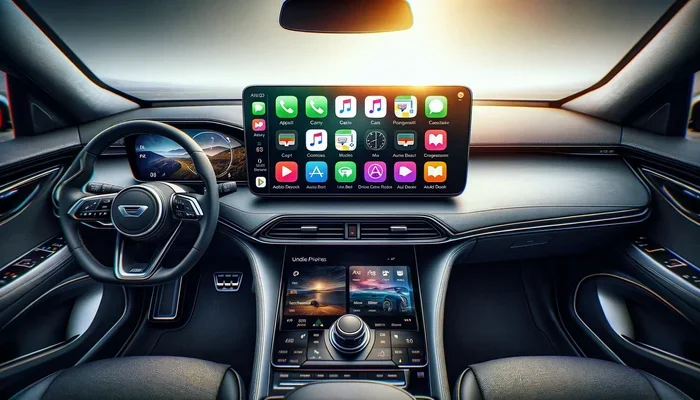
Before we dive into installation, let us quickly cover what CarPlay actually is. Apple CarPlay is a smartphone mirroring system. It connects your iPhone to your car’s infotainment system. Once connected, you see a simplified version of your iPhone on the car screen. You can make calls, send messages, use navigation, and listen to music. All of this is done through voice commands or the car’s touchscreen.
The main goal of CarPlay is safety. It keeps your eyes on the road and hands on the wheel. You do not need to pick up your phone while driving. Siri handles most tasks through voice input. You can say “Hey Siri, navigate home” and the map opens instantly. This hands-free approach is a game changer for daily commutes and long road trips alike.
CarPlay also supports a wide range of apps. Popular apps like Spotify, Google Maps, WhatsApp, Waze, and Podcasts all work with CarPlay. Apple updates the platform every year with new features. The latest versions even support wireless connections, so you do not need a cable at all. This makes the whole experience much more convenient.
Can You Install CarPlay in Any Car?
The short answer is yes. You can install CarPlay in almost any car. But the method you use depends on your car’s current setup. Let us break this down into three main scenarios. Each one applies to a different type of vehicle.
Scenario 1: Your Car Already Has Factory CarPlay
If your car was built after 2016, there is a good chance it already supports CarPlay. Many manufacturers started offering CarPlay as a standard or optional feature. In this case, you just need to activate it. Plug in your iPhone with a Lightning or USB-C cable. A prompt should appear on your car screen asking if you want to enable CarPlay.
Some cars support wireless CarPlay too. This means you do not need a cable at all. Your phone connects automatically when you get in the car. Wireless CarPlay is becoming more common in newer models. If your car has it, you are already set. No installation is needed at all.
Scenario 2: Your Car Has an Infotainment System but No CarPlay
This is the most common situation. Your car has a working screen and audio system. But it was built before CarPlay became standard. Maybe your car is from 2012 to 2016. Or maybe it is a budget model that never offered CarPlay as an option. In this case, you have two main paths forward.
First, check if your car manufacturer released a software update. Some brands like Ford, Chevrolet, and Hyundai added CarPlay support through firmware updates. You can visit your dealer or check the owner’s manual. A simple update might unlock CarPlay without any extra cost. This is the easiest and cheapest option.
If a software update is not available, you can use an aftermarket adapter. These small devices plug into your car’s existing system and add CarPlay support. They are affordable and easy to install. We will talk more about these in a later section.
Scenario 3: Your Car Has No Infotainment System at All
Some older cars have no screen at all. They might have a basic radio with a CD player. In this case, adding CarPlay requires a bit more work. You will need to replace the entire head unit. This is the most involved option, but it also gives you the best results.
A new head unit gives you a fully modern infotainment system. You get a touchscreen, CarPlay, backup cameras, and better sound quality. It is like putting a new brain into your old car. The cost is higher than other methods, but the upgrade is well worth it for many drivers.
Factory CarPlay vs Aftermarket CarPlay
When you are exploring CarPlay options, you will hear two main terms. Factory CarPlay and aftermarket CarPlay. They are very different. Understanding the difference helps you make the right choice.
What Is Factory CarPlay?
Factory CarPlay means the car was designed with CarPlay support from the start. The automaker built the infotainment system to work seamlessly with Apple CarPlay. The connection is smooth, the interface looks clean, and everything feels native. You get the best possible CarPlay experience with factory support.
Factory CarPlay also tends to be more reliable. Because the system was designed together with Apple, there are fewer bugs. Updates come through your car manufacturer or Apple. The integration with other car features like steering wheel controls and dash cameras is also better.
What Is Aftermarket CarPlay?
Aftermarket CarPlay means you added it yourself after the car was built. You use a third-party device or head unit to get CarPlay working. The most common aftermarket solutions are adapters and new head units. Brands like Carlinkit, AA CarPlay, and Pioneer offer popular options.
Aftermarket CarPlay has come a long way in recent years. Wireless adapters now offer a nearly identical experience to factory CarPlay. The setup is simple and the cost is much lower. For most car owners, aftermarket CarPlay is the best practical choice.
Comparison Table
| Feature | Factory CarPlay | Aftermarket CarPlay |
|---|---|---|
| Installation Cost | Included in car price | $50 to $300+ |
| Ease of Setup | Very easy | Easy to moderate |
| Wireless Support | Available in newer models | Available with adapters |
| Interface Quality | Seamless and native | Very good with modern adapters |
| Reliability | Excellent | Good to excellent |
| Upgrade Options | Limited to software updates | Can swap head units anytime |
| Works With Older Cars | No | Yes |
How to Install CarPlay in Cars Without It
If your car does not have CarPlay, do not worry. There are several ways to add it. Let us walk through each method step by step.
Method 1: Use an Aftermarket CarPlay Adapter
This is the most popular and affordable method. An aftermarket CarPlay adapter plugs into your car’s existing infotainment system. It adds CarPlay support without replacing any factory parts. The process is simple and usually takes less than ten minutes.
Here is how it works. You plug the adapter into your car’s USB port or auxiliary input. Then you connect your iPhone to the adapter. The CarPlay interface appears on your car screen. Some adapters support wireless connection. Others need a cable. Wireless adapters are more convenient but cost a bit more.
Popular brands include Carlinkit, AA CarPlay, and Belkin. Prices range from about $50 for basic wired adapters to $150 for wireless models. These adapters work with most cars that have a working screen and audio system.
Method 2: Upgrade Your Head Unit
If your car has no screen or an outdated infotainment system, a head unit upgrade is the way to go. A new head unit replaces your factory radio. It comes with a built-in CarPlay-ready touchscreen. Many modern head units also support Android Auto, Bluetooth 5.0, and backup camera inputs.
The installation process is more involved than using an adapter. You need to remove the old unit, wire in the new one, and connect everything properly. If you are handy with basic tools, you can do it yourself. Many online tutorials walk you through the process for specific car models. Otherwise, a local car audio shop can handle the install for you.
Head unit prices vary widely. Budget units start around $150. Mid-range options with wireless CarPlay run $250 to $400. Premium units with large touchscreens and advanced features can cost $500 or more. Brands like Pioneer, Kenwood, and Sony offer excellent options at every price point.
Method 3: Check for Manufacturer Software Updates
Before you buy anything, check if your car manufacturer offers a software update that adds CarPlay. This is the easiest and cheapest option. Visit your dealer or check the manufacturer’s website for your specific model and year.
Some brands that have added CarPlay through updates include Ford, Chevrolet, BMW, and Hyundai. The update is usually free or very low cost. It involves downloading software to a USB drive and installing it through your car’s settings menu. Always back up your car data before performing any updates.
Quick Tips for a Smooth CarPlay Installation
- Check compatibility first: Look up your car model and year to confirm what CarPlay options are available.
- Use a high-quality USB cable: A cheap cable can cause connection drops and frustration with your CarPlay cable connection.
- Restart your phone before connecting: This simple step fixes many CarPlay connection issues.
- Update your iPhone before setup: Make sure you are running the latest iOS version for the best Apple CarPlay features.
- Test wireless CarPlay first: If your adapter supports it, try wireless before going the cable route.
- Keep your car manual handy: It will help you locate the right ports and settings for installation.
Common Mistakes to Avoid When Installing CarPlay
Many people run into problems when adding CarPlay to their car. Most of these issues are easy to avoid. Here are the most common mistakes and how to prevent them.
Buying the wrong adapter. Not all CarPlay adapters work with every car. Some adapters only work with specific infotainment brands. Always check the adapter’s compatibility list before you buy. Look for models that explicitly list your car brand or head unit model.
Skipping the firmware update. If your car supports a software update that adds CarPlay, do not skip it. Many people jump straight to buying an adapter when a free update would have solved the problem. Always check for updates first.
Using a damaged cable. A frayed or low-quality USB cable is the number one cause of CarPlay connection issues. Invest in a good-quality MFi-certified cable. MFi stands for Made for iPhone. These cables are tested and guaranteed to work with Apple devices.
Ignoring wireless options. If you are buying a new adapter, consider a wireless model. Wireless CarPlay eliminates cable clutter and is much more convenient. The price difference is small compared to the convenience you gain.
Not testing before committing. If you are having a shop install a head unit, ask if they can demo the CarPlay connection first. This ensures everything works before you commit to the full install. It also gives you a chance to ask questions about the setup.
Expert Insights on CarPlay Installation
We spoke with automotive tech experts to get their take on the best ways to add CarPlay to any car.
According to industry professionals, the best approach depends on your budget and your car’s current system. For cars with a working infotainment screen, an aftermarket adapter is the go-to solution. It is affordable, easy to install, and delivers solid performance. For cars with no screen at all, a head unit swap is the only real option, but it transforms the entire driving experience.
Experts also emphasize the importance of wireless CarPlay. The technology has matured significantly in the past two years. Most modern wireless adapters now offer a stable, lag-free connection. If you have the option, wireless is the way to go. It removes the hassle of plugging and unplugging cables every time you get in the car.
One expert tip that many people overlook is to check your car’s USB port type. Some older cars only have USB-A ports. Newer CarPlay adapters work best with USB-C connections. If your car only has USB-A, make sure the adapter you buy supports it. This small detail can save you a lot of frustration.
Key Takeaways
- Almost any car can support CarPlay: Whether through a software update, adapter, or head unit swap, there is always a solution.
- Start with the cheapest option: Check for a free manufacturer update before buying any hardware.
- Aftermarket adapters are affordable and effective: They add CarPlay to most cars with a working screen for under $150.
- Head unit upgrades offer the most complete experience: They transform older cars with no screen into modern infotainment powerhouses.
- Wireless CarPlay is now widely available: You do not need a cable anymore with most modern adapters and head units.
- Compatibility is key: Always verify that your chosen solution works with your specific car model and year.
- Quality cables matter: A good MFi-certified cable prevents most common CarPlay connection problems.
Conclusion
So, can you install CarPlay in any car? Absolutely. No matter what car you drive or how old it is, there is a way to get Apple CarPlay working on your dashboard. If your car already has a compatible infotainment system, a simple update or adapter might be all you need. If your car has no screen at all, a head unit swap will give you a completely new experience.
The key is to start by understanding what your car currently supports. Check your owner’s manual. Visit the manufacturer’s website. Talk to your dealer. Once you know what you are working with, you can choose the best method for your situation and budget.
CarPlay is more than just a convenience feature. It is a safety tool. It keeps your eyes on the road and your hands on the wheel. It gives you access to navigation, music, calls, and messages in a safe, hands-free way. Adding CarPlay to your car is one of the best upgrades you can make. It makes every drive better, safer, and more connected.
Do not let the idea of installation scare you. The process is simpler than most people think. Whether you plug in a small adapter or swap in a new head unit, the results are worth it. Your car does not need to be new or expensive to enjoy all the benefits of Apple CarPlay. With the right approach, any car can get CarPlay.
Take the time to research your options. Read reviews. Compare prices. Pick the method that fits your car and your budget. Then enjoy the ride with Apple CarPlay at your fingertips.
Frequently Asked Questions
Is CarPlay free to use?
Yes, Apple CarPlay is completely free. There are no subscription fees or monthly charges. You just need an iPhone and a compatible car or adapter. Some CarPlay apps like Spotify or Spotify may require their own subscriptions, but CarPlay itself costs nothing to use.
Can I install CarPlay myself?
Yes, many CarPlay installations are DIY-friendly. Using an aftermarket adapter is the easiest method and requires no technical skills. Head unit swaps are more involved but still doable for people comfortable with basic car electronics. Always follow the manufacturer’s instructions carefully and disconnect your battery before any electrical work.
Does CarPlay work wirelessly in older cars?
Yes, wireless CarPlay is available for older cars through aftermarket wireless adapters. These small devices plug into your car’s existing system and enable a wireless connection with your iPhone. You no longer need to use a cable, making the experience much more convenient. Look for adapters that specifically advertise wireless CarPlay support.
Will installing CarPlay void my car warranty?
Using an aftermarket CarPlay adapter generally does not void your warranty. However, a head unit swap or any modification that involves cutting wires may be subject to warranty policies. Check with your car manufacturer or dealer before making any permanent changes. In many cases, they can perform the upgrade without affecting your warranty.
Can I use CarPlay with Android phones?
No, Apple CarPlay is designed exclusively for iPhones. If you use an Android phone, you should look into Android Auto instead. Some aftermarket head units support both CarPlay and Android Auto, giving you flexibility regardless of your phone brand. Always check compatibility before purchasing any CarPlay device.
How much does it cost to add CarPlay to a car?
The cost depends on the method you choose. A software update from the manufacturer is often free or costs under $100. Aftermarket CarPlay adapters range from $50 to $150. Head unit upgrades start around $150 and can go up to $500 or more for premium models. Installation by a professional shop may add $50 to $100 to the total cost.