Disconnect Battery How Long to Reset Toyota Computer
Disconnecting your Toyota battery for 15 to 30 minutes is the standard method to reset the computer. This simple procedure clears error codes, resets adaptive learning, and can fix minor electronic glitches. We walk you through the exact steps, safety precautions, and what to expect after reconnection.
Have you ever wondered how long you should leave your Toyota battery disconnected to reset the computer? This is a question Toyota owners ask all the time. Whether you are dealing with a check engine light, a stubborn error code, or just want to clear out old data, a battery disconnect reset can work wonders.
The process is simpler than most people think. But the timing matters a lot. Leave it disconnected too short, and nothing happens. Leave it too long, and you might drain something you did not mean to drain. In this guide, we break down the exact timing, the step-by-step process, and everything else you need to know about resetting your Toyota computer by disconnecting the battery.
Key Takeaways
- 15 to 30 minutes is the sweet spot: This is the recommended time to leave your Toyota battery disconnected for a full computer reset.
- Always disconnect the negative terminal first: This is the safest method and prevents short circuits.
- You may need to reset your radio and clock: These settings will be lost after a battery disconnect.
- Some Toyota models need a longer wait: Hybrid and newer models may require extra time for all modules to fully reset.
- Check for error codes afterward: Use an OBD2 scanner to confirm the reset was successful.
- Never disconnect the battery while the engine is running: This can damage sensitive electronic components.
📑 Table of Contents
- Why Would You Need to Reset a Toyota Computer?
- How Long Should You Leave the Battery Disconnected?
- Step-by-Step: How to Disconnect Your Toyota Battery
- What to Expect After a Toyota Computer Reset
- Common Mistakes to Avoid When Disconnecting Your Toyota Battery
- When Should You NOT Disconnect Your Toyota Battery?
- Quick Tips for a Successful Toyota Battery Reset
- Final Thoughts
Why Would You Need to Reset a Toyota Computer?
Your Toyota is packed with smart electronics. The computer, also known as the ECU or Engine Control Unit, manages everything from fuel injection to transmission shifting. Over time, this computer stores data. Sometimes that data becomes outdated or corrupted. A reset clears the old information and lets the system start fresh.
Here are the most common reasons Toyota owners choose to reset their computer:
- Check engine light keeps coming back: A reset can clear temporary codes that keep returning after a fix.
- Rough idle or stalling: The computer may have learned bad driving habits over time.
- Transmission shifting issues: A reset forces the transmission control module to relearn your driving style.
- After battery replacement: New batteries sometimes need the computer to re-adapt to the fresh power source.
- Electrical gremlins: Random flickering lights or glitchy dashboards can often be solved with a reset.
- Before selling your car: A clean slate looks better and can help the next owner start fresh.
It is important to note that a battery disconnect is not a magic fix for every problem. If your Toyota has a serious mechanical issue, resetting the computer will not repair it. But for electronic hiccups and minor error codes, it is a great first step.
How Long Should You Leave the Battery Disconnected?
This is the big question. The answer depends on what you are trying to achieve. Here is the general rule of thumb for Toyota battery disconnect reset time.
The Standard Reset Time: 15 to 30 Minutes
For most Toyota models, leaving the battery disconnected for 15 to 30 minutes is enough to fully reset the computer. This gives the ECU and all other electronic modules enough time to clear their short-term memory. When you reconnect the battery, the system boots up fresh with default factory settings.
Think of it like restarting your phone. A quick restart clears small glitches. But if you want a deeper clean, you might need to power it off completely. The same idea applies to your Toyota. Fifteen minutes handles light resets. Thirty minutes handles deeper resets.
When You Need a Longer Disconnect: 30 to 60 Minutes
Some Toyota vehicles need more time. This is especially true for:
- Newer models (2018 and later): These have more complex computer systems with multiple modules that all need to reset.
- Hybrid models: The hybrid battery management system adds extra layers of memory that take longer to clear.
- Vehicles with infotainment systems: The audio and navigation modules sometimes hold onto data longer.
If you own a Toyota hybrid, you might want to wait closer to 30 to 60 minutes. This ensures the hybrid control module fully resets along with the main ECU. For more information on working with Toyota hybrid batteries, you can check out Can You Jump Start A Toyota Hybrid Battery for related battery care tips.
What Happens If You Leave It Disconnected Too Long?
Some people worry that leaving the battery disconnected for hours will cause damage. The good news is it will not hurt your Toyota. The worst that happens is your clock, radio presets, and power window settings reset. You will need to reprogram those after reconnecting.
However, there is one risk. If your car has a keyless entry system or a smart key fob, a very long disconnect might require you to re-sync the key. This is rare but worth knowing about.
Step-by-Step: How to Disconnect Your Toyota Battery
Now that you know the timing, let us walk through the actual process. Follow these steps carefully to ensure a safe and effective reset.
Step 1: Gather Your Tools
You do not need much for this job. Here is what you will need:
- A standard 10mm or 12mm wrench (check your Toyota model)
- Safety gloves
- Safety glasses
- A memory saver device (optional but recommended for newer models)
A memory saver is a small device that plugs into your OBD2 port and keeps power flowing to your computer while the battery is disconnected. This prevents you from losing radio presets and learned settings. You can find memory savers at most auto parts stores for under $20.
Step 2: Park Safely and Turn Off the Engine
Always work on a flat surface with the engine completely off. Engage the parking brake. Remove the key from the ignition. Never disconnect the battery while the engine is running. This can cause voltage spikes that damage your Toyota’s sensitive electronics.
Step 3: Locate the Battery
On most Toyota models, the battery sits under the hood on the front driver side. Open the hood and look for the rectangular box with two terminals on top. If you cannot find it, check your owner manual. Some Toyota models, especially certain SUVs, have the battery in the trunk or under a rear seat.
Step 4: Disconnect the Negative Terminal First
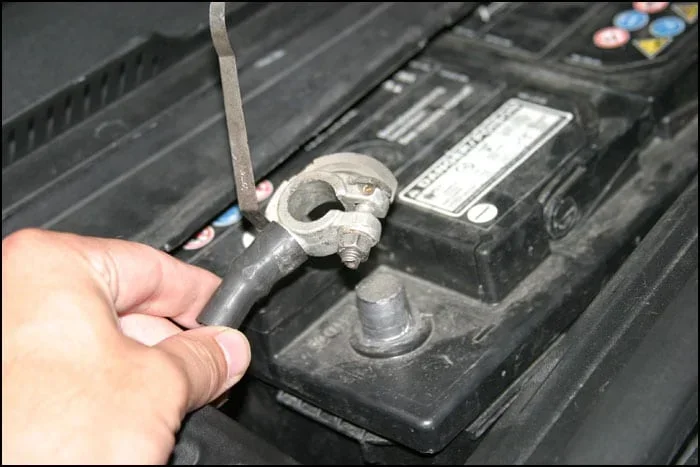
This is the most important safety step. Always disconnect the negative (black) cable first. Use your wrench to loosen the nut on the negative terminal clamp. Once loose, carefully pull the cable off the terminal. Tuck it away from the battery so it cannot accidentally touch the terminal again.
Why negative first? Disconnecting the negative side breaks the ground connection. This prevents any chance of a short circuit if your wrench accidentally touches metal parts of the car.
Step 5: Disconnect the Positive Terminal
After the negative is off, move to the positive (red) terminal. Loosen the nut and remove the cable. Again, tuck it away safely. Now both terminals are disconnected and your Toyota battery is completely isolated.
Step 6: Wait the Recommended Time
Set a timer for 15 to 30 minutes. For most resets, 20 minutes is a good middle ground. If you have a newer or hybrid Toyota, aim for 30 to 45 minutes. Use this time to grab a coffee or take a short walk.
Step 7: Reconnect the Positive Terminal First
When your timer goes off, it is time to reconnect. Start with the positive (red) terminal. Place the cable back on the terminal and tighten the nut securely. Then move to the negative (black) terminal and tighten it as well.
Why positive first on reconnect? Reconnecting positive first reduces the risk of sparking near the battery. Battery acid and hydrogen gas can be dangerous, so minimizing sparks is always a good idea.
Step 8: Start the Engine and Test
Get in, turn the key or push the start button, and let the engine run. You might notice a few things right away. The check engine light may be off. The idle might sound smoother. The transmission shifts might feel different. Give the car a short test drive to let the computer relearn your driving patterns.
If you are wondering about related battery maintenance, check out Does Leaving A Car Door Open Drain The Battery for tips on preventing unnecessary battery drain.
What to Expect After a Toyota Computer Reset
The first few drives after a reset can feel a little different. Here is what is normal and what to watch for.
The Relearning Period
After a reset, your Toyota’s computer needs time to relearn. It starts tracking your driving habits again from scratch. This process usually takes about 50 to 100 miles of driving. During this period, you might notice:
- Slightly different idle speed: The engine may idle a bit higher or lower than usual at first.
- Transmission shifting differently: The transmission may feel firmer or softer as it relearns your style.
- Fuel economy changes: It might take a few tanks of gas for fuel efficiency to return to normal.
All of this is completely normal. The computer is simply recalibrating itself. Give it a week of normal driving before you judge the results.
Settings You Will Need to Reset Manually
Some settings do not come back automatically after a battery disconnect. Here is what you will likely need to redo:
- Clock and time settings
- Radio presets and Bluetooth pairings
- Power window auto-up/down calibration
- Rearview camera preferences
- Navigation system home location
- Seat and mirror memory positions (if equipped)
These are all simple fixes. They just require a few minutes of your time after reconnecting the battery.
Common Mistakes to Avoid When Disconnecting Your Toyota Battery
Even though this process is straightforward, people make mistakes. Here are the most common ones and how to avoid them.
Mistake 1: Not Waiting Long Enough
Some folks disconnect the battery for only five minutes and call it done. That is not enough time for the computer to fully reset. The ECU needs at least 15 minutes to clear its memory completely. Set a proper timer and be patient.
Mistake 2: Disconnecting While the Key Is in the On Position
This is a big one. If you disconnect the battery with the ignition in the accessory or on position, you can fry sensitive modules. Always make sure the key is fully out and all electronics are off before you touch anything.
Mistake 3: Mixing Up the Terminals
Disconnecting the positive terminal first creates a risk of short circuits. Your wrench could touch metal and create a spark. Always negative first, negative last on reconnection. This simple rule keeps you and your Toyota safe.
Mistake 4: Forgetting to Clear Error Codes After Reset
A battery disconnect clears short-term memory. But some error codes are stored in long-term memory and may return. If the check engine light comes back on after a reset, use an OBD2 scanner to check the codes again. You may have a real problem that needs fixing, not just a reset.
Mistake 5: Ignoring the Hybrid System
If you drive a Toyota hybrid, the process is slightly different. The hybrid battery has its own control module that may not fully reset with just a 15-minute disconnect. For more details on Toyota hybrid systems and battery care, visit How Long Can A Hybrid Sit Without Being Driven for useful hybrid maintenance insights.
When Should You NOT Disconnect Your Toyota Battery?
A battery disconnect reset is not the right move in every situation. Here are times when you should skip it or consult a professional instead.
- Your battery is already weak or old: Disconnecting it might prevent you from starting the car again. Test the battery first.
- You have a serious mechanical problem: A reset will not fix a broken sensor, a failing fuel pump, or worn brake pads.
- Your Toyota is under warranty: Some dealers say that aftermarket resets can void certain electronic warranties. Check with your dealer first.
- You are not comfortable working with car electronics: If you are unsure, take your Toyota to a trusted mechanic. A professional can perform a proper reset with diagnostic equipment.
Sometimes the best approach is to let a professional handle it. A Toyota dealer or certified mechanic can use specialized diagnostic tools to reset specific modules without disconnecting the battery at all. This is especially useful for newer models with complex computer networks.
For those interested in understanding more about your Toyota’s electronic health, you might want to learn about How Long Does A Full Car Diagnostic Take to understand what a professional diagnostic involves.
Quick Tips for a Successful Toyota Battery Reset
Here are some quick tips to make the process smooth and stress-free:
- Take photos before you start: Snap a picture of the battery terminals and cable placement. This helps you remember exactly how everything connects back.
- Use a memory saver: It saves you from resetting your radio and clock every time.
- Clean the terminals while you are at it: A little baking soda and water can remove corrosion and improve your connection.
- Drive gently for the first 50 miles: Let the computer relearn without extreme driving habits.
- Keep your owner manual handy: Some Toyota models have specific reset procedures outlined in the manual.
- Note the date and time of your reset: This helps you track how long it takes for any issues to return.
Final Thoughts
Resetting your Toyota computer by disconnecting the battery is one of the simplest and most effective things you can do as a car owner. The key is timing. Leave the battery disconnected for 15 to 30 minutes for most models, and up to 60 minutes for newer or hybrid Toyotas. Follow the safety steps, reconnect in the right order, and give your car time to relearn after the reset.
Whether you are clearing a check engine light, fixing a rough idle, or just giving your Toyota a fresh electronic start, a battery disconnect reset gets the job done. It costs nothing, takes about an hour of your time, and can save you a trip to the mechanic. Just remember to be patient, be safe, and follow the steps in this guide.
Your Toyota is a smart machine. Sometimes it just needs a fresh start to run at its best. Now you know exactly how to give it one.
Frequently Asked Questions
How long should I disconnect my Toyota battery to reset the computer?
For most Toyota models, 15 to 30 minutes is the recommended time. For newer models and hybrids, you may want to wait 30 to 60 minutes to ensure all electronic modules fully reset. The key is to be patient and let the system clear its memory completely.
Will disconnecting my Toyota battery erase all my settings?
Yes, a battery disconnect will reset some settings. Your clock, radio presets, Bluetooth pairings, and power window calibration may need to be reprogrammed. Using a memory saver device can help preserve these settings during the reset process.
Can I disconnect just one battery terminal to reset the Toyota computer?
Yes, disconnecting the negative terminal alone can work for a basic reset. However, disconnecting both terminals ensures a more complete reset of all electronic modules. Always disconnect the negative terminal first for safety.
Will a battery disconnect reset clear my check engine light?
It can, but only temporarily. If the underlying problem that triggered the check engine light is still present, the light will likely return after driving for a while. A battery disconnect clears short-term codes, but persistent issues need proper diagnosis and repair.
Is it safe to disconnect the battery on a Toyota hybrid?
Yes, it is generally safe. However, Toyota hybrids have additional high-voltage systems. Always disconnect the standard 12V auxiliary battery, not the hybrid battery pack. If you are unsure, consult your owner manual or a certified Toyota technician for guidance.
How often should I reset my Toyota computer by disconnecting the battery?
You should not do this regularly. A battery disconnect reset is a troubleshooting tool, not routine maintenance. Only perform a reset when you are addressing a specific electronic issue. Frequent resets can disrupt the computer’s learned adaptations and cause more problems than they solve.