Easy Steps to Reset the Alfa Romeo Giulia Oil Light
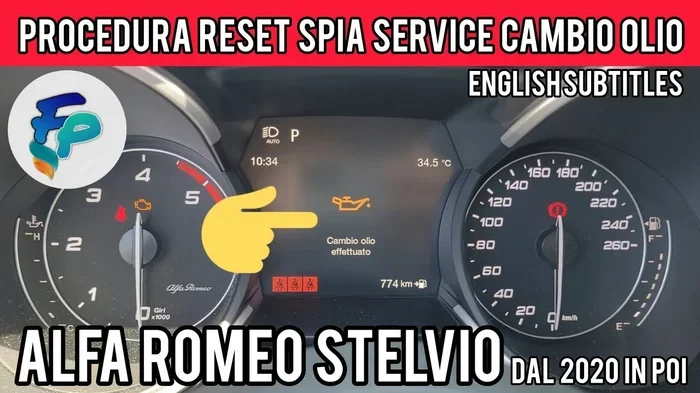
Resetting the Alfa Romeo Giulia oil light is a simple process you can do at home in minutes. This guide walks you through each step clearly so your maintenance reminder disappears after every oil change. Whether you use the steering wheel buttons or the infotainment screen, we cover all methods to reset your oil service indicator with confidence.
That little oil can symbol on your dashboard can be annoying. It shows up right after you get an oil change, and it stays there mocking you. If you own an Alfa Romeo Giulia, you are not alone in wondering how to make it disappear. The good news is that resetting the oil light on a Giulia is a very easy process.
You do not need a fancy mechanic or a trip to the dealership. With just a few button presses, you can clear the oil service reminder and get back to enjoying your drive. This guide gives you every step you need. We keep it simple and straightforward, so anyone can follow along. Whether you are a first-time car owner or a seasoned driver, you will find this helpful.
Let us dive into the world of oil light reset and take the mystery out of your Alfa Romeo Giulia dashboard. By the end of this article, you will know exactly how to handle that blinking light like a pro.
Key Takeaways
- Easy DIY Process: You can reset the oil light on your Alfa Romeo Giulia without visiting a dealer or mechanic.
- Multiple Methods Available: The Giulia offers both steering wheel button and infotainment screen methods for resetting.
- Regular Oil Changes Matter: Keeping up with your oil change interval protects your engine and keeps the light off.
- Common Mistakes Happen: Skipping steps or using the wrong button sequence can cause frustration, so follow our guide carefully.
- When in Doubt, Seek Help: If the light persists after resetting, a professional inspection may be needed.
📑 Table of Contents
- Why Does the Alfa Romeo Giulia Oil Light Come On?
- What You Need Before Resetting the Oil Light
- Step-by-Step Guide to Reset the Alfa Romeo Giulia Oil Light
- Common Mistakes When Resetting the Oil Light
- How Often Should You Change Your Oil?
- When Should You See a Professional?
- Quick Tips for Keeping Your Giulia’s Oil System Healthy
- Final Thoughts on Resetting the Alfa Romeo Giulia Oil Light
Why Does the Alfa Romeo Giulia Oil Light Come On?
The oil light on your Giulia serves one main purpose. It tells you that your car needs attention. Most of the time, it means your oil life system has counted down to zero. This system tracks your driving habits and engine conditions. When it decides the time is right, it triggers the reminder.
Here are the most common reasons the light appears:
- Oil Change Due: Your car has reached the end of its oil change interval. The oil life percentage has dropped to zero.
- Low Oil Level: The sensor detects that oil is below the recommended level. You may need to add oil to your car if it is low.
- Oil Pressure Issue: The oil pressure sensor detects a problem. This is more serious and needs quick attention.
- System Malfunction: Sometimes the sensor or computer system glitches. The light stays on even after an oil change.
Understanding why the light comes on helps you respond correctly. Not all oil lights mean the same thing. A yellow oil can usually means service is due soon. A red oil light means stop driving and check immediately. Know the difference to keep your engine safe.
Oil Change Interval for the Giulia
Most Alfa Romeo Giulia models use synthetic oil. The recommended oil change interval is typically every 7,500 to 10,000 miles. However, this can vary based on your driving style. If you drive in stop-and-go traffic or extreme temperatures, you may need to change oil more often. Check your owner manual for the exact car maintenance schedule for your specific model year.
What You Need Before Resetting the Oil Light
Before you start, make sure you have everything ready. The process is quick, but having the right setup helps. Here is what you need:
- A Fully Charged Battery: The reset process uses your car’s electrical system. A weak battery can cause problems.
- The Ignition Key or Start Button: You need to turn the car on without starting the engine.
- Steering Wheel Controls: Most Giulia models use buttons on the steering wheel for the reset.
- Owner Manual (Optional but Helpful): If you get stuck, your manual has model-specific details.
It is also a good idea to change your oil first before resetting the light. You do not want to clear the reminder and then realize you still need fresh oil. If you have not yet changed the oil, do that now. A clean oil change gives your engine the best start after the reset.
Step-by-Step Guide to Reset the Alfa Romeo Giulia Oil Light
Now for the part you have been waiting for. Here is how to reset the oil light on your Alfa Romeo Giulia. We break it down into simple steps. Follow them in order, and the light should go off quickly.
Method 1: Using the Steering Wheel Controls
This is the most common method for Giulia models. The steering wheel has buttons that control the trip and menu functions. Here is how to use them:
- Turn the Ignition On: Press the start button without pressing the brake pedal. The dashboard lights up, but the engine does not start.
- Find the Trip Button: Look for the trip reset button on the left side of the steering wheel. It is usually marked with a small arrow or the word “Trip.”
- Press and Hold the Trip Button: Keep holding it for about 5 to 10 seconds. The oil service indicator should start flashing on the display.
- Release and Press Again: Let go of the button, then press and hold it again for another 5 seconds.
- Check the Display: The oil light should now show a reset confirmation or disappear entirely.
- Turn the Ignition Off and On Again: This confirms the reset. The light should stay off.
If the light does not go off after these steps, do not worry. Try the second method below. Some Giulia model years use slightly different button sequences.
Method 2: Using the Infotainment Screen
Newer Giulia models may use the infotainment system for resets. This method works well if your steering wheel buttons do not respond:
- Turn the Ignition On: Same as before. Press the start button without the brake.
- Navigate to the Vehicle Menu: Use the touchscreen to find the “Vehicle” or “Settings” option.
- Select Service or Maintenance: Look for a section called “Service” or “Maintenance Information.”
- Find the Oil Life System: Select the oil life system option from the menu.
- Choose Reset: Tap the reset button and confirm your choice.
- Turn the Car Off and Back On: This finalizes the reset process.
The infotainment method gives you more control. You can also check your oil life percentage and see when the next service is due. This is very handy for tracking your car maintenance schedule without guessing.
Method 3: Using the OBD-II Scanner
If both button methods fail, you can use an OBD-II scanner. This tool connects to your car’s diagnostic port. It reads and clears fault codes. Here is how:
- Find the Diagnostic Port: It is usually under the dashboard on the driver side.
- Connect the Scanner: Plug it in and turn the ignition on.
- Follow the Scanner Prompts: Select “Clear Codes” or “Reset Maintenance Light.”
- Confirm the Reset: The scanner will clear the oil service indicator from the system.
An OBD-II scanner is a great tool to have in your garage. It does more than just reset lights. It also helps you clear the check engine light yourself and diagnose other issues. Many affordable options work well with the Giulia.
Common Mistakes When Resetting the Oil Light
Even simple tasks can go wrong if you skip steps. Here are the most common mistakes people make when trying to reset the Alfa Romeo Giulia oil light:
- Resetting Before Changing the Oil: This is the biggest mistake. Never clear the light without fresh oil in the engine. The oil life system tracks oil quality, not just time.
- Holding the Wrong Button: The Giulia has several buttons on the steering wheel. Holding the wrong one will not trigger the reset. Find the trip or menu button first.
- Not Turning the Ignition to the Right Position: You need the “ON” position, not “ACC” and not “START.” The dashboard must be fully lit for the reset to work.
- Giving Up Too Soon: Some methods take a few tries. Hold buttons for the full 10 seconds. Do not let go too early.
- Ignoring a Persistent Light: If the light comes back after resetting, there may be a real problem. Do not just keep resetting it. Investigate further.
Avoiding these mistakes saves time and frustration. Take your time and follow each step carefully. A rushed reset rarely works the first time.
How Often Should You Change Your Oil?
The oil change interval for your Giulia depends on several factors. The factory recommendation is a good starting point, but real-world driving can change things. Here is a quick breakdown:
| Driving Condition | Recommended Interval |
|---|---|
| Normal Driving | Every 7,500 to 10,000 miles |
| Severe Driving (Short Trips, Stop-and-Go) | Every 5,000 to 7,500 miles |
| Extreme Temperatures (Hot or Cold) | Every 5,000 miles |
| Towing or Heavy Loads | Every 5,000 to 7,500 miles |
Using synthetic oil helps extend the interval in many cases. Synthetic oil resists breakdown better than conventional oil. It keeps your engine cleaner and protected for longer. If you are unsure which oil to use, check your owner manual or ask a trusted mechanic.
Remember that the oil life system is just a guide. It uses algorithms to estimate oil life. But real-world conditions can make oil degrade faster. Trust your instincts too. If the oil looks dark or gritty, it is time for a change regardless of what the system says.
When Should You See a Professional?
Most of the time, resetting the oil light is a DIY job. But there are moments when professional help makes sense. Here are signs you should see a mechanic:
- The Light Keeps Coming Back: If you reset the light and it returns within days, something is wrong. The oil pressure sensor may be failing.
- You See a Red Oil Light: A red light means low oil pressure. Stop driving and get the car checked. This is not a simple reset issue.
- Unusual Engine Noises: Knocking or ticking sounds after a reset could mean low oil or engine wear.
- You Are Uncomfortable with the Process: There is no shame in asking for help. A quick trip to the shop can save you from bigger problems.
Also, if you bought a used Giulia and are unsure of its maintenance history, get a full inspection. The previous owner may have skipped oil changes. Resetting the light without changing the oil can hide serious engine problems.
Quick Tips for Keeping Your Giulia’s Oil System Healthy
Prevention is always better than cure. Keep your Alfa Romeo Giulia running smoothly with these tips:
- Check your oil level every two weeks. A quick dipstick check takes less than a minute.
- Use the oil type recommended by Alfa Romeo. Do not substitute with a lower grade.
- Keep track of your mileage between oil changes. A simple notebook or phone app works great.
- Reset the oil light immediately after every oil change. Do not let it linger.
- Watch for other dashboard warning lights. They work together to tell you the health of your car.
Taking care of your oil system is one of the easiest ways to protect your engine. Fresh oil keeps everything lubricated and cool. It prevents wear and extends the life of your Giulia. A small effort now saves big repairs later.
Final Thoughts on Resetting the Alfa Romeo Giulia Oil Light
Resetting the oil light on your Alfa Romeo Giulia is a task anyone can do. It takes just a few minutes and no special tools. Whether you use the steering wheel buttons, the infotainment screen, or an OBD-II scanner, the process is straightforward. The key is to follow each step carefully and never reset without a fresh oil change first.
Keeping up with your oil change interval is one of the best things you can do for your car. It protects the engine, improves performance, and keeps your Giulia running strong for years. Do not ignore the oil light when it comes on. Address it promptly and reset it properly.
Now that you know how to handle the oil service indicator on your Alfa Romeo Giulia dashboard, you are ready for the next oil change. Grab your tools, follow our guide, and enjoy the satisfaction of a job well done. Your car will thank you for it.
Frequently Asked Questions
Can I drive my Alfa Romeo Giulia with the oil light on?
You should not drive with the oil light on for long. If it is a yellow service light, you have some time to schedule an oil change. But if it is a red oil pressure light, stop driving immediately. Low oil pressure can cause serious engine damage within minutes.
How long does it take to reset the oil light on a Giulia?
The process takes less than five minutes. Once you know the button sequence, it becomes second nature. Most people complete the reset in under two minutes after the first try.
What should I do if the oil light comes back after resetting?
A returning oil light usually means there is an underlying issue. Check your oil level first. If the oil is full and the light persists, visit a mechanic. The oil pressure sensor or another component may need inspection.
Do I need any special tools to reset the Giulia oil light?
No special tools are needed for most methods. The steering wheel button method and infotainment method require nothing but your car keys. An OBD-II scanner is optional but very useful for other diagnostic tasks too.
Can I reset the oil light myself or do I need a dealer?
You can absolutely reset the oil light yourself. The process is designed to be user-friendly. You do not need to visit a dealer or pay for a service appointment. Just follow the steps in this guide and you will be fine.
How do I know if my Giulia needs synthetic oil?
Most Alfa Romeo Giulia models come with synthetic oil from the factory. Check your owner manual for the exact oil specification. Using the right oil type ensures the oil life system works correctly and keeps your engine protected.
=== CONCLUSION ===
Resetting the Alfa Romeo Giulia oil light is a simple but important part of car ownership. With the steps in this guide, you can handle it yourself every time. Remember to change the oil first, follow the reset process carefully, and never ignore a persistent light. Your Giulia deserves regular care, and a quick oil light reset is one of the easiest ways to show it. Keep this guide saved for your next oil change, and you will always know exactly what to do.