How to Reset the Maintenance Required Light on a Toyota
Resetting the maintenance required light on a Toyota is a straightforward process that most owners can do at home in just a few minutes. Whether you’ve recently changed your oil or completed scheduled service, knowing how to reset the maintenance required light keeps your dashboard clean and prevents unnecessary alerts from popping up. The exact steps vary slightly depending on your Toyota model and year, but the method typically involves using the trip meter button or navigating the dashboard menu. In this guide, you’ll learn the exact reset procedure for popular Toyota models, along with tips to avoid common mistakes that can trip you up. Let’s get your dashboard back to normal.
How to Reset the Maintenance Required Light on a Toyota
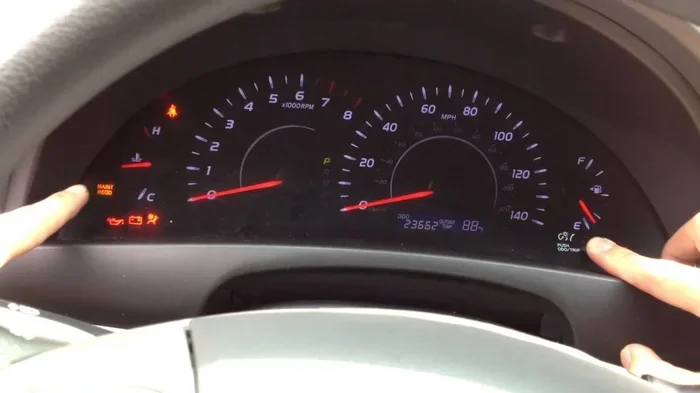
That little maintenance required light on your Toyota dashboard can feel like a nagging reminder you just can’t shake. Whether it popped up after your last oil change or showed up out of the blue, knowing how to reset the maintenance required light on a Toyota is a skill every Toyota owner should have. It saves you time, keeps your dashboard clean, and gives you peace of mind.
In this guide, we’ll walk you through the exact steps to clear that stubborn light. You’ll learn why it comes on, how different Toyota models handle the reset, and what mistakes to avoid. We’ll also share some quick tips so you never have to deal with an annoying dashboard warning again. Let’s get into it.
Key Takeaways
- Reset methods vary by model: Consult your owner’s manual for the exact sequence.
- Always reset after completing service: This keeps your maintenance schedule accurate and reliable.
- Use the odometer reset button: Turn the ignition ON, then hold the button until the light blinks.
- Never ignore the warning light: Driving with it on risks missed services and potential engine damage.
- Some models need a diagnostic scanner: Visit a Toyota dealer if the manual reset fails.
- Regular maintenance protects your investment: Resetting the light is just one part of proper car care.
📑 Table of Contents
- Why Does the Maintenance Required Light Come On?
- How to Reset the Maintenance Required Light on a Toyota
- Step-by-Step Reset for Popular Toyota Models
- Common Mistakes When Resetting the Maintenance Light
- When to See a Mechanic Instead
- Tips to Keep Your Toyota’s Maintenance Light from Coming Back Too Soon
- Key Takeaways
Why Does the Maintenance Required Light Come On?
Before you rush to reset anything, it helps to understand why the light is there in the first place. The maintenance required light is not the same as the check engine light. It is a service reminder built into your Toyota’s system. It tracks things like mileage and time since your last service.
Here are the most common reasons it triggers:
- Routine oil changes — Your Toyota tracks mileage since the last oil change. Once you hit a set interval, the light turns on.
- Time-based reminders — Even if you drive less, the system may remind you based on how many months have passed.
- Other service items — Brake pads, air filters, spark plugs, and transmission fluid can also trigger the light.
- Dashboard reset needed — Sometimes the light stays on because someone forgot to reset it after a service.
Think of it like a friendly nudge from your car. It does not mean something is broken. It just means your Toyota maintenance schedule says it is time for some routine care.
If you are wondering whether you can ignore it, the short answer is: yes, for a little while. But it is better to stay on top of it. Want to know more about the difference between this light and the check engine light? Check out Can I Drive My Toyota Camry With The Check Engine Light On for a deeper look.
How to Reset the Maintenance Required Light on a Toyota
Now for the main event. Resetting the maintenance light on a Toyota is usually simple. The exact steps depend on your model year and trim, but most Toyotas share a similar process. Here is the general method that works for many models.
The Standard Reset Method (Most Toyota Models)
This method works on a wide range of Toyota vehicles, including the Camry, Corolla, RAV4, and Tacoma. Follow these steps carefully:
- Turn off the engine. Make sure your car is fully off and in park.
- Press and hold the trip reset button. This is usually located on the dashboard near the odometer or on the steering wheel. Some models have it on the instrument cluster.
- Turn the ignition to the “ON” position. Do not start the engine. Just turn the key or press the start button without braking (or with, depending on the model).
- Keep holding the trip button. Watch the odometer display. After a few seconds, the maintenance light should start blinking or reset to zero.
- Release the button. Once the light resets, turn the ignition off and start the engine again to confirm it is gone.
That is it. Most owners can do this in under a minute. If this is your first time, you might want to check your Toyota owner’s manual for model-specific details. And if you have recently had an oil change, you may want to read our guide on Do You Reset After An Oil Change to understand the full picture.
Alternative Reset Using the Odometer
Some newer Toyota models use the odometer button in a slightly different way. Here is an alternate approach:
- Press the odometer button until you see the total mileage display.
- Turn the ignition to “ON” (engine off).
- Press and hold the odometer button for about 10 seconds.
- The maintenance light should blink and then turn off.
If neither method works, do not worry. We will cover model-specific steps next.
Step-by-Step Reset for Popular Toyota Models
Not all Toyotas are the same. Different models and years use slightly different reset procedures. Here is a breakdown for some of the most popular Toyota vehicles.
Toyota Camry
The Camry is one of the most common Toyota models on the road. For most Camry years (2010-2024), the process is straightforward:
- Turn off the engine and press the trip button on the instrument panel.
- Turn the key to the “ON” position without starting the engine.
- Hold the trip button until the odometer shows “000” and the light blinks.
- Release the button and start the engine to verify.
Toyota Corolla
The Corolla follows a similar pattern, especially for recent model years. Newer Corollas (2019 and up) often use the steering wheel controls:
- Press the “Menu” or “Trip” button on the steering wheel.
- Scroll through the display until you see the maintenance light option.
- Hold the button down for several seconds to reset.
Toyota RAV4
The RAV4 tends to use the odometer-based reset. For most RAV4 models:
- Press and hold the trip reset button on the dashboard.
- Turn the ignition to “ON.”
- Wait for the light to blink, then release.
For the 2019 and newer RAV4 models, you may also need to navigate through the multi-information display using the steering wheel buttons. The process is similar to the Corolla.
Toyota Tacoma
Tacoma owners will be happy to know the reset process is fairly simple:
- Turn the ignition to “ON” without starting the engine.
- Press and hold the trip odometer reset button.
- Wait for the maintenance light to blink and then go dark.
- Start the engine and confirm the light is off.
Here is a quick comparison table for reference:
| Toyota Model | Primary Reset Method | Button Location |
|---|---|---|
| Camry | Trip button + ignition ON | Instrument panel |
| Corolla | Steering wheel controls | Steering wheel |
| RAV4 | Trip button + ignition ON | Dashboard/steering wheel |
| Tacoma | Trip button + ignition ON | Instrument cluster |
Keep in mind that model years matter. Always double-check your Toyota dashboard manual if the steps above do not match your setup.
Common Mistakes When Resetting the Maintenance Light
Resetting the light seems easy, but plenty of people run into problems. Here are some common mistakes to watch out for.
Resetting Before the Service Is Done
This is the biggest mistake. Some people reset the light right after paying for a service but before the work is actually finished. This defeats the whole purpose of the reminder. Always make sure your Toyota service indicator is reset only after the work is complete.
Not Holding the Button Long Enough
The system needs a few seconds to recognize your input. Many people press the button for just a second and give up too soon. Be patient. Hold it down for at least 5-10 seconds while the ignition is in the “ON” position.
Using the Wrong Button
Some Toyotas have multiple buttons near the odometer. Using the wrong one will not trigger the reset. Look for the button labeled “Trip” or “Trip A/B.” If you are unsure, your owner’s manual will clarify which one to use.
Ignoring the Light After Resetting
Resetting the light is not a license to skip maintenance. The system tracks important service intervals. If you keep ignoring those intervals, you might end up with bigger problems down the road. If you are unsure about what the light means, check out Does The Maintenance Light Stay On for more helpful insights.
Trying to Reset With the Engine Running
Most reset procedures require the ignition to be in the “ON” position with the engine off. Starting the engine too early can interrupt the process. Make sure you follow the steps in the right order.
When to See a Mechanic Instead
Most of the time, you can reset the maintenance required light on a Toyota at home with no special tools. But there are situations where it makes sense to visit a professional.
See a mechanic if:
- The light keeps coming back after you reset it. This could signal a deeper issue with the vehicle’s computer system.
- You do not have access to the trip reset button or odometer controls in your model.
- The light is accompanied by other warnings, such as the check engine light or a temperature warning.
- You are not comfortable working with your car’s dashboard electronics.
There is no shame in asking for help. A mechanic can reset the light quickly and also check for any underlying issues. Plus, they can confirm whether your Toyota maintenance schedule is up to date.
Also, keep in mind that some Toyota dealerships offer free resets as part of your scheduled service. It is always worth asking. If you are dealing with a high mileage vehicle, you might want to check what services are recommended at higher mileages. Our article on 000 Mile Service On A Toyota Rav4 covers this in detail.
Tips to Keep Your Toyota’s Maintenance Light from Coming Back Too Soon
Once you have successfully reset the light, you want it to stay off for as long as possible. Here are some practical tips to help.
Follow the Recommended Service Intervals
Toyota builds its vehicles to last, but regular care is essential. Stick to the recommended oil change intervals, tire rotations, and fluid top-offs. This keeps your car running smoothly and prevents the light from showing up unexpectedly.
Use Quality Oil and Parts
Cheap oil can break down faster, which may trigger the maintenance system sooner. Use the oil weight recommended in your owner’s manual. The same goes for filters and other replacement parts. Quality matters.
Keep Track of Your Service History
A simple notebook or phone app can help you track when you last serviced your Toyota. This makes it easy to know when the next service is due. It also helps if you sell the car — a well-documented service history adds value.
Pay Attention to Dashboard Symbols
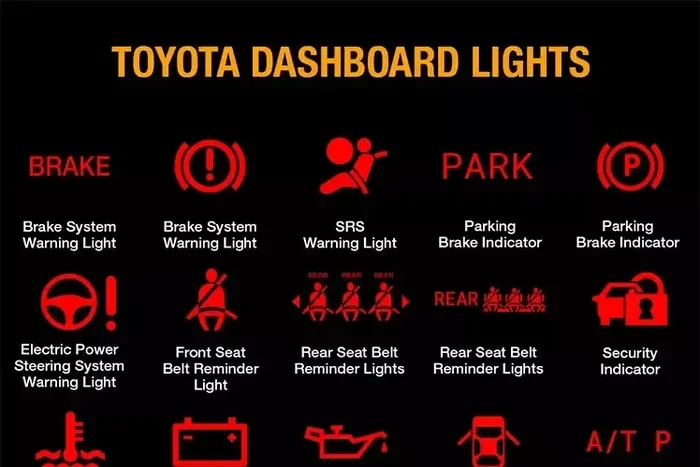
Your Toyota dashboard has a whole set of symbols and indicators. Learning what each one means helps you respond quickly to any warning. From the service soon light to the fuel indicator, knowing your dashboard is a big advantage.
Do Not Delay Routine Services
It is tempting to push off an oil change or tire rotation when life gets busy. But delaying maintenance can lead to bigger problems — and more annoying dashboard lights. Stay ahead of it.
Quick Tip: Reset After Every Service
Make it a habit to reset the light every time you get service. Whether you go to a dealership or an independent shop, ask them to reset it, or do it yourself right after. A simple reset after an oil change keeps everything running cleanly.
Key Takeaways
Resetting the maintenance required light on a Toyota does not have to be stressful. Here is a quick recap of everything we covered:
- The maintenance light is a service reminder, not a warning of a broken part.
- Most Toyotas can be reset using the trip button and ignition in under a minute.
- Different models may use slightly different methods — always check your owner’s manual.
- Common mistakes include resetting too early and not holding the button long enough.
- See a mechanic if the light keeps coming back or if other warnings appear.
- Stay on top of your maintenance schedule to avoid surprise trips to the dealer.
Knowing how to clear the maintenance light on your Toyota is a handy skill. It takes just a minute, saves you a trip to the mechanic, and keeps your dashboard looking clean. Just remember: the light is there for a reason. Reset it, but do not skip the maintenance your car needs.
Now that you know the process, go ahead and try it the next time that light comes on. You will be surprised how simple it really is. And if you ever run into trouble, your owner’s manual and a trusted mechanic are always just a phone call away. Happy driving!
Frequently Asked Questions
How do you reset the maintenance required light on a Toyota?
To reset the maintenance required light on a Toyota, turn the ignition to the “ON” position without starting the engine. Press and hold the trip reset button on the dashboard for several seconds until the light turns off. The exact steps can vary slightly depending on your Toyota model and year.
Can you reset the maintenance light yourself on a Toyota?
Yes, you can reset the Toyota maintenance light yourself without visiting a mechanic. Most Toyota models only require a few simple button presses on the instrument panel. However, some newer models may need a specific sequence or a diagnostic tool.
Why won’t my Toyota maintenance light turn off after resetting?
If the Toyota maintenance required light stays on after a reset, the issue may be with the button sequence or the vehicle’s computer hasn’t fully registered the change. Try disconnecting the battery for a few minutes and then reconnecting it. If the light persists, a mechanic may need to run a diagnostic check.
How do you reset the oil maintenance light on a Toyota Camry?
To reset the oil maintenance light on a Toyota Camry, turn the ignition to the ON position and press the trip odometer reset button. Hold the button down until the light blinks and then turns off. This simple Toyota maintenance reset process works for most Camry models from recent years.
What does the maintenance required light mean on a Toyota?
The maintenance required light on a Toyota is a reminder that your vehicle is due for scheduled service, such as an oil change or tire rotation. It is not a warning of an immediate mechanical problem. Resetting the Toyota maintenance light after servicing lets the system track your next service interval accurately.
How often should you reset the maintenance light on a Toyota?
You should reset the Toyota maintenance light every time you complete a scheduled service, which is typically every 5,000 to 7,500 miles. Regularly resetting the maintenance required light on a Toyota ensures your service records stay accurate. Skipping resets can lead to confusing reminders and missed maintenance deadlines.