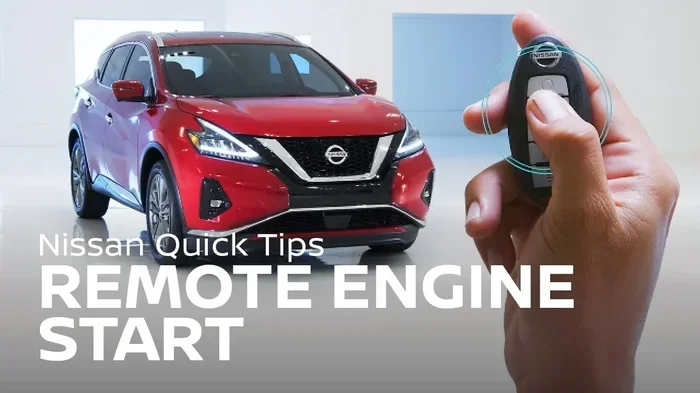
How to Remote Start a Nissan Murano With Your Phone
Remote starting your Nissan Murano with your phone is simple once you know the steps. You can warm up or cool down your vehicle before you even step outside. This guide covers setup, the NissanConnect app, and common fixes for 2015–2023 models.
Remote starting your Nissan Murano feels like something from a sci-fi movie. You press a button on your phone, and your engine turns over before you even walk outside. It is one of those features that makes daily life so much easier, especially on cold winter mornings or hot summer afternoons.
If you own a Nissan Murano and want to learn how to use this feature, you are in the right place. This guide walks you through everything you need to know. We cover the NissanConnect system, the phone app setup, key fob options, and how to fix common problems.
Remote start is not just a luxury. It is a practical tool that saves time and keeps your Nissan Murano comfortable. Let us dive in and get you started.
Key Takeaways
- NissanConnect Services: You need an active NissanConnect subscription to use phone-based remote start.
- Smartphone App: The NissanConnect app lets you start your Murano from anywhere with cellular or WiFi access.
- Key Fob Backup: Your key fob also supports remote start if you prefer a physical button approach.
- Climate Control: Remote start lets you pre-heat or pre-cool your Murano before you drive.
- Safety First: The engine auto-shuts off after 10 minutes if no door is opened.
- Setup Matters: Proper pairing and subscription activation are essential for the system to work.
📑 Table of Contents
- Can You Remote Start a Nissan Murano?
- What You Need Before Remote Starting
- Step-by-Step: Remote Start Your Nissan Murano
- Using the NissanConnect App for More Than Just Remote Start
- Troubleshooting Common Remote Start Issues
- Tips for Getting the Most From Remote Start
- Common Mistakes People Make With Remote Start
- Is Remote Start Worth It for the Nissan Murano?
- Final Thoughts
Can You Remote Start a Nissan Murano?
Yes, you can remote start a Nissan Murano. But the method depends on your model year and what package your vehicle came with. Newer models from 2015 onward have better remote start options than older ones.
The two main ways to remote start your Murano are through the NissanConnect app on your smartphone or with the key fob. Both methods work well, but the phone option gives you more flexibility. You can start your car from across the room or from a parking lot far away.
Before you try remote start, make sure your Murano has the right hardware. Some base models may not include remote start as a factory option. Check your owner’s manual or ask your Nissan dealer if you are unsure. They can tell you exactly what your trim level supports.
Which Model Years Support Remote Start?
Most Nissan Murano models from 2015 to 2023 support remote start. Here is a quick breakdown:
- 2015–2018: Remote start available through key fob on higher trims. NissanConnect adds phone-based remote start.
- 2019–2021: Both key fob and NissanConnect app support remote start on most trims.
- 2022–2023: Full phone-based remote start through the NissanConnect Services platform.
If your Murano does not have remote start built in, you can sometimes add an aftermarket remote start system. A professional installer can set this up for you. Just be aware that it may void certain warranties if not done correctly.
What You Need Before Remote Starting
Setting up remote start takes a few steps. You need the right tools, a working account, and a paired phone. Let us go through what you need before you can press that start button from your couch.
1. An Active NissanConnect Subscription
NissanConnect is the service that connects your Murano to the internet. It is what makes phone-based remote start possible. Without an active subscription, the app will not let you start your engine.
You can sign up for NissanConnect at your dealer or online. Plans vary in price and features. Some plans include free trials for the first few months. After that, you may need to pay a yearly fee to keep the services running.
Check your subscription status in the app. If your plan has expired, renew it before trying to remote start. This is one of the most common reasons people cannot get the feature to work.
2. A Compatible Smartphone
The NissanConnect app works with both iPhone and Android devices. Make sure your phone is running a supported operating system version. As of now, the app requires iOS 14 or later and Android 10 or later.
You will also need a stable internet connection on your phone. The app uses cellular data or WiFi to communicate with your vehicle. If your phone has no signal, remote start will not work. This is different from using the key fob, which uses a radio signal and does not need internet.
If you are having trouble connecting, try syncing your iPhone to your new car again. Sometimes re-pairing the device fixes connection issues. The process is quick and only takes a few minutes.
3. Your Vehicle in Park
This might sound obvious, but it is worth repeating. Your Murano must be in park and the parking brake must be engaged before remote start will work. The system has safety checks built in to prevent the car from moving while remote started.
Also, all doors must be closed and locked. If a door is open, the system will not start the engine. This is a safety feature designed to protect you and your vehicle.
Step-by-Step: Remote Start Your Nissan Murano
Now that you have everything set up, let us walk through the actual process. Follow these steps carefully to get your Murano started from your phone.
Using the NissanConnect App
Open the NissanConnect app on your phone. Make sure you are logged in with your Nissan account. The home screen should show your vehicle status, including fuel level, tire pressure, and engine status.
- Tap the Remote Start button on the app home screen.
- Select your Murano from the list of linked vehicles if you have more than one.
- Choose your climate settings if you want to pre-condition the cabin.
- Confirm the command when prompted.
- Wait for the confirmation message that your engine has started.
The engine should turn over within 30 seconds. You will see a confirmation on your phone screen. Your Murano will stay running for up to 10 minutes or until you walk up and open a door.
Using the Key Fob
If you prefer not to use your phone, the key fob offers a simple alternative. The process is slightly different depending on your model year.
- Make sure you are within range of your Murano (usually within 100 feet).
- Press the lock button on the key fob.
- Within a few seconds, press and hold the remote start button (it usually has a circular arrow icon).
- The engine should start, and the parking lights will flash.
The key fob method does not require internet or a subscription. It uses a radio frequency signal, so it works even if you have no cell service. This makes it a reliable backup option.
Setting a Timer for Remote Start
One of the best features of phone-based remote start is the ability to set a timer. You can schedule your Murano to start 15 or 30 minutes before you plan to leave. This is perfect for cold mornings when you want a warm car ready to go.
In the NissanConnect app, look for the schedule or timer option. Set your desired start time, and the app will handle the rest. Just make sure your phone has power and internet access at the scheduled time.
Using the NissanConnect App for More Than Just Remote Start
The NissanConnect app does much more than just start your engine. It is a full vehicle management tool that gives you control over many features from your phone.
Pre-Conditioning Your Vehicle
Pre-conditioning means heating or cooling your Murano before you get in. In winter, this means stepping into a warm car instead of a freezing one. In summer, it means escaping the scorching heat.
You can set the temperature and fan speed through the app before starting the engine. The system will run the climate control while the engine is idling. This uses a small amount of fuel but saves you from sitting in an uncomfortable car.
Checking Your Vehicle Status
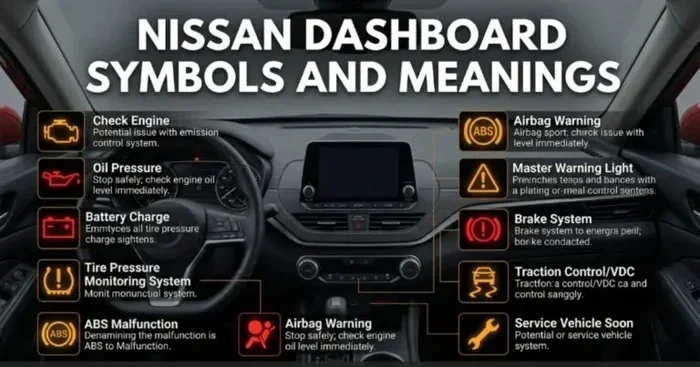
The app lets you check things like fuel level, oil life, tire pressure, and mileage. You can also see if any warning lights are on in your dashboard. This is helpful for catching small problems before they become big ones.
If you are planning a road trip, these features are especially useful. You can check your status right from your phone and know if anything needs attention before you leave.
Locking and Unlocking Remotely
Ever locked your keys in the Murano? With NissanConnect, that does not have to be a problem. You can lock and unlock your doors remotely through the app. This also works if you need to let someone into your car while you are away.
Just make sure your Murano is in a safe location when using this feature. Remote unlock works just like the physical key fob, so use it with the same care.
Troubleshooting Common Remote Start Issues
Remote start is a great feature, but sometimes it does not work as expected. Here are the most common problems and how to fix them.
The App Says “Vehicle Not Responding”
This error usually means your phone cannot connect to NissanConnect servers. Check your internet connection first. Try switching between WiFi and cellular data to see if one works better.
If your internet is fine, the issue might be on Nissan’s end. Their servers sometimes go down for maintenance. Wait a few minutes and try again. You can also check Nissan’s service status page for updates.
The Engine Starts But Shuts Off Immediately
This can happen if the system detects a problem. Check that all doors are closed and locked. Make sure the parking brake is engaged and the transmission is in park.
If everything looks correct, there might be an underlying issue with your vehicle. In that case, it is worth visiting your Nissan dealer for a diagnostic check. Sometimes a faulty sensor can trigger the shutdown.
Remote Start Does Not Work After a Battery Change
If you recently replaced your Murano’s battery or had a jump start, the remote start system may need to be reset. The system sometimes loses its pairing after a power interruption.
Try re-pairing your phone with the vehicle through the app. If that does not work, you may need to reprogram the key fob as well. Your owner’s manual has instructions for this, or you can ask your dealer to handle it.
My Car Won’t Start With a New Battery
If you replaced the battery and remote start stopped working, the issue may be related to the battery itself. Make sure the new battery is fully charged and properly connected. Sometimes a new battery needs a few drive cycles to fully register with the vehicle’s systems.
You can also try resetting the NissanConnect system. Turn the vehicle off, remove the key, wait 30 seconds, and try again. This simple reset often fixes connection issues after a battery swap.
Tips for Getting the Most From Remote Start
Once you have remote start working, there are some smart ways to use it every day. These tips will help you get the most value from the feature.
Warm Up Your Engine in Winter
Cold weather is hard on car engines. Letting your Murano idle for a few minutes before driving allows the oil to circulate and the engine to reach operating temperature. This reduces wear and tear over time.
Set a schedule in the app to start your Murano 10 minutes before your morning commute. By the time you walk out the door, your car is warm and ready to go.
Cool Down in Summer
On hot days, remote start lets you turn on the air conditioning before you get in. This is a game changer when the interior has been baking in the sun all day.
Set the temperature to a comfortable level before starting the engine. When you walk up to your Murano, the cabin will already be cooled down. You can roll down the windows first to let the hot air escape faster.
Use Remote Start Sparingly
While remote start is convenient, do not overuse it. Letting your Murano idle for long periods wastes fuel and can cause carbon buildup in the engine over time.
The 10-minute auto-shutoff feature is there for a reason. Do not reset the timer to keep the engine running longer. This is bad for the engine and wastes fuel unnecessarily.
Keep Your App Updated
Nissan regularly updates the NissanConnect app to fix bugs and add features. Keeping your app updated ensures you have the latest security patches and the best performance.
Turn on automatic updates in your phone’s app store. This way, you never miss an important update that could affect your remote start experience.
Common Mistakes People Make With Remote Start
Even though remote start is straightforward, people still make avoidable mistakes. Here are a few to watch out for.
- Forgetting to pair your phone: If you buy a used Murano, the previous owner may still be paired. You need to re-pair the device with your own Nissan account.
- Ignoring subscription renewals: NissanConnect subscriptions expire. Set a reminder to renew yours so you do not lose access to remote start.
- Leaving the car running too long: The 10-minute limit is there for safety and fuel efficiency. Do not try to bypass it.
- Not checking fuel levels: Remote start does not add fuel. Make sure you have enough gas, especially if you use the engine to pre-condition the cabin.
- Ignoring software updates: Both the app and the vehicle’s systems need updates for optimal performance.
Is Remote Start Worth It for the Nissan Murano?
Absolutely. If you live in an area with extreme temperatures, remote start is almost a necessity. It saves time, keeps your engine healthy, and makes your daily routine more comfortable.
The NissanConnect app makes it easy to use from anywhere. The key fob backup ensures you are never completely without the option. Between the two methods, you will always have a way to remote start your Murano.
Just remember to keep your subscription active, your phone updated, and your vehicle maintained. With those basics covered, remote start will work reliably for years to come.
Final Thoughts
Remote starting your Nissan Murano with your phone is one of those features you do not realize you need until you have it. Once you experience stepping into a warm or cool car on a bad weather day, you will not want to go back.
The setup takes a little time upfront, but the daily convenience is well worth it. Whether you use the NissanConnect app or the key fob, you have options that fit your lifestyle.
Follow the steps in this guide, troubleshoot any issues that come up, and enjoy the comfort of a pre-conditioned Nissan Murano every time you drive. It is a small feature that makes a big difference in your daily routine.
Frequently Asked Questions
Can I remote start my Nissan Murano without NissanConnect?
Yes, if your Murano has a key fob with a remote start button, you can use that method without NissanConnect. The key fob uses a radio signal, so it does not need internet or a subscription. Check your key fob for a circular arrow button to confirm it has this feature.
How far away can I be from my Murano when using phone remote start?
With the NissanConnect app, you can remote start your Murano from anywhere you have internet access. This means you can start your car from home, work, or even while traveling. The only limit is cellular or WiFi coverage on your phone.
Does remote start waste a lot of fuel?
Not significantly. The engine idles for up to 10 minutes, which uses a small amount of fuel. This is similar to letting your car warm up on a cold morning. Used occasionally, the fuel cost is minimal compared to the comfort it provides.
Can I remote start my Murano if the battery is low?
If your battery is very low, remote start may not work. The system needs enough electrical charge to turn the engine over. If your car won’t start with a new battery, you may need to check the battery connections or have the battery tested at a Nissan dealer.
Is it safe to remote start my Nissan Murano in a closed garage?
No, never remote start your vehicle in an enclosed space like a garage. The engine produces carbon monoxide, which is dangerous in enclosed areas. Always remote start your Murano in an open, well-ventilated area. This is a critical safety rule for all remote start systems.
How do I pair my iPhone with the NissanConnect app?
Download the NissanConnect app from your phone’s app store. Create a Nissan account and follow the on-screen instructions to pair your Murano. You may need your vehicle identification number and some basic vehicle information. If you run into issues, try unpairing and re-pairing your device, or consult the app’s help section for detailed pairing steps.
=== CONCLUSION ===
Remote starting your Nissan Murano with your phone is a feature that adds real value to your daily driving experience. Whether you use the NissanConnect app or the key fob, the process is straightforward and reliable.
Make sure you have an active subscription, a compatible phone, and a paired device. Follow the setup steps carefully, and you will be warming up your Murano from your phone in no time. Keep your app updated, watch for common issues, and use the feature wisely to get the most out of it.
Once you start using remote start regularly, you will wonder how you ever managed without it. It is one of those small conveniences that makes a big impact on your comfort and your engine’s longevity. Enjoy your Nissan Murano, and happy remote starting.