How to Get a Digital Speedometer Installed on Nissan Rogue
Adding a digital speedometer to your Nissan Rogue is one of the best upgrades you can make for clarity and safety. This guide walks you through every step, from choosing the right unit to professional installation tips. You will learn how digital speedometers work, what tools you need, and how to enjoy a modern dashboard in your older Rogue model.
There is something satisfying about a clean, bright digital display on your dashboard. If you drive a Nissan Rogue and wish your speedometer looked more modern, you are not alone. Many Rogue owners want to upgrade to a digital speedometer for better readability and a sleeker look. Whether your Rogue is older or newer, getting a digital speedometer installed is more achievable than you might think. This guide covers everything you need to know, from choosing the right unit to the actual installation process.
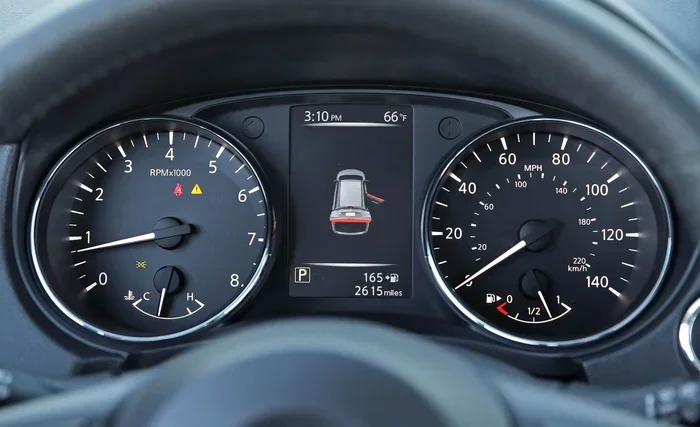
A digital speedometer replaces the traditional needle-based gauge with a clear digital readout. You get exact speed numbers, often with additional features like trip mileage, fuel economy, and even navigation prompts. The Nissan Rogue has always been a practical SUV, but adding a digital display takes it to the next level. Let us walk through how you can make this upgrade happen.
Key Takeaways
- Digital speedometers are easier to read and reduce eye strain during night driving
- Multiple options exist including aftermarket units, OEM upgrades, and smartphone integration
- Installation can be DIY or professional depending on your comfort level with car electronics
- Nissan Rogue hybrid models already feature advanced digital displays that can be upgraded further
- Proper calibration is essential to ensure your speed readings are accurate and legal
- Cost ranges from affordable DIY kits to premium dealer-installed options
📑 Table of Contents
- Why Install a Digital Speedometer on Your Nissan Rogue?
- Types of Digital Speedometers for the Nissan Rogue
- How Does a Digital Speedometer Work?
- Tools and Materials You Will Need
- Step-by-Step Installation Guide
- Common Mistakes to Avoid
- How Long Does Installation Take?
- Cost Considerations
- Final Thoughts
Why Install a Digital Speedometer on Your Nissan Rogue?
Before you dive into the how, it helps to understand the why. A digital speedometer offers real advantages over the old analog needle gauges. Here are the top reasons Rogue owners choose this upgrade.
Better Readability
Analog speedometers can be hard to read, especially at night or in bright sunlight. A digital display shows your speed in bold, crisp numbers. You do not have to squint or guess where the needle points. This alone makes the road safer for you and everyone around you.
More Information at a Glance
A digital speedometer can show you more than just your current speed. Many units include average speed, trip distance, elapsed time, and even fuel consumption data. This extra information helps you drive more efficiently and stay aware of your vehicle’s performance.
Modern Aesthetic
Let us be honest. A digital display just looks cooler. It gives your Nissan Rogue’s dashboard a modern, tech-forward feel. Even if your Rogue is a few years old, a digital speedometer can make the interior feel brand new.
Types of Digital Speedometers for the Nissan Rogue
Not all digital speedometers are the same. Before you buy anything, you need to know what options are available. Here are the main types you can consider for your Rogue.
Aftermarket Digital Gauge Clusters
These are replacement gauge clusters you install in place of your existing instrument panel. They come with pre-programmed digital speedometers and often include additional gauges like tachometers and fuel gauges. Brands like AutoGauge and IntelliDash offer popular options. These units plug into your vehicle’s existing wiring, making installation relatively straightforward.
OEM-Upgraded Instrument Clusters
If your Nissan Rogue has a lower trim level, it may have come with an analog speedometer from the factory. You can sometimes source a higher trim level’s instrument cluster and swap it in. This is the most seamless option because everything matches your dashboard perfectly. You may need to visit a dealership or find a used cluster from a salvage yard.
Smartphone Integration Units
Some digital speedometer systems connect to your phone via Bluetooth or a wired connection. These units use apps to display your speed, navigation, and other vehicle data on a screen mounted on your dashboard. This option is great if you want maximum flexibility. You can learn more about syncing your phone to your car in our guide on how to sync your iPhone to your new car.
Add-On Digital Speed Displays
These are standalone units that mount on your dashboard or windshield and display your speed digitally. They do not replace your existing speedometer but add a second digital readout. These are the easiest to install and the least expensive option. They work by receiving signals from your vehicle’s vehicle speed sensor.
How Does a Digital Speedometer Work?
Understanding how a digital speedometer functions helps you troubleshoot issues and choose the right unit. The basic principle is simple but clever.
Your Nissan Rogue has a vehicle speed sensor (VSS) that measures how fast your wheels are turning. This sensor sends a signal to your car’s computer, which then translates that signal into a speed reading. In older analog speedometers, this signal moves a needle across a dial. In a digital speedometer, the signal is processed and displayed as a number on a screen.
Most aftermarket digital speedometers intercept the signal from the vehicle speed sensor and convert it into a digital display. Some units also tap into your car’s CAN bus system, which is the network that allows different electronic components to communicate. The Nissan Rogue hybrid models already use advanced digital displays, and understanding how hybrid systems work can help you choose the best upgrade path. You can learn more about how hybrid systems function in our guide on how a hybrid car works step by step.
The Role of the Vehicle Speed Sensor
The VSS is a small device usually located near your transmission. It uses a magnetic or optical sensor to detect wheel rotation. As your wheels turn, the sensor sends electrical pulses to your car’s computer. The faster the wheels spin, the more pulses per second, and the higher your displayed speed. A digital speedometer simply reads these same pulses and shows them as a number instead of moving a needle.
CAN Bus and Digital Integration
Modern vehicles like the Nissan Rogue use a Controller Area Network (CAN bus) to let different systems talk to each other. Your speedometer, fuel gauge, and warning lights all communicate through this network. A digital speedometer that taps into the CAN bus can access more data and display it more accurately. However, CAN bus integration can be more complex to set up.
Tools and Materials You Will Need
Before you start the installation, gather everything you need. Having the right tools makes the process smoother and prevents frustrating delays. Here is a checklist of what you will need.
- Digital speedometer unit (aftermarket cluster, add-on display, or OEM replacement)
- Screwdriver set (Phillips and flathead)
- Trim removal tools (to safely remove dashboard panels)
- Wire strippers and crimpers (for wiring connections)
- Electrical tape and wire connectors
- Multimeter (to test electrical connections)
- Owner’s manual for your Nissan Rogue
- Dashboard mounting kit (if using an add-on display)
Having a multimeter is especially important. It lets you verify that your vehicle speed sensor is sending the correct signal before you connect your new digital speedometer. This small tool can save you hours of troubleshooting later.
Step-by-Step Installation Guide
Installing a digital speedometer on your Nissan Rogue involves several steps. Whether you choose a full gauge cluster replacement or a simple add-on display, the general process follows a similar path. Here is a detailed walkthrough.
Step 1: Disconnect the Battery
Always start by disconnecting the negative terminal of your car battery. This prevents electrical shorts and protects your vehicle’s computer systems. Use a wrench to loosen the nut on the negative cable and pull the connector off the battery post. Wait at least five minutes before proceeding to allow any residual electricity to dissipate.
Step 2: Remove the Existing Instrument Cluster
Use trim removal tools to carefully pry off the dashboard panels surrounding your current speedometer. There are usually clips holding the panels in place, so work slowly to avoid breaking them. Once the panels are off, locate the screws holding the instrument cluster in place. Remove them and gently pull the cluster forward. Unplug the wiring harnesses connected to the back of the cluster.
Step 3: Prepare the Wiring
If you are installing an add-on digital display, you will need to tap into your vehicle’s wiring. Locate the vehicle speed sensor wire in your wiring harness. Use your multimeter to identify which wire carries the speed signal. Most Nissan Rogues have a dedicated speed signal wire that you can tap into. Strip the ends of the wires and connect them using appropriate wire connectors.
Step 4: Install the Digital Speedometer
Mount your new digital speedometer in your preferred location. Add-on displays can be placed on the dashboard or windshield using adhesive mounts or suction cups. If you are replacing the entire gauge cluster, simply reverse the removal process. Plug in all wiring harnesses, secure the cluster with screws, and replace the dashboard panels.
Step 5: Reconnect the Battery and Test
Reconnect the negative battery terminal and tighten the nut securely. Turn the ignition to the accessory position and check that your new digital speedometer lights up. Start the engine and verify that the speed reading is accurate. Drive at a known speed (like 30 mph in a safe area) and compare the digital reading to your phone’s GPS speed. They should match closely.
Step 6: Calibrate the Speedometer
Speedometer calibration ensures your digital display shows accurate speeds. Some aftermarket units come with calibration settings that you can adjust. If your readings are off, consult the unit’s manual for calibration instructions. You can also visit a mechanic who can perform a full car diagnostic to verify everything is working correctly. Our guide on how long a full car diagnostic takes can help you understand what to expect during this process.
Common Mistakes to Avoid
Installing a digital speedometer is not difficult, but there are common pitfalls that can cause problems. Here are mistakes to watch out for.
- Skipping the battery disconnect – This can damage your car’s electrical system and reset important settings
- Using the wrong wiring harness – Always double-check that you are tapping into the correct speed signal wire
- Forgetting to calibrate – An uncalibrated digital speedometer can show incorrect speeds, which may lead to speeding tickets
- Rushing the trim removal – Dashboard clips break easily if you force them. Take your time
- Ignoring warranty concerns – Aftermarket electrical modifications may void certain vehicle warranties. Check with your dealer first
How Long Does Installation Take?
The installation time depends on the type of digital speedometer you choose. A simple add-on display can be installed in 30 minutes to an hour. A full gauge cluster replacement may take two to four hours, especially if you need to wire into existing systems. If you are not comfortable with car electronics, consider having a professional handle the installation.
It is also worth noting that the Nissan Rogue hybrid models already feature advanced digital instrument clusters. If you own a hybrid Rogue, you may only need a software update or a minor display upgrade rather than a full installation. The hybrid system in the Rogue integrates digital displays seamlessly, and understanding how this technology works can help you make the best decision for your upgrade.
Cost Considerations
The cost of adding a digital speedometer to your Nissan Rogue varies widely based on the option you choose. Add-on digital displays typically cost between $50 and $200. Aftermarket gauge clusters range from $150 to $500 depending on features and brand. OEM instrument cluster replacements from a dealership can cost $300 to $800 or more. Professional installation adds another $100 to $300 depending on your location and the complexity of the job.
While DIY installation saves on labor costs, it does require some technical comfort. If you are unsure about any step, it is perfectly fine to consult a professional mechanic. The investment is worthwhile for the improved readability, safety, and modern look you get in return.
Final Thoughts
Getting a digital speedometer installed on your Nissan Rogue is a rewarding project that enhances both functionality and aesthetics. Whether you choose a budget add-on display or a full gauge cluster replacement, the upgrade makes your daily drives more comfortable and safer. The key is to plan carefully, follow each step, and take your time with the installation.
Remember to test your speedometer thoroughly after installation and calibrate it for accuracy. If you run into any issues, a quick diagnostic check can usually pinpoint the problem. With your new digital speedometer in place, you will wonder how you ever drove without it. Enjoy the upgrade and the clearer view of your speed on every trip.
Frequently Asked Questions
Can I install a digital speedometer myself on a Nissan Rogue?
Yes, if you have basic experience with car electronics and tools. Simple add-on displays are very DIY-friendly. Full gauge cluster replacements require more technical skill and patience. Always disconnect your battery before starting any electrical work.
Will a digital speedometer void my Nissan Rogue warranty?
It depends on your warranty terms and the type of installation. Aftermarket electrical modifications can sometimes void parts of your warranty. Check with your Nissan dealer before proceeding to understand your specific coverage.
How accurate are aftermarket digital speedometers compared to factory ones?
Most quality aftermarket digital speedometers are very accurate when properly calibrated. GPS-based speed checks can help you verify accuracy. Factory speedometers are generally more integrated, but aftermarket units can match or exceed their precision with proper setup.
What is the best digital speedometer for the Nissan Rogue?
The best option depends on your budget and goals. Add-on displays like the Garmin Dash Cam with speed overlay are affordable and easy to install. Aftermarket gauge clusters from brands like AutoGauge offer more features. OEM replacements provide the most seamless factory look.
How do I calibrate my new digital speedometer?
Most units have calibration settings in their menu. Drive at a known speed on a highway with clear speed limit signs and compare your digital reading to your GPS. Adjust the calibration until both readings match. Some units also allow dealer-level calibration using diagnostic tools.
Can I remove the digital speedometer and revert to my original analog gauge?
Yes, in most cases you can reverse the installation and go back to your original setup. Keep all original parts and wiring in good condition. If you replaced the entire instrument cluster, you may need to reprogram certain settings after reinstalling the original unit.