How to Change the Battery on Your Infiniti Key Fob
Changing the battery on your Infiniti key fob is a simple DIY task you can finish in under five minutes. Most Infiniti models use a common CR2032 coin cell battery, and you do not need any special tools or a trip to the dealer. This guide walks you through every step, from opening the fob to testing the new battery, so your Infiniti smart key is back in working order fast.
If your Infiniti key fob suddenly stopped working, the first thing to check is the battery. A dead key fob battery is the most common reason for remote failure, and it is an easy fix. You do not need to visit a dealership or call a locksmith. In this guide, we show you exactly how to change the battery on your Infiniti key fob, step by step.
Whether you drive an Infiniti Q50, an Infiniti QX60, or another Infiniti model, the process is very similar. We also cover which battery to buy, what tools you need, and how to avoid mistakes that could damage your Infiniti remote key. Let us get started.
Key Takeaways
- Easy DIY Job: You can replace the battery at home with basic tools and no prior experience.
- CR2032 Battery: Most Infiniti key fobs use this widely available coin cell battery.
- Quick Process: The entire battery swap takes less than five minutes.
- No Dealer Visit Needed: Save money and time by doing it yourself.
- Reprogramming Is Rarely Needed: Most Infiniti fobs resync automatically after a battery change.
- Preventive Tip: Replace the battery every 2-3 years to avoid a dead key fob.
📑 Table of Contents
- Why Your Infiniti Key Fob Battery Dies
- What Battery Does an Infiniti Key Fob Use?
- Tools You Need to Change the Battery
- Step-by-Step Guide: How to Change the Battery on Your Infiniti Key Fob
- Do You Need to Reprogram the Key Fob After Changing the Battery?
- Common Mistakes When Changing an Infiniti Key Fob Battery
- How to Extend Your Infiniti Key Fob Battery Life
- When to Seek Professional Help
- Key Takeaways
- Frequently Asked Questions
Why Your Infiniti Key Fob Battery Dies
Understanding why your key fob battery dies helps you prevent surprises. Most Infiniti smart key systems rely on a small coin cell battery to power the remote functions. Over time, this battery loses its charge and eventually fails.
Common Signs of a Low Key Fob Battery
Watch for these warning signs before your fob stops working completely:
- The remote range becomes shorter. You have to stand closer to the car to unlock it.
- The buttons feel less responsive or require multiple presses.
- The dashboard displays a key fob warning message.
- The push-button start does not recognize the fob easily.
- The lock or unlock sounds become weaker.
If you notice any of these symptoms, it is time to replace the key fob battery. Ignoring the signs can leave you stranded with a dead key fob battery when you least expect it.
How Long Does a Key Fob Battery Last?
On average, an Infiniti key fob battery lasts between two and three years. However, usage patterns affect battery life. If you use the remote frequently, the battery may drain faster. Cold weather can also reduce key fob battery life significantly. Keeping a spare battery in your glove box is a smart Infiniti vehicle maintenance habit.
What Battery Does an Infiniti Key Fob Use?
Most Infiniti models use a CR2032 battery. This is a standard coin cell battery that you can find at any grocery store, pharmacy, or auto parts shop. It is inexpensive and widely available.
Battery Compatibility by Model
While the CR2032 is the most common, some older or special Infiniti models may use slightly different batteries. Here is a quick reference:
- Infiniti Q50 (2014+): CR2032
- Infiniti QX60 (2013+): CR2032
- Infiniti QX50 (2019+): CR2032
- Infiniti Q70 (2014+): CR2032
- Older Infiniti Models (pre-2013): May use CR2025 or CR2016
Always check your owner’s manual if you are unsure. Using the wrong battery type can cause key fob troubleshooting issues or damage the compartment. The CR2032 is the safest and most common choice for modern Infiniti vehicles.
Tools You Need to Change the Battery
One of the best things about this job is how simple the tool requirements are. You do not need expensive equipment or specialized knowledge.
Essential Tools
- A CR2032 replacement battery
- A small flathead screwdriver or a plastic pry tool
- A clean, soft cloth
- Optional: a small tray to keep screws safe
A plastic pry tool is ideal because it prevents scratches on the fob casing. If you do not have one, a flathead screwdriver wrapped in a soft cloth works well too. Avoid using metal tools that could slip and scratch the interior components.
Step-by-Step Guide: How to Change the Battery on Your Infiniti Key Fob
Now for the main part. Follow these steps carefully, and you will have your Infiniti remote key working again in no time.
Step 1: Locate the Battery Compartment
Hold your Infiniti key fob with the buttons facing up. Look for a small seam or groove along the edge of the fob. This is where the two halves of the fob separate. On most Infiniti models, the seam runs along the long side of the fob.
Some newer Infiniti models have a small release button or tab near the top. Press or slide this to begin opening the fob. If your model uses a screw, you will see a tiny screw on the back or side of the fob. Use a small screwdriver to remove it.
Step 2: Open the Fob Carefully
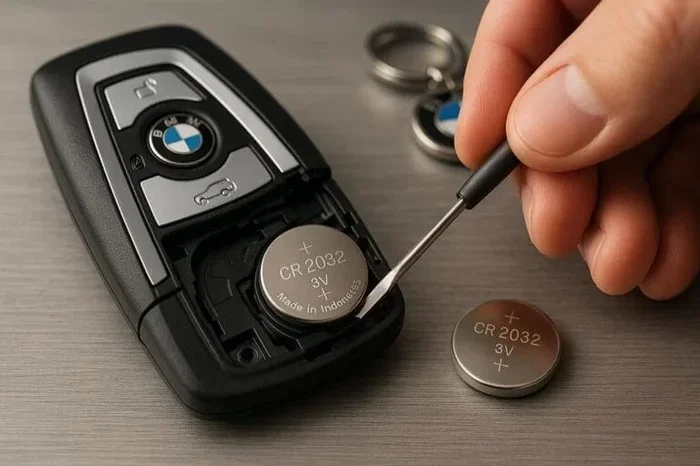
Insert your flathead screwdriver or plastic pry tool into the seam. Work it gently around the edge until the top half pops loose. Do not force it. The fob clips are made of plastic and can break if you are too aggressive.
Once the top half lifts, set it aside carefully. You will see the battery sitting in a small compartment inside. Take note of how the battery is oriented, paying attention to the positive and negative sides.
Step 3: Remove the Old Battery
The old battery is usually held in place by a small metal clip or simply rests in a slot. Use the tip of your screwdriver or a plastic tool to gently pry the battery out. Pull it out slowly and avoid touching the internal circuitry with metal tools.
Dispose of the old battery properly. Coin cell batteries contain materials that should not go in regular household trash. Many stores that sell batteries have recycling bins, or you can check with your local waste management facility.
Step 4: Insert the New Battery
Take your new CR2032 battery and check the markings. The positive side (marked with a +) should face up, matching the orientation of the old battery. Place the new battery into the compartment and press it down gently until it clicks into place under the metal clip.
Make sure the battery sits flat and secure. A loose battery can cause intermittent key fob not working issues. Double-check the orientation before moving to the next step.
Step 5: Reassemble the Key Fob
Align the top half of the fob with the bottom half. Press firmly around the edges until the clips snap back into place. You should hear a soft click when the fob is fully sealed. If your fob had a screw, reinsert it now.
Wipe down the fob with a clean, soft cloth to remove any fingerprints or dust. This small step helps keep the buttons and internal components clean over time.
Step 6: Test the Key Fob
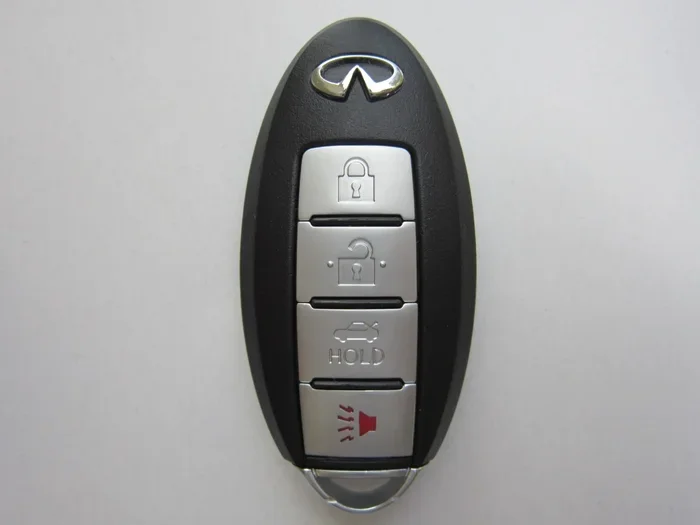
Stand near your Infiniti and test all the remote functions. Press the lock button, the unlock button, the trunk release, and the panic button if your model has one. If the Infiniti smart key system responds immediately, your battery replacement was successful.
For push-button start models, hold the fob close to the start button and press the brake pedal. The car should recognize the fob and allow you to start the engine. If nothing happens, check the battery orientation and make sure it is seated properly.
Do You Need to Reprogram the Key Fob After Changing the Battery?
In most cases, the answer is no. Infiniti key fobs are designed to resync automatically after a battery change. The Infiniti smart key system recognizes the fob immediately once the new battery powers up the internal chip.
However, there are rare situations where the fob does not reconnect on its own. If your Infiniti remote key still does not work after replacing the battery, try these quick steps:
- Hold the fob close to the push-button start and press the start button twice.
- Turn the ignition on and off using the physical key (if your model has one).
- Check the owner’s manual for a manual resync procedure specific to your model year.
If these steps do not work, you may need professional key fob reprogramming. Visit a dealership or a qualified locksmith. This is uncommon but worth knowing about just in case.
Common Mistakes When Changing an Infiniti Key Fob Battery
Avoid these mistakes to keep your Infiniti key fob in perfect working condition:
Using the Wrong Battery Type
Not all coin cell batteries are the same. Using a CR2025 instead of a CR2032 can cause fit issues or voltage problems. Always verify the correct battery type for your specific Infiniti model before purchasing.
Forcing the Fob Open
The fob clips are fragile. Forcing the two halves apart with too much pressure can crack the casing or break the clips. Work slowly and gently, letting the pry tool do the work.
Touching Internal Components with Metal Tools
Metal screwdrivers can short-circuit the internal electronics if they slip. Use a plastic pry tool whenever possible, or wrap your screwdriver in a cloth for protection.
Ignoring the Battery Orientation
Putting the battery in upside down will not damage the fob, but it will not work either. Always match the positive and negative sides to the markings inside the compartment.
Skipping the Test
Never put the fob back together without testing it first. Testing before reassembly saves you from having to reopen the fob a second time if something is wrong.
How to Extend Your Infiniti Key Fob Battery Life
Want to get the most out of your next battery replacement? Follow these simple Infiniti vehicle maintenance tips:
- Avoid extreme temperatures: Leave the fob inside the car or in a temperature-controlled space. Heat and cold both drain coin cell batteries faster.
- Do not press buttons unnecessarily: Every press uses a small amount of power. Only use the remote when you need it.
- Keep contacts clean: Occasionally wipe the battery contacts inside the fob with a dry cloth.
- Replace proactively: Change the battery every two to three years, even if the fob still works. This prevents unexpected failures.
- Store a spare battery: Keep a CR2032 in your glove box for emergencies.
These habits add years of reliable service to your Infiniti smart key system. They also save you from the frustration of a key fob not working at the worst possible moment.
When to Seek Professional Help
Most battery replacements are straightforward, but there are times when professional help makes sense. If you have replaced the battery correctly and the fob still does not work, the issue may be with the fob itself rather than the battery.
Also, if your Infiniti key fob has physical damage, such as cracks or water damage, a new battery will not fix the problem. In these cases, visit a dealership or a qualified locksmith. They can diagnose deeper issues and, if needed, provide key fob reprogramming or a replacement fob.
If you have ever wondered whether you could start an ignition without a key, the answer for modern Infiniti models is yes, but only when the smart key fob is functioning properly. A dead battery in the fob removes this convenience, which is exactly why keeping the battery fresh matters so much.
Some owners also ask whether they can drive a vehicle without a working key fob. Most Infiniti models allow you to start the car using the physical key blade that is hidden inside the fob. So even if the remote functions fail completely, you can still access and start your vehicle in an emergency.
Key Takeaways
- Simple DIY Task: Changing the battery on your Infiniti key fob takes less than five minutes and requires only a CR2032 battery and a small screwdriver.
- Correct Battery Matters: Always use a CR2032 coin cell battery unless your specific model requires a different type.
- No Reprogramming Needed: Infiniti fobs resync automatically in most cases after a battery swap.
- Avoid Common Mistakes: Do not force the fob open, use the wrong battery, or ignore the orientation markings.
- Proactive Maintenance: Replace the battery every 2-3 years and keep a spare on hand.
- Know When to Get Help: If the fob still fails after a new battery, the issue may require professional diagnosis or key fob reprogramming.
Frequently Asked Questions
What type of battery does an Infiniti key fob use?
Most Infiniti key fobs use a CR2032 coin cell battery. This is a standard 3-volt battery available at virtually any store. Some older models may use a CR2025 or CR2016, so always check your owner’s manual to confirm the correct type for your specific Infiniti model.
How do I know when the key fob battery is low?
Common signs include reduced remote range, weaker lock/unlock sounds, a key fob warning on the dashboard, and difficulty starting the car with the push-button system. If you notice any of these symptoms, replacing the battery should resolve the issue quickly.
Do I need to reprogram the key fob after changing the battery?
In most cases, no. Infiniti key fobs resync automatically once the new battery powers up the internal chip. If the fob does not reconnect, try holding it close to the push-button start and cycling the ignition. Refer to your owner’s manual for model-specific resync steps.
Can I replace the key fob battery myself?
Absolutely. Replacing the battery is a straightforward DIY task that requires no special tools or technical knowledge. You just need a replacement CR2032 battery and a small flathead screwdriver or plastic pry tool. If you want more details on DIY battery replacement, check out our guide on Can You Replace A Key Fob Battery Yourself for additional tips and insights.
How long does a key fob battery last?
A key fob battery typically lasts between two and three years, depending on usage and weather conditions. Frequent use and exposure to extreme temperatures can shorten battery life. Replacing the battery proactively every two years helps prevent unexpected failures.
What should I do if my Infiniti key fob still does not work after replacing the battery?
First, double-check that the battery is installed with the correct orientation. If the orientation is correct and the fob still fails, the issue may be with the fob’s internal electronics rather than the battery. In this case, visit a dealership or a qualified locksmith for diagnosis and possible key fob reprogramming or replacement.