How to Change the Battery in Your Acura MDX Key Fob
Changing the battery in your Acura MDX key fob is a quick DIY job you can do in minutes. This guide walks you through everything from finding the right battery type to reassembling your remote. You will learn the exact steps, common mistakes to avoid, and troubleshooting tips so your keyless entry works perfectly again.
Your Acura MDX key fob stops working at the worst possible time. You are standing in the driveway, arms full of groceries, and the remote just will not unlock the doors. It is frustrating, but the fix is almost always simple. A dead battery is the most common reason an Acura key fob fails. The good news is that you can swap in a new battery yourself in just a few minutes.
This guide shows you exactly how to change the battery in your Acura MDX key fob. We cover the battery type you need, the tools required, and every step from opening the fob to testing it afterward. Whether you have the smart key remote or the standard key fob, this guide has you covered.
Many car owners worry that working on a key fob is complicated or risky. That is not the case here. The Acura MDX fob is designed for easy battery access. You do not need any special training or expensive tools. A little patience and the right battery are all you need.
Key Takeaways
- CR2032 battery: The Acura MDX key fob uses a common CR2032 coin cell battery that is easy to find at any store.
- Simple tools needed: You only need a small flathead screwdriver or a coin to open the fob housing.
- Quick process: The entire battery swap takes less than five minutes with no special skills required.
- Reset may be needed: In some cases, you may need to reset the key fob after replacing the battery.
- Avoid common mistakes: Do not use a metal tool that can scratch the fob, and make sure the new battery is seated correctly.
- Know when to seek help: If the fob still does not work after a battery change, the issue may be beyond the battery.
📑 Table of Contents
- What Battery Does the Acura MDX Key Fob Use?
- Tools You Will Need
- Step-by-Step Guide to Changing the Battery
- Common Problems After a Battery Change
- How to Prevent Key Fob Battery Problems
- When to Seek Professional Help
- How Often Should You Replace the Key Fob Battery?
- Acura MDX Key Fob Battery: Quick Reference
- Final Thoughts
What Battery Does the Acura MDX Key Fob Use?
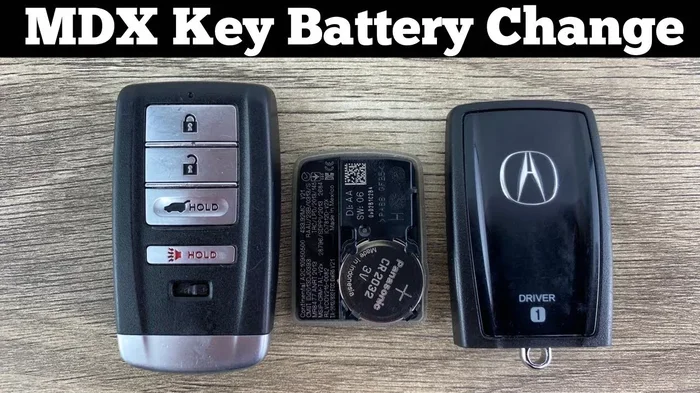
The Acura MDX key fob runs on a CR2032 battery. This is a standard 3-volt coin cell battery. You can find it at almost any grocery store, pharmacy, or auto parts shop. The CR2032 is one of the most common batteries in the world, so you will never have trouble sourcing one.
Here are some important details about the battery:
- Battery type: CR2032 lithium coin cell
- Voltage: 3 volts
- Lifespan: Typically 2 to 4 years depending on usage
- Cost: Usually between $3 and $10 per battery
- Brands: Energizer, Duracell, Panasonic, and others all work well
When you buy a replacement battery, make sure it says CR2032 on the package. Some stores sell similar-looking batteries that are not the right size or voltage. Always double-check before you purchase. If you are unsure, the Can You Replace A Key Fob Battery Yourself guide offers additional tips on choosing the right battery.
Tools You Will Need
One of the best things about this job is how little you need. You probably already have everything at home. Here is a simple list of tools:
- A small flathead screwdriver: A tiny one works best for prying open the fob.
- A coin: A penny or a dime can also work if you do not have a screwdriver.
- The replacement CR2032 battery: Make sure it is fresh and not expired.
- A clean, soft cloth: This helps keep the battery contacts clean.
That is it. No special equipment, no trips to the dealer. You can do this entire job at your kitchen table.
Step-by-Step Guide to Changing the Battery
Step 1: Prepare Your Workspace
Find a clean, well-lit surface. A kitchen table or desk works great. Lay down a soft cloth to prevent scratches. Make sure your hands are dry and clean. Static electricity or moisture can damage the electronic components inside the fob.
Before you start, take note of how the fob opens. Some Acura MDX remotes have a small seam running along the side. Others have a sliding panel on the back. Familiarizing yourself with the fob layout makes the process smoother.
Step 2: Open the Key Fob Housing
Insert the flathead screwdriver or coin into the seam of the fob. Gently twist or pry along the edge. Work slowly and apply even pressure. The housing should pop open without too much force. If it feels stuck, do not force it. Check for any hidden clips or screws holding the two halves together.
Be careful not to scratch the plastic. The fob housing is not expensive to replace, but it is annoying when it gets damaged. If you are concerned about scratches, wrap a cloth around the tip of your screwdriver before prying.
Step 3: Remove the Old Battery
Once the fob is open, you will see the old battery sitting in a small compartment. Note which side is facing up. The positive side (marked with a +) usually faces up. Use the screwdriver or a pair of tweezers to gently lift the battery out.
Dispose of the old battery properly. Do not throw it in the regular trash if your local recycling program accepts batteries. Many stores that sell batteries also have recycling bins.
Step 4: Clean the Battery Contacts
This is a step many people skip, but it matters. Use a dry cloth or a cotton swab to gently wipe the metal contacts inside the fob. Over time, a thin layer of dust or corrosion can build up. Clean contacts ensure better electrical connection with the new battery.
If you notice any greenish or white residue on the contacts, use a slightly damp cloth. Let the contacts dry completely before inserting the new battery.
Step 5: Insert the New Battery
Take your fresh CR2032 battery and place it in the compartment with the positive side facing up, just as the old battery was. Press it down gently until it clicks into place. Make sure it sits flat and secure. A loose battery will not make proper contact, and the fob will not work.
Double-check the orientation before you close the fob. Putting the battery in backwards is an easy mistake that will prevent the fob from functioning.
Step 6: Reassemble the Key Fob
Align the two halves of the fob housing. Press them together firmly but gently. You should hear or feel the clips snap into place. Make sure there are no gaps between the two halves. A properly sealed fob is also water-resistant, which protects the internal electronics.
Do not use excessive force when closing the fob. If the two halves do not align easily, open it back up and check that the battery is seated correctly and nothing is obstructing the closure.
Step 7: Test Your Key Fob
Stand near your Acura MDX and test all the buttons. Try locking the doors, unlocking the doors, opening the trunk, and activating the panic alarm. If all functions work, you are done. Congratulations, you just saved yourself a trip to the dealer.
If some buttons do not work, open the fob again and check the battery placement. Sometimes the battery shifts slightly during reassembly. Reposition it and test again.
Common Problems After a Battery Change
Sometimes the key fob still does not work even after you put in a new battery. This can be frustrating, but there are several common reasons and easy fixes.
The fob is not detected by the car. This can happen if the new battery is not making proper contact. Open the fob and reseat the battery. Also check for any debris or corrosion on the contacts.
Some buttons work but others do not. This usually points to a worn-out button pad rather than a battery issue. If only the lock button works but the unlock button does not, the problem is likely the button itself.
The fob still shows no signs of life. Try the car key not turning in ignition troubleshooting steps, as a dead fob can sometimes be confused with ignition issues. If the fob is truly dead, the battery might be defective. Try a different CR2032 battery from a different brand or package.
In rare cases, the internal electronics of the fob may have failed. If you have tried a new battery and the fob still does not work, it may be time to replace the entire key fob or visit an Acura dealer for diagnostics.
How to Prevent Key Fob Battery Problems
You cannot prevent a battery from dying, but you can take steps to extend the life of your key fob and avoid surprises.
- Keep a spare battery on hand. A CR2032 battery costs very little, and having one in your glove box means you are never stranded.
- Avoid extreme temperatures. Leaving your fob in a hot car or freezing temperatures can drain the battery faster. Keep it in a pocket or bag when possible.
- Replace the battery proactively. If your fob starts acting sluggish, do not wait for it to die completely. Replace the battery at the first sign of weakness.
- Keep the fob clean. Dirt and grime can work their way into the seams and affect button performance. Wipe your fob down regularly with a soft cloth.
When to Seek Professional Help
Most of the time, a battery change solves the problem. But there are situations where professional help makes sense. If you have replaced the battery and the fob still does not work, the issue could be internal damage or a programming problem.
An Acura dealer or a qualified locksmith can reprogram your key fob if needed. They have the tools and expertise to handle more complex issues. This is also the right move if your fob has physical damage, such as a cracked housing or broken buttons.
Keep in mind that some key fob issues can be mistaken for battery problems. For example, if your car does not recognize the fob at all, it could be a key fob not working when driving situation that goes beyond a simple battery swap. A professional diagnosis can save you time and money in the long run.
How Often Should You Replace the Key Fob Battery?
The CR2032 battery in an Acura MDX key fob typically lasts between two and four years. The exact lifespan depends on how often you use the remote functions. If you use the keyless entry and remote start features daily, the battery may drain faster.
Signs that your battery is getting low include:
- The fob has reduced range. You have to stand closer to the car for it to work.
- The buttons feel less responsive.
- The dashboard shows a low battery warning for the fob.
- The fob works intermittently or stops working entirely.
If you notice any of these signs, replace the battery right away. Waiting too long means you could end up with a completely dead fob when you need it most.
Acura MDX Key Fob Battery: Quick Reference
Here is a quick reference table for easy access:
| Detail | Information |
|---|---|
| Battery Type | CR2032 |
| Voltage | 3 volts |
| Estimated Lifespan | 2 to 4 years |
| Replacement Cost | $3 to $10 |
| Tools Needed | Flathead screwdriver or coin |
| Replacement Time | Under 5 minutes |
| Where to Buy | Grocery stores, pharmacies, auto parts stores |
This table makes it easy to print out or save on your phone for quick reference the next time you need to swap the battery.
Final Thoughts
Changing the battery in your Acura MDX key fob is one of the easiest maintenance tasks you can do. It takes less than five minutes, costs just a few dollars, and requires no special skills. Once you have done it once, you will never need to pay a dealer or locksmith for a simple battery swap again.
Keep a spare CR2032 battery in your glove box, and you will always be prepared. Your key fob is an essential part of driving your Acura MDX. Keeping it in good working order means you always have smooth, hassle-free access to your vehicle.
Now that you know how to handle this simple fix yourself, you can tackle it the next time your fob starts acting up. Do not let a dead battery slow you down. Grab a CR2032 battery, follow the steps in this guide, and you will be back to unlocking your MDX with a single press in no time.
Frequently Asked Questions
What type of battery does the Acura MDX key fob use?
The Acura MDX key fob uses a CR2032 lithium coin cell battery. This is a 3-volt battery that is widely available at grocery stores, pharmacies, and auto parts shops. Always check that the battery is labeled CR2032 before purchasing.
How long does the key fob battery last in an Acura MDX?
The battery typically lasts between two and four years, depending on how frequently you use the remote functions. Daily use of keyless entry and remote start can shorten the lifespan. If you notice reduced range or intermittent operation, it is time to replace the battery.
Do I need any special tools to change the battery?
No special tools are needed. A small flathead screwdriver or a coin is all you need to pry open the fob housing. A soft cloth can help keep the contacts clean during the replacement process.
Should I reset my Acura MDX key fob after changing the battery?
In most cases, the key fob works immediately after a battery change. However, if the fob does not respond, you may need to reprogram it. Refer to your Acura MDX owner’s manual for specific reset instructions. You can also visit an Acura dealer for assistance with reprogramming.
Can I use any brand of CR2032 battery for my Acura MDX key fob?
Yes, any reputable brand of CR2032 battery will work. Energizer, Duracell, Panasonic, and other major brands are all compatible. The key is to make sure the battery is labeled CR2032 and is fresh. Avoid generic or expired batteries for the best performance.
What should I do if my key fob still does not work after replacing the battery?
First, double-check that the new battery is installed correctly with the positive side facing up. Clean the battery contacts and reseat the battery. If the fob still does not work, the internal electronics may have failed, or there could be a programming issue. In that case, consider visiting an Acura dealer or locksmith for further diagnosis.
=== CONCLUSION ===
Changing the battery in your Acura MDX key fob is a simple, fast, and inexpensive task that anyone can do. You now have all the information you need, from the right battery type to the exact steps for opening, replacing, and testing your fob. Keep this guide bookmarked for future reference, and always have a spare CR2032 battery on hand.
Taking care of your key fob battery proactively means you will never be caught off guard by a dead remote. The next time your Acura MDX fob starts acting up, you will know exactly what to do. Grab your replacement battery, follow the steps, and get back to enjoying the convenience of keyless entry in minutes.