How to Change the Time Settings on Volkswagen Passat
Changing the time on your Volkswagen Passat is simple once you know where to look. Whether you drive a newer model with a touchscreen infotainment system or an older Passat with a traditional dashboard clock, this guide walks you through every method. You will learn how to adjust the time manually, switch between 12-hour and 24-hour formats, and fix common clock issues in minutes.
Your Volkswagen Passat is a well-crafted car. It handles well. It gets good gas mileage. And the dashboard looks clean and professional. But there is one small thing that can drive you crazy. The clock is wrong. Maybe you just moved your car across time zones. Or maybe the battery died last winter and the clock reset itself. Either way, you need to fix it. And the good news is that you can do it yourself in just a few minutes.
This guide covers everything you need to know about changing the time on a Volkswagen Passat. We will walk you through every method. We will cover older models with physical buttons. We will cover newer models with touchscreen displays. And we will help you troubleshoot common problems. By the end of this article, your Passat clock will be spot on.
Before we dive in, let us talk about why this matters. A correct clock is not just about knowing what time it is. Your Passat uses the clock for several functions. The maintenance reminder system tracks time between services. The automatic light sensors sometimes rely on time-based settings. And if you use your phone to sync with the car, the time needs to match. So keeping your clock accurate is more important than you might think.
Key Takeaways
- Multiple Methods Exist: You can change the time through the dashboard controls, the infotainment screen, or the instrument cluster buttons depending on your Passat model year.
- Quick and Easy: Most Passat models let you adjust the time in under two minutes with just a few button presses.
- 24-Hour Format Option: You can switch between 12-hour and 24-hour time display to match your preference.
- Troubleshooting Is Simple: Common clock issues like a blank display or incorrect time often have easy fixes.
- Model Year Matters: Newer Passat models (2015 and up) use a touchscreen interface, while older models rely on physical buttons.
- Automatic Time Sync: Some Passat models can sync the clock automatically through the GPS or phone connection.
📑 Table of Contents
- Understanding Your Volkswagen Passat Clock System
- How to Change the Time on Older Volkswagen Passat Models
- How to Change the Time on Newer Volkswagen Passat Models
- Switching Between 12-Hour and 24-Hour Format
- Troubleshooting Common Clock Problems on Volkswagen Passat
- Expert Tips for Keeping Your Passat Clock Accurate
- Common Mistakes to Avoid When Changing the Time
- When to Seek Professional Help
- Conclusion
Understanding Your Volkswagen Passat Clock System
The Volkswagen Passat has gone through several major redesigns over the years. Each generation has a different way of handling the clock. Before you start adjusting anything, it helps to know which type of system your car has.
Older Passat Models (Pre-2015)
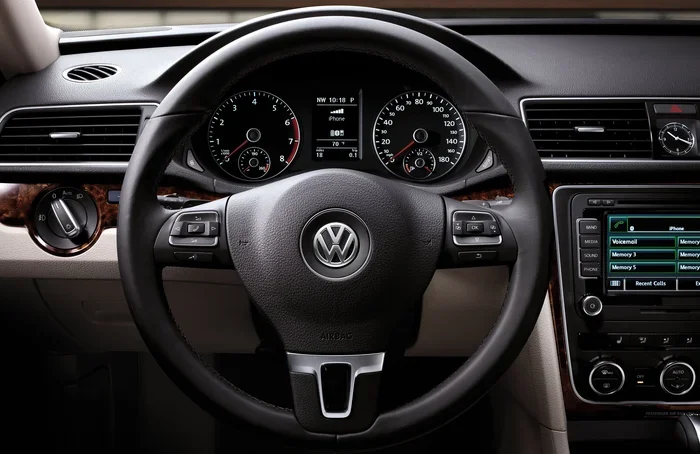
If your Passat was made before 2015, you likely have a traditional dashboard clock. This clock sits in the center of the instrument cluster. It uses small buttons or a rotary knob to adjust the time. These models do not have a touchscreen for the clock settings. Instead, you will find the controls near the clock itself or on the turn signal stalk.
The older Passat clock is straightforward. It shows hours and minutes. Some models also let you set seconds. The display is usually green or white, depending on your trim level. These clocks are reliable. But they can be tricky to adjust if you have not done it before.
Newer Passat Models (2015 and Later)
If your Passat is from 2015 or newer, you have a more advanced system. These models come with a digital infotainment display. The clock appears on this screen. You can adjust it through the settings menu. Newer Passat models also support automatic time syncing. This means the clock can update itself based on your GPS location or phone connection.
The newer systems are much easier to use. The touchscreen makes navigation simple. You can also change the time format from 12-hour to 24-hour with just a few taps. If your Passat has the Discover Pro infotainment system, the clock settings are even more detailed.
How to Change the Time on Older Volkswagen Passat Models
Changing the clock on an older Passat is quick once you find the right controls. Follow these steps carefully. The process takes about one to two minutes.
Step 1: Locate the Clock Controls
First, look at the instrument cluster. The clock sits in the center of the dashboard. Near the clock, you should see small buttons. These buttons control the time settings. On some Passat models, the controls are located on the left side of the instrument cluster. On others, they are behind a small flip cover.
If you cannot find the buttons, check the turn signal stalk. Some Passat models use the stalk to adjust the clock. There may be a small button on the stalk that you press to enter the clock-setting mode.
Step 2: Enter Clock-Setting Mode
Press and hold the button labeled “Clock” or “Set.” Hold it for about two to three seconds. The display should flash. This means you are now in clock-setting mode. You can now change the hours and minutes.
If your Passat does not have a dedicated “Clock” button, try pressing the button that looks like a clock face. On some models, you may need to press the trip button on the turn signal stalk to access the clock settings.
Step 3: Adjust the Hours
Once the display is flashing, use the “Up” and “Down” buttons to change the hours. Press the “Up” button to increase the hour. Press the “Down” button to decrease it. Set the hour to the correct time. Make sure you note whether it is AM or PM.
Quick tip: If you are not sure whether your Passat uses a 12-hour or 24-hour format, check the current display. In 24-hour format, the clock shows hours from 00 to 23. In 12-hour format, it shows hours from 1 to 12 with AM or PM.
Step 4: Adjust the Minutes
After setting the hours, press the “Set” button again. The minutes will now flash. Use the “Up” and “Down” buttons to adjust the minutes. Set them to the correct value. Then press “Set” one more time to save your changes.
Step 5: Exit Clock-Setting Mode
Wait about five to ten seconds without pressing any buttons. The display will stop flashing. This means the clock has saved your new settings. If the display does not stop flashing, press the “Set” button once more to exit the mode.
How to Change the Time on Newer Volkswagen Passat Models
If your Passat has a touchscreen infotainment system, changing the time is even easier. The touchscreen interface makes it simple to navigate through the settings. Here is how to do it.
Step 1: Open the Settings Menu
Tap the “Settings” icon on the infotainment screen. The icon usually looks like a gear. Once you tap it, you will see a list of categories. Look for “System” or “Vehicle Settings.” Tap on it to expand the menu.
On some Passat models, you may need to swipe down from the top of the screen to access quick settings. This will show you shortcuts to common functions, including the clock.
Step 2: Find the Clock Settings
Inside the System menu, look for an option called “Clock,” “Time,” or “Date & Time.” Tap on it. You will now see the current time displayed on the screen. There should be an “Edit” or “Change” button nearby.
Newer Passat models with the MIB3 infotainment system have a very clean interface. The clock settings are easy to find. The system also remembers your preferences between drives.
Step 3: Adjust the Time
Tap the “Edit” button. The hours and minutes will become editable. Use the on-screen number pad or the “Up” and “Down” arrows to change the time. Set the correct hour and minute. Then tap “Save” or “Confirm” to apply the changes.
You can also change the time format on this screen. Look for an option labeled “12-Hour Format” or “24-Hour Format.” Toggle it to match your preference. This is a great feature if you travel internationally or prefer the 24-hour format.
Step 4: Set the Time Zone (If Available)
Some newer Passat models allow you to set the time zone manually. This is useful if you have moved from one region to another. Look for a “Time Zone” option in the clock settings. Select your current time zone from the list. The clock will update automatically.
If your Passat has GPS, the system may set the time zone automatically. This is a convenient feature that saves you the trouble of manual adjustment.
Switching Between 12-Hour and 24-Hour Format
The 12-hour and 24-hour clock formats serve the same purpose. They just display time differently. The 12-hour format uses AM and PM. The 24-hour format runs from 00:00 to 23:59. Many drivers prefer the 24-hour format because it removes any confusion about AM and PM.
To switch the format on an older Passat, look for a small button near the clock labeled “Format” or “12/24.” Press it once. The display should switch between the two formats. On newer Passat models, you can change the format through the infotainment settings menu as described above.
Here are a few things to keep in mind when switching formats:
- It does not change the actual time. Only the display format changes. Your clock will still show the correct time.
- Some settings reset after a battery disconnect. If you recently changed your car battery, you may need to switch the format back.
- The format affects other displays too. Your radio, navigation system, and phone connection may all follow the same time format.
Troubleshooting Common Clock Problems on Volkswagen Passat
Sometimes the clock on your Passat does not work the way it should. This can be frustrating. But most clock problems have simple solutions. Here are the most common issues and how to fix them.
The Clock Is Blank or Dark
If your Passat clock is not displaying anything, the first thing to check is the display brightness. On older models, there may be a dimmer control near the clock. Turn it up to see if the display comes back. On newer models, check the display settings in the infotainment menu. The brightness may have been turned down accidentally.
If the brightness is fine and the clock is still blank, the issue may be electrical. Check your car lights on auto settings. Sometimes a parasitic draw from the lights can drain the battery enough to affect the clock display. You may also want to check if your battery needs replacement.
The Clock Resets After the Battery Dies
This is a very common problem. When your car battery dies or gets disconnected, the clock resets to 12:00. This happens because the clock loses power. The fix is simple. Just follow the steps in this guide to set the time again. It only takes a couple of minutes.
To prevent this from happening again, consider using a battery maintainer during long periods of inactivity. This keeps the battery charged and preserves all your settings, including the clock.
The Clock Won’t Change When You Press the Buttons
If the buttons near the clock are not responding, try pressing them more firmly. On older Passat models, the buttons can become stiff over time. Clean around the buttons with a dry cloth. Sometimes dust or debris can prevent the buttons from working properly.
If the buttons still do not respond, the issue may be with the instrument cluster. In this case, you may want to visit a qualified mechanic. They can diagnose whether the cluster needs to be replaced or repaired. You should also check if any error codes are present. You can manually clear car codes to see if any electrical faults are affecting the clock system.
The Time Is Off by One Hour
If your clock is off by exactly one hour, you may have the wrong AM or PM setting. On 12-hour format clocks, it is easy to accidentally set the time as AM when it should be PM. Simply re-enter the clock-setting mode and correct the time.
On newer Passat models, this issue can also happen if the time zone is set incorrectly. Go to the clock settings and verify that your time zone matches your current location.
The Clock Shows the Wrong Date Along With the Time
Some Passat models display the date alongside the time. If the date is wrong, you can usually adjust it in the same clock settings menu. On older models, you may need to enter a separate date-setting mode. Look for a “Date” or “Day” button near the clock controls.
On newer models with the infotainment system, the date usually syncs automatically with the time zone settings. If the date is wrong, double-check your time zone in the system settings.
Expert Tips for Keeping Your Passat Clock Accurate
Keeping your Passat clock accurate is easy with a few simple habits. Here are some expert tips that work across all Passat model years.
Sync Your Clock with Your Phone
If your Passat supports Bluetooth or Apple CarPlay, you can sync the clock with your phone. Your phone gets its time from the network, so it is always accurate. When your phone connects to the car, the clock can update automatically. This is one of the easiest ways to keep your Passat clock correct without any manual adjustment.
Check the Clock After Daylight Saving Time
Daylight saving time can throw off your Passat clock. On older models, the clock does not automatically adjust for daylight saving time. You will need to change it manually. Set a reminder on your phone to check the clock when the clocks spring forward or fall back each year.
Keep Your Battery Healthy
A healthy battery keeps all your car systems running properly, including the clock. Have your battery tested at least once a year. Replace it every three to five years, or sooner if you notice any warning signs. A weak battery can cause the clock to reset or display incorrectly.
Consult Your Owner’s Manual
Every Volkswagen Passat comes with an owner’s manual. The manual has specific instructions for your model year. If you are having trouble finding the clock controls, the manual will show you exactly where they are. You can also find the manual online on the Volkswagen website.
Common Mistakes to Avoid When Changing the Time
Even a simple task like changing the clock can go wrong if you are not careful. Here are common mistakes to avoid.
- Forgetting to save the settings: Always wait for the display to stop flashing before you walk away. If you do not save, your changes will not take effect.
- Mixing up AM and PM: Double-check whether you are setting the time in AM or PM. Setting it wrong means your clock will be off by 12 hours.
- Pressing the wrong button: On older Passat models, the buttons are small and close together. Take your time and press the right one.
- Ignoring the time zone: On newer models, always verify that your time zone is set correctly. An incorrect time zone will make the clock wrong even if the hours and minutes are correct.
- Assuming the clock will fix itself: Some drivers wait for the clock to correct itself. In most cases, the clock will not fix itself. You need to make the adjustment manually.
When to Seek Professional Help
Most clock issues on the Volkswagen Passat are easy to fix at home. But there are times when you should see a professional. If the clock display is completely dead and changing the brightness does not help, there may be a wiring issue. If the clock works intermittently, the instrument cluster may be failing. And if you notice other electrical problems alongside the clock issue, such as warning lights on the dashboard or problems with your check engine light, it is best to get a full diagnostic check.
A Volkswagen dealership or a qualified independent mechanic can diagnose electrical issues quickly. They have specialized tools that can read your car’s systems and pinpoint the problem. Do not ignore persistent clock problems. They can sometimes be a sign of a larger electrical issue that needs attention.
Conclusion
Changing the time on your Volkswagen Passat does not have to be complicated. Whether you drive a classic model with physical buttons or a newer model with a touchscreen, the process is straightforward. You just need to know where to look and what to press. This guide has covered every method. You now know how to adjust the clock on older and newer Passat models. You know how to switch between 12-hour and 24-hour formats. And you know how to troubleshoot common problems.
Keep this guide handy. The next time your Passat clock is off, you will know exactly what to do. A few minutes of adjustment will keep your dashboard accurate and your driving experience smooth. Take a moment today to check your clock. It is one of those small things that makes a big difference in your daily drive.
Frequently Asked Questions
How do I change the time on a 2012 Volkswagen Passat?
On a 2012 Passat, locate the clock buttons on the instrument cluster. Press and hold the “Set” button until the display flashes. Use the up and down buttons to adjust the hours and minutes. Press “Set” again to save. The whole process takes less than two minutes.
Why does my Volkswagen Passat clock keep resetting?
The most common reason is a weak or dying battery. When the battery voltage drops, the clock can lose its settings. Have your battery tested and replaced if needed. This should fix the resetting problem completely.
Can I change the Passat clock from 12-hour to 24-hour format?
Yes, you can. On older Passat models, look for a “Format” or “12/24” button near the clock. On newer models with the infotainment system, go to Settings, then System, then Clock. Toggle the time format to your preference.
Does the Volkswagen Passat clock adjust automatically for daylight saving time?
On most Passat models, the clock does not adjust automatically for daylight saving time. You will need to change it manually when the clocks spring forward or fall back. Some newer models with GPS may handle this automatically.
How long does it take to change the clock on a Volkswagen Passat?
It usually takes about one to two minutes. Older models with physical buttons take slightly longer because you need to navigate button presses. Newer models with touchscreens are even faster since you can tap the numbers directly on screen.
What should I do if the clock buttons on my Passat are not working?
First, clean around the buttons with a dry cloth. Sometimes dust or grime prevents the buttons from making contact. If cleaning does not help, the issue could be with the instrument cluster. Visit a mechanic for a proper diagnosis. You may also want to check if any error codes are affecting the electrical system by manually clearing car codes to rule out related issues.