Car Blueprints for 3D Modeling Your Ultimate Guide
Car blueprints for 3D modeling are detailed technical drawings that serve as the foundation for creating realistic digital vehicle models. Whether you are a hobbyist, game developer, or automotive designer, using car blueprint templates saves time and boosts accuracy. This guide covers everything from blueprint types and software tools to step-by-step tips for building your own 3D car model from scratch.
Have you ever wanted to build a realistic 3d car model but did not know where to start? The secret lies in car blueprints for 3d modeling. These detailed technical drawings act as your roadmap. They show every curve, line, and measurement of a vehicle. Without them, you are basically guessing. And guessing never leads to great results.
Whether you want to design cars for video games, build 3d print car models, or simply explore automotive design as a hobby, blueprints are essential. They give your work structure. They keep your proportions correct. And they help you move faster from concept to finished model. In this guide, we will walk you through everything you need to know about car blueprint drawing and vehicle design plans.
The world of 3d modeling car projects has grown massively. More people are diving into this creative space every day. Free car blueprint download sites have made it easier than ever to get started. You do not need to be a professional engineer. You just need the right resources and a willingness to learn. Let us get into it.
Key Takeaways
- Car blueprints for 3D modeling give you precise reference points for building accurate digital vehicles.
- You can find free and paid car blueprint downloads in multiple formats like DWG, SVG, and PNG.
- Popular software options include Blender, Blender, SketchUp, and Autodesk Maya for automotive 3D modeling.
- Using blueprint templates dramatically reduces modeling time and improves design quality.
- Common mistakes include ignoring scale, using low-resolution references, and skipping the blocking phase.
- 3D print car models start with high-quality blueprints and proper file preparation.
- Beginners should start with simple car shapes and gradually move to complex vehicle design plans.
📑 Table of Contents
- What Are Car Blueprints for 3D Modeling?
- Types of Car Blueprints Available for 3D Modeling
- Best Software for Using Car Blueprints in 3D Modeling
- How to Get Started with Car Blueprints for 3D Modeling
- Common Mistakes to Avoid When Using Car Blueprints
- Expert Insights on Automotive Blueprint Modeling
- Where to Find Quality Car Blueprints for Your Projects
- Conclusion
What Are Car Blueprints for 3D Modeling?
A car blueprint is a detailed technical drawing of a vehicle. It shows the shape, dimensions, and proportions from multiple angles. Think of it as a map that your 3d modeling software follows. Instead of sculpting blindly, you have a clear reference to work from.
In the world of automotive 3D modeling, blueprints serve as the starting point. They are not just pictures. They are precise documents with measurements and alignment guides. When you import a blueprint template into your software, you can trace over it or use it as a background image. This makes the modeling process much more accurate.
Why Blueprints Matter for Vehicle Design
Imagine trying to build a house without a floor plan. That is what modeling a car without blueprints feels like. You might get close, but the details will be off. Car design blueprints ensure that every panel, every angle, and every line matches real-world proportions.
Here is why they matter so much:
- Accuracy: Blueprints provide exact measurements. Your model stays proportional and realistic.
- Speed: Having a reference speeds up your workflow. You spend less time guessing and more time creating.
- Consistency: When you work from a blueprint, all angles and views match. This keeps your model coherent.
- Professional Results: Clients and audiences notice the difference between models made with and without references.
If you are serious about 3d modeling car projects, blueprints are not optional. They are a necessity.
Types of Car Blueprints Available for 3D Modeling
Not all car blueprints for 3d modeling are the same. Different projects need different types of references. Understanding what is available helps you choose the right one for your needs.
Orthographic Blueprints
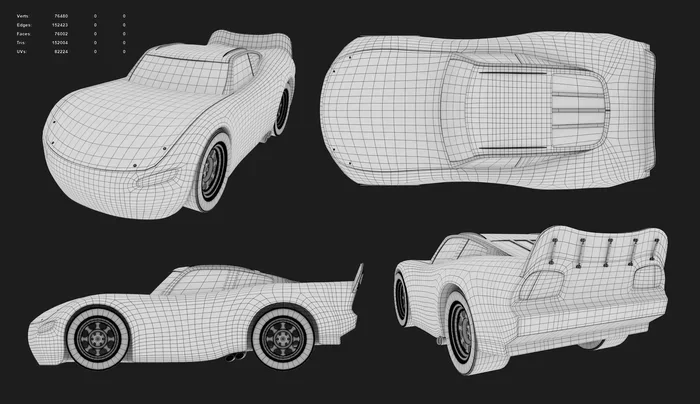
Orthographic blueprints show a vehicle from multiple flat views. You typically get a front view, side view, rear view, and top view. These are the most common type used in automotive 3D modeling. They align perfectly with the orthographic camera setup in most 3d modeling software.
Orthographic views eliminate perspective distortion. This means every line stays true to scale. For beginners, these are the best starting point. You can find car blueprint templates in this format on many websites.
Perspective Reference Images
These are realistic photographs or rendered images of a car from specific angles. They show how a vehicle looks in real life. While they do not provide exact measurements, they are excellent for capturing the feel and style of a car.
Many 3d car blueprint packs include both orthographic views and perspective images. This gives you the best of both worlds. You get accuracy from the orthographic views and realism from the perspective shots.
CAD and DWG Blueprint Files
CAD files are the most technical type of vehicle design plans. They contain actual 3D data and measurements. Formats like DWG and DXF are widely used in automotive design. These files can be imported directly into some 3d modeling car software.
CAD blueprints are ideal for engineers and professionals. They offer the highest level of precision. However, they can be complex for beginners. If you are just starting out, simpler car blueprint drawing files like PNG or SVG might be better.
Free vs. Paid Car Blueprints
The internet offers plenty of free car blueprint download options. Sites like BlueprintArchive, CGTrader, and TurboSquid host free and paid blueprint templates. Free options are great for practice and learning.
Paid blueprints usually come with higher resolution, better alignment, and more views. If you are working on a commercial project, investing in quality car blueprints for 3d modeling is worth it. Here is a quick comparison:
- Free blueprints: Good for learning, hobby projects, and testing new software.
- Paid blueprints: Better resolution, more views, and often come with licensing for commercial use.
Best Software for Using Car Blueprints in 3D Modeling
Choosing the right 3d modeling software makes a huge difference. Some tools are better suited for automotive design than others. Let us look at the top options for working with car blueprints for 3d modeling.
Blender
Blender is a free, open-source powerhouse. It supports 3d modeling car projects of all sizes. You can import blueprint images as background planes and trace over them. Blender has a massive community and tons of tutorials for automotive 3D modeling.
Many beginners start with Blender because it costs nothing. The learning curve is steep, but the results are worth it. You can create stunning 3d print car models and game-ready assets with this tool.
Autodesk Maya and 3ds Max
Maya and 3ds Max are industry standards. Professional studios use them for vehicle design plans and automotive 3D modeling. They offer advanced tools for precision modeling and texturing.
The downside is the cost. Both programs require a subscription. However, if you are serious about a career in automotive design, they are worth the investment. They also handle car blueprint drawing files and CAD imports very well.
SketchUp
SketchUp is known for being beginner-friendly. It is great for architectural modeling but also works well for simpler 3d modeling car projects. You can import blueprint templates and build your model on top of them.
SketchUp is not as powerful as Blender or Maya for complex organic shapes. But for boxy cars or concept vehicles, it gets the job done. It is a solid choice for hobbyists exploring car blueprints for 3d modeling.
ZBrush for Detailing
ZBrush is a sculpting tool. It is not a traditional modeler, but it excels at adding fine details. Once you have your base 3d car model built from blueprints, ZBrush helps you add panel lines, textures, and realistic surface details.
Many professionals use ZBrush as a second step. They build the base shape in Blender or Maya, then move to ZBrush for refinement. This workflow produces some of the most realistic 3d print car models you will see.
How to Get Started with Car Blueprints for 3D Modeling
Ready to start your first 3d modeling car project? Here is a practical roadmap to get you going using car blueprints for 3d modeling.
Step 1: Choose Your Car
Pick a vehicle that inspires you. Sports cars, trucks, and classic cars all have different challenges. Start with a simpler shape if you are a beginner. A boxy sedan or a basic hatchback is easier to model than a curved supercar.
Step 2: Find the Right Blueprint
Search for car blueprint download sites that offer orthographic views. Make sure the blueprint includes front, side, top, and rear views. Check the resolution. High-resolution images give you more detail to work with. Free car blueprint templates are plentiful, so take your time to find a good one.
Step 3: Set Up Your Software
Import the blueprint images into your 3d modeling software. In Blender, you can use the Import Images as Planes add-on. Align the front and side views on the X and Y axes. This setup ensures your model stays accurate from all angles.
Step 4: Block Out the Basic Shape
Start with simple shapes. Use boxes and cylinders to build the basic form. Do not worry about details yet. Focus on getting the overall silhouette right. This phase is called “blocking” and it is the foundation of every great automotive 3D modeling project.
Step 5: Refine and Add Details
Once the basic shape looks right, start refining. Add curves, edges, and panel lines. Use your car design blueprints as a guide for proportions. Take your time with this step. Rushing through it leads to inaccuracies.
Step 6: Texture and Render
After the model is complete, add materials and textures. Paint the body, add wheels, and set up lighting. Render your final 3d car model and admire your work. If you want to 3d print car model files, export in STL or OBJ format.
Quick Tips for Beginners
- Always start with orthographic blueprints. They keep your proportions correct.
- Use a tablet or drawing tablet for tracing. It is much faster than using a mouse.
- Save often. Modeling can be unpredictable, and you do not want to lose progress.
- Watch tutorials specific to automotive 3D modeling. They teach shortcuts and techniques you cannot learn alone.
- Join online communities. Forums like Blender Artists and Reddit have active car modeling groups.
Common Mistakes to Avoid When Using Car Blueprints
Even experienced modelers make mistakes. Knowing what to avoid saves you hours of frustration. Here are the most common errors people make with car blueprints for 3d modeling.
Ignoring Scale and Proportions
The biggest mistake is not checking scale. A blueprint might show a car that is 10% longer than it should be. If you do not verify the measurements, your entire model will be off. Always cross-check dimensions with real-world data or the blueprint source.
Using Low-Resolution Images
Blurry blueprints lead to blurry models. Always use the highest resolution car blueprint drawing you can find. A pixelated reference makes it hard to see fine details like body lines and window frames.
Skipping the Blocking Phase
Some modelers jump straight into details. This is a recipe for disaster. Without a solid block-out, your proportions will be wrong, and you will have to redo a lot of work. Always build the basic shape first.
Not Using All Views
Many beginners only use the side view. But a car is a 3D object. You need front, top, rear, and perspective views to model it accurately. Use all the views provided in your blueprint templates.
Forgetting About Real-World References
Blueprints are great, but they are not enough on their own. Look at real cars. Study photos. Watch how light hits the body panels. Combining vehicle design plans with real-world references takes your 3d modeling car projects to the next level.
Expert Insights on Automotive Blueprint Modeling
Professional automotive designers and 3D modeling experts share a common philosophy. They always start with references. Car blueprints for 3d modeling are not just tools. They are the language of vehicle design.
Industry professionals emphasize the importance of clean, well-aligned blueprints. A messy blueprint leads to a messy model. Take time to clean up your reference images before you start. Crop them, align them, and organize them in your software.
Another expert tip is to model in layers. Start with the body shell. Then add wheels, windows, and interior elements separately. This non-destructive workflow makes it easy to go back and fix mistakes. It also makes your automotive 3D modeling projects more organized and professional.
Many professionals also recommend studying real car blueprint drawing techniques. Understanding how engineers create these plans gives you insight into vehicle proportions. You start to see how panels flow into each other and how surfaces curve. This knowledge directly improves your digital models.
The 3d print car model community has also grown significantly. People now use car blueprints for 3d modeling not just for digital renders but for physical prints. If you plan to 3D print your model, make sure your blueprint has enough detail. High-resolution blueprint templates translate into better printed results.
Finally, never stop learning. The tools and techniques for automotive design evolve constantly. New software features, better car blueprint download sources, and improved workflows emerge every year. Stay curious, keep practicing, and your skills will grow.
Where to Find Quality Car Blueprints for Your Projects
Finding the right car blueprints for 3d modeling is easier than you think. Several platforms host high-quality car blueprint templates for all skill levels.
Free options include websites like BlueprintArchive, DeviantArt, and open-source modeling communities. These sites often have car blueprint drawing files in PNG or SVG format. They are perfect for beginners who want to practice without spending money.
Paid platforms like TurboSquid, CGTrader, and ArtStation offer premium blueprint templates with higher resolution and better organization. These are ideal for commercial projects where quality matters. Many paid packs include multiple views, aligned grids, and even editable CAD files.
If you are looking for car blueprint download options, always check the license. Some free blueprints are for personal use only. Others allow commercial use. Read the terms before you start your project to avoid any issues.
For those interested in 3d print car model creation, look for blueprints that include side, front, top, and rear views. This complete set gives you everything you need to build a model that prints correctly. Pay attention to file format too. DWG and SVG files often provide the cleanest lines for vehicle design plans.
Conclusion
Car blueprints for 3d modeling are the backbone of every great vehicle project. They give you the accuracy, structure, and inspiration you need to create stunning digital models. From orthographic views to CAD files, the world of car blueprint drawing offers something for everyone.
Whether you are a beginner exploring automotive design or a professional building 3d print car models, using quality blueprints transforms your workflow. You work faster. You model more accurately. And you produce results you can be proud of.
Start with simple projects. Use free car blueprint templates to practice. Gradually move to more complex vehicle design plans as your skills grow. The journey of 3d modeling car projects is incredibly rewarding. With the right blueprints and the right tools, there is no limit to what you can create.
So grab your car blueprints for 3d modeling, fire up your favorite software, and start building. Your dream vehicle model is just a blueprint away.
Frequently Asked Questions
What are car blueprints for 3D modeling?
Car blueprints for 3D modeling are detailed technical drawings of a vehicle that show its shape, dimensions, and proportions from multiple angles. They serve as reference images that 3d modeling software users trace or build upon to create accurate digital vehicle models.
Where can I find free car blueprints for 3D modeling?
You can find free car blueprint download options on sites like BlueprintArchive, DeviantArt, and open-source modeling communities. These platforms offer car blueprint templates in formats like PNG and SVG. Always check the license to make sure they allow your intended use.
What software is best for using car blueprints?
Blender is a top choice because it is free and powerful. Autodesk Maya and 3ds Max are industry standards for automotive 3D modeling. SketchUp works well for beginners. ZBrush is excellent for adding detailed textures after the base model is built.
Can I 3D print a car model made from blueprints?
Yes, absolutely. Many people create 3d print car models using car blueprints for 3d modeling. Make sure your blueprint has high resolution and includes all views. Export your finished model in STL or OBJ format for printing.
Do I need to be an expert to use car blueprints?
Not at all. Car blueprints for 3d modeling are used by beginners and professionals alike. Start with simple vehicles and free blueprint templates. Follow tutorials, practice regularly, and your skills will improve quickly.
What format should I look for in a car blueprint file?
PNG and SVG are the most common formats for car blueprint drawing files. DWG and DXF are used for CAD-based vehicle design plans. PNG works great for most 3d modeling car projects. Choose high-resolution files for the best results.