How to Get a QR Code for a Vehicle in Just Minutes
Getting a QR code for your vehicle is fast, easy, and incredibly useful. Whether you want to share car details, streamline parking, or boost safety, a vehicle QR code makes it all possible. You can generate one in minutes using free online tools. This guide walks you through every step, from choosing the right type to placing it perfectly on your car.
Have you ever wondered how to get a QR code for a vehicle? Maybe you want to make parking easier. Perhaps you need a quick way to share car details during a sale. Or maybe you just want to look tech-savvy in your garage. Whatever your reason, the process is simpler than you think.
A vehicle QR code works like a digital business card for your car. When someone scans it with their phone, they instantly see the information you chose to share. This could be a link to your car’s listing, a maintenance log, or even your contact details. The best part? You do not need any special skills or expensive equipment. Anyone can do it.
In this guide, we walk you through everything you need to know. We cover how to generate a QR code, where to place it, which type to choose, and common pitfalls to avoid. By the end, you will have your very own QR code for your car ready to go. Let us dive in.
Key Takeaways
- Quick Setup: You can create a vehicle QR code in under 5 minutes using free tools.
- Multiple Uses: QR codes work for parking, maintenance tracking, car sales, and safety identification.
- Easy Placement: Windshield, rear window, and dashboard are the best spots for visibility and scanning.
- Dynamic vs Static: Dynamic QR codes let you update information without reprinting.
- Avoid Common Mistakes: Don’t place codes where they get damaged by weather or blocked by objects.
- Legal Awareness: Some regions have rules about what information you can display on a vehicle.
📑 Table of Contents
- What Is a QR Code for a Vehicle?
- How to Get a QR Code for Your Vehicle in Minutes
- Best Places to Put a QR Code on Your Vehicle
- Types of QR Codes for Vehicles
- Benefits of Using a QR Code for Your Vehicle
- Common Mistakes to Avoid When Using Vehicle QR Codes
- How to Choose the Right QR Code Generator
- Real-World Examples of Vehicle QR Codes in Action
- Final Thoughts
What Is a QR Code for a Vehicle?
A QR code for a vehicle is a two-dimensional barcode that stores information about a car. When scanned with a smartphone camera, it directs the user to a specific webpage, document, or digital profile. Think of it as a tiny window into your vehicle’s digital identity.
People use vehicle QR codes for many reasons. Car dealers place them on vehicles for quick buyer access to specs. Fleet managers use them for vehicle tracking QR code systems. Car owners link them to maintenance records. And some people use them for parking passes or digital car registration.
How Does It Work?
The process is straightforward. You create a QR code using an online QR code generator. You input a URL or text. The tool creates a unique pattern of black squares on a white background. When someone points their phone camera at it, the pattern decodes and opens the linked content. No app download is usually needed. Most modern phones handle this automatically.
Static vs Dynamic QR Codes
Not all QR codes are the same. Here is a quick look at the two main types.
- Static QR Codes: These link to one fixed destination. You cannot change the content after creation. They are free and simple to make.
- Dynamic QR Codes: These link to a dashboard where you can update the destination URL anytime. You do not need to reprint the code. This is ideal for vehicle maintenance QR code tracking or changing parking details.
For most vehicle uses, a dynamic QR code gives you more flexibility. You can update the linked page without redesigning or reprinting a sticker.
How to Get a QR Code for Your Vehicle in Minutes
Now for the fun part. Creating your own QR code for a vehicle takes just a few minutes. Here is the exact process step by step.
Step 1: Decide What Information to Share
Before you use any QR code generator, think about what you want the code to do. Do you want it to open a webpage? A PDF document? A Google Form? A social media profile? Write down your goal first. This decision shapes everything else.
Here are some popular ideas for vehicle QR code content:
- A link to your car’s online sale listing
- A digital vehicle registration or inspection pass
- A maintenance log or service history page
- A contact form for buyers or renters
- A parking permit or garage access link
Step 2: Choose a QR Code Generator
Many free tools let you generate a QR code quickly. Some popular options include QRCode Monkey, Beaconstac, and Canva. These platforms are user-friendly and do not require any design skills. You simply paste your URL or text, pick a color scheme if you like, and download the image.
If you want a dynamic QR code for your vehicle, look for generators that offer tracking and editing features. Some free tools limit dynamic options, so you may need a basic paid plan for full flexibility.
Step 3: Create and Customize Your Code
Open your chosen QR code generator. Paste the link or text you prepared. Then customize the design if the tool allows it. You can add your car brand logo, change the eye shapes, or pick colors that match your vehicle. Just make sure the code remains scannable. Avoid making it too small or too complex in design.
Quick Tip: Always test your QR code before printing. Scan it with two or three different phones to make sure it works perfectly.
Step 4: Download and Print
Download the QR code as a PNG or SVG file. SVG is best for printing because it stays sharp at any size. Print it on a durable material like vinyl or laminated paper. Regular paper will not hold up well in a car environment with heat, rain, and dust.
Expert Insight: Professional auto detailers and fleet managers often use QR code labels printed on weather-resistant vinyl. This ensures the code stays scannable for months or even years.
Best Places to Put a QR Code on Your Vehicle
Where you place your QR code for a vehicle matters a lot. A code hidden in a dark corner will never get scanned. You want a spot that is visible, protected, and easy to reach. Here are the best locations.
Inside the Windshield
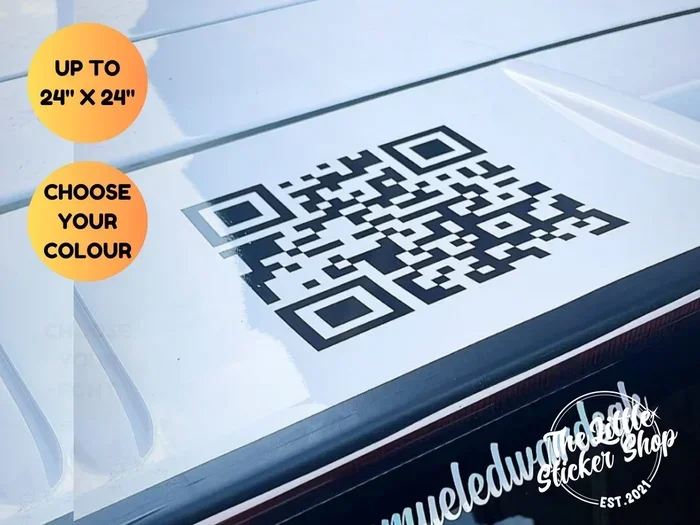
The most popular spot is the lower corner of the rear windshield on the passenger side. This area is highly visible to parking attendants and other drivers. It also stays relatively protected from direct sun damage. Use a small QR code sticker designed for car windows. These are easy to remove without leaving residue.
On the Dashboard
Placing a code on the dashboard works well for contactless vehicle check systems. It is easy for anyone sitting in the driver’s seat to scan. However, direct sunlight can fade the print over time. Consider using a digital display frame that shows the QR code on a screen instead.
On the Rear Bumper or Trunk
If you use the QR code for a car sale QR code, placing it on the rear bumper or trunk lid makes sense. Potential buyers can scan it from outside the vehicle. Just make sure it is flat and not on a curved surface, which can distort the scan.
Inside the Driver-Side Door
The driver-side door panel is another great spot. Many people keep a small envelope or sleeve there for registration papers. You can slip a laminated QR code label inside the same spot. It stays protected and is easy to access.
Quick Tips for Placement
- Avoid placing codes near heat sources like the engine bay.
- Do not cover any legally required vehicle stickers or plates.
- Keep the code away from areas where it might get scratched by keys or debris.
- Test the scan from a realistic distance, about 12 to 18 inches away.
Types of QR Codes for Vehicles
Not every vehicle QR code serves the same purpose. Different types work better for different needs. Here is a breakdown of the most common ones.
Vehicle Information QR Code
This type links to a webpage with full details about the car. It might include the make, model, year, mileage, VIN, and a photo gallery. Car owners use this during private sales. It gives buyers instant access to all the info they need without flipping through papers.
Vehicle Maintenance QR Code
A maintenance QR code links to a digital log of all services, oil changes, tire rotations, and repairs. This is especially useful for used car sellers. It builds trust with buyers by showing a transparent service history. Some owners use apps like Carfax or AutoKeeper to manage this digitally.
Vehicle Parking QR Code
Many office buildings and parking garages now use QR codes for parking. You can place a code on your dashboard that links to your parking pass or garage access system. This eliminates the need for physical passes and makes entry seamless.
Vehicle Inspection QR Code
Some regions require vehicle inspections. A QR code for vehicle inspection can link to the digital inspection certificate. Inspectors, law enforcement, and parking attendants can quickly verify that the vehicle is current on its inspection. This is becoming more common in smart city programs.
Emergency Contact QR Code
This is a safety-focused option. The code links to emergency contact information, medical details, and insurance data. First responders can scan it quickly in the event of an accident. It is a small addition that can make a big difference.
Benefits of Using a QR Code for Your Vehicle
Why should you bother with a vehicle QR code? The benefits go beyond just looking modern. Here are some real advantages that car owners and businesses experience.
Speed and Convenience
A scan QR code action takes less than two seconds. That is faster than typing a URL or searching for a document. For parking attendants, car buyers, and fleet managers, this speed adds up to significant time savings over days and weeks.
Professional Image
If you sell cars privately or run a dealership, a QR code for car sale makes you look organized and professional. It shows you embrace digital tools. Buyers trust sellers who make the process easy and transparent.
Reduced Paper Waste
Digital vehicle passes and maintenance logs cut down on paper. A digital vehicle registration system using QR codes is greener and more efficient. No more printing stacks of paper that fade or get lost.
Improved Safety
An emergency contact QR code on your vehicle can provide critical information to first responders. It does not replace a physical emergency card, but it adds a layer of digital access that can be invaluable in a crisis.
Easy Updates
With a dynamic QR code, you can change the linked content anytime. Need to update your parking pass? Change the URL in your dashboard. The printed code stays the same. This saves time and money on reprinting.
Common Mistakes to Avoid When Using Vehicle QR Codes
While creating a QR code for a vehicle is easy, avoiding mistakes is just as important. Here are the most common ones and how to prevent them.
Using a Code That Is Too Small
A tiny QR code is hard to scan, especially from a distance. Make sure the printed code is at least 2 by 2 inches for best results. If you place it on a windshield, go bigger, around 3 by 3 inches. The scanning distance matters too. A code on a dashboard can be smaller than one on a rear bumper.
Placing It Where Sunlight Damages It
Direct sunlight on a car dashboard can fade ink and warp stickers within weeks. Do not place your QR code sticker on the dash where it gets constant UV exposure. Use laminated vinyl or a digital display instead.
Forgetting to Test the Scan
Always test your vehicle QR code before final placement. Scan it from the exact spot where people will stand. Test it in different lighting conditions, including bright sunlight and dim parking garages. A code that works indoors might fail outdoors.
Overloading the Code with Too Much Data
QR codes work best when they link to a simple, clean webpage. Do not try to cram a long text paragraph directly into the code. Instead, link to a short webpage or a well-formatted PDF. This ensures smooth scanning and a better user experience.
Ignoring Legal and Privacy Concerns
Some regions have rules about what information you can display on a vehicle. Avoid putting personal details like your home address on a publicly visible QR code. Use a contact form or a professional landing page instead. Respect privacy laws and think about what you are sharing with the public.
How to Choose the Right QR Code Generator
Not all QR code generators are created equal. Here is what to look for when picking one for your vehicle needs.
- Ease of Use: The tool should be simple enough that anyone can create a code in minutes. No coding or design experience needed.
- Dynamic Options: Look for generators that allow you to edit the destination URL after creation. This is essential for vehicle tracking QR code and maintenance applications.
- Customization: The ability to add logos, change colors, and adjust the frame helps your code blend with your vehicle’s look.
- Scan Tracking: Some tools let you see how many times your code was scanned. This is useful for car sellers tracking buyer interest.
- Download Formats: Make sure the generator offers SVG and PNG downloads. SVG is best for high-quality printing.
- Cost: Many excellent generators are free. You only need to pay if you want advanced features like analytics or bulk generation.
Popular generators that check all these boxes include QRCode Monkey, Beaconstac, and Canva. Each has a free tier that works perfectly for most vehicle QR code needs.
Real-World Examples of Vehicle QR Codes in Action
Still not sure how a QR code for a vehicle fits into real life? Here are a few practical examples.
Example 1: Private Car Sale. Sarah wants to sell her 2019 Honda Civic. She creates a QR code for car sale that links to a detailed listing on her personal website. She places the sticker on the rear windshield. Interested buyers scan it and instantly see photos, specs, and a contact form. She gets three serious inquiries in the first week.
Example 2: Fleet Management. A delivery company places vehicle QR codes on the doors of each truck. Drivers scan the code to log their daily vehicle check. Managers track the data in a dashboard. This contactless vehicle check system saves hours of paperwork each month.
Example 3: Smart Parking. A university parking lot uses QR codes for parking at each space. Students scan the code with their phone to pay for parking. No more feeding meters or buying physical passes. It is fast, clean, and modern.
Final Thoughts
Getting a QR code for a vehicle is one of the simplest upgrades you can make. It takes just a few minutes, costs almost nothing, and opens up a world of convenience. Whether you use it for parking, maintenance tracking, car sales, or safety, a vehicle QR code adds real value to your daily driving experience.
Start by choosing the right type of code for your needs. Pick a reliable QR code generator and create your design. Print it on durable material. Place it in a visible, protected spot on your car. Test it thoroughly. And then enjoy the ease of having a digital link right on your vehicle.
The world is going digital, and your car can be part of that shift. A well-designed QR code for your car makes you smarter, safer, and more organized. So go ahead, give it a try. You will wonder why you did not do it sooner.
Remember, the key to a great vehicle QR code is simplicity. Keep the linked content clean and relevant. Make sure the code is easy to scan. And update it whenever your information changes. With these tips, your QR code for a vehicle will serve you well for a long time.
Frequently Asked Questions
Can I use any free QR code generator for my vehicle?
Yes, many free QR code generators work great for vehicle use. Tools like QRCode Monkey and Canva let you create codes at no cost. Just make sure the generator allows downloads in PNG or SVG format for printing.
Is it legal to put a QR code on my car?
In most places, yes. A QR code for a vehicle is treated like any other sticker or decal. However, some regions restrict what information you can display on a vehicle. Avoid putting personal addresses or sensitive data on publicly visible codes.
How long does a QR code sticker last on a car?
A quality vinyl QR code sticker can last several months to years, depending on exposure to sun and weather. Laminated or weather-resistant labels hold up best. If the code starts fading or peeling, simply replace it with a new one.
Can I change the information linked to my vehicle QR code?
Yes, if you use a dynamic QR code. Dynamic codes let you update the destination URL through the generator’s dashboard without reprinting the code. This is perfect for vehicle maintenance QR code tracking or changing parking details.
What information should I include in my vehicle QR code?
Keep it relevant and simple. Options include a car sale listing, maintenance log, parking pass, inspection certificate, or emergency contact page. A vehicle information QR code works best when it links to a clean, well-organized webpage.
Do I need a special app to scan a vehicle QR code?
No. Most modern smartphones can scan QR codes using the built-in camera app. Simply point the camera at the code, and a notification appears to open the linked content. No third-party app is usually required.
=== CONCLUSION ===
Getting a QR code for a vehicle is one of the easiest and most useful upgrades you can make. The entire process takes just minutes, and the results last for months or longer. Whether you want a QR code for your car for parking, safety, sales, or maintenance tracking, the steps are simple and the payoff is real.
Start today. Pick a QR code generator, decide what to link, create your design, print it on durable material, and place it on your vehicle. Test it, refine it, and enjoy the convenience. A vehicle QR code is a small change that makes a big difference in how you interact with your car and the world around you.