Do You Have to Reprogram Toyota Key Fob After Battery Change
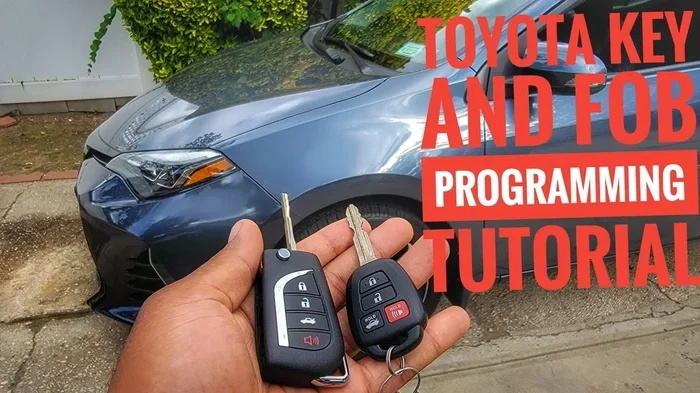
You usually do not need to reprogram your Toyota key fob after swapping out the battery. In most cases, the key fob retains its programming when you replace the small internal battery. However, some Toyota models may require a quick reset or re-sync. This guide covers everything you need to know about Toyota key fob reprogramming after a battery change, including model-specific tips and easy troubleshooting steps.
Have you just popped open your Toyota key fob, swapped out the tiny battery, and suddenly realized the remote no longer works? That sinking feeling is real. You start wondering if you need to reprogram your Toyota key fob from scratch. The good news is that most of the time, you do not have to. In this guide, we will walk you through everything you need to know about Toyota key fob reprogramming after a battery change. Whether you drive a Toyota RAV4, Camry, or Tacoma, this article has you covered. We will look at when reprogramming is needed, how to do it yourself, and what to do if your Toyota remote key still refuses to cooperate.
Changing the battery in your Toyota key fob is one of those simple maintenance tasks that everyone should know how to do. The battery inside most Toyota key fobs lasts about two to three years. When it starts to die, you might notice the key fob range issues getting worse. The signal gets weaker. The buttons feel sluggish. At that point, it is time for a fresh battery. But once you pop that little cover off and slide in the new one, a common question pops up: do you need to reprogram the fob? Let us find out.
Key Takeaways
- No reprogramming needed in most cases: Your Toyota key fob typically keeps its programming after a battery swap.
- Some models require a reset: Certain Toyota vehicles may need a quick re-sync of the key fob.
- Use the right battery type: Always match the battery to your key fob model for best results.
- DIY programming is possible: You can often program or reset your Toyota key fob at home without a dealer.
- Watch for warning signs: If the fob stops working after a battery change, simple troubleshooting usually fixes it.
- Dealer support is available: A Toyota dealership can help if you cannot resolve the issue yourself.
📑 Table of Contents
- Do You Need to Reprogram Your Toyota Key Fob After a Battery Change?
- How to Tell If Your Toyota Key Fob Needs Reprogramming
- Step-by-Step Guide to Reprogramming a Toyota Key Fob
- Which Toyota Models Need Reprogramming After a Battery Change?
- Common Mistakes When Changing a Toyota Key Fob Battery
- Can You Program a Toyota Key Fob Yourself?
- How to Prevent Key Fob Problems After a Battery Change
- When to See a Toyota Dealer for Key Fob Help
- Final Thoughts
Do You Need to Reprogram Your Toyota Key Fob After a Battery Change?
The short answer is no, not in most cases. When you replace the battery inside your Toyota key fob, the key fob programming stays intact. The memory chip inside the fob does not lose its data just because the battery died. This is true for the vast majority of Toyota models on the road today. Your remote start, lock, unlock, and trunk release functions should all work exactly as they did before.
However, there are a few exceptions. Some older Toyota models or certain trim levels may behave differently. In rare cases, the Toyota key fob reset process becomes necessary after a battery swap. If you notice that your fob is not communicating with the car after replacing the battery, do not panic. There are simple steps you can take to get things working again. Let us look at what those steps are and when you might need them.
When Reprogramming Might Be Needed
Even though reprogramming is rarely required, there are specific situations where it could help. Understanding these scenarios will save you time and frustration. Here are some common cases where you might need to take extra steps after a battery change:
- The fob was completely dead for a long time: If the battery died and sat unused for weeks or months, the fob sometimes loses its pairing with the vehicle.
- You replaced the wrong battery type: Using the wrong battery can cause voltage issues that confuse the fob electronics.
- The fob got reset accidentally: Some key fobs have a tiny reset button inside that can be pressed by accident when opening the casing.
- Your Toyota model requires a re-sync: A few older Toyota models need a manual re-sync after any battery replacement.
- You replaced the fob entirely: If you got a new replacement fob rather than just a new battery, programming is definitely required.
If none of these situations apply to you, your Toyota key fob battery replacement should go smoothly without any reprogramming. The fob should work right away after you snap the cover back on.
How to Tell If Your Toyota Key Fob Needs Reprogramming
After you change the battery in your Toyota key fob, you will want to test it right away. Here are the signs that your fob may need reprogramming or a simple reset:
- The fob does not lock or unlock the doors at all.
- The fob works only from very close range, even when it worked fine from across the parking lot before.
- The push button start does not recognize the fob when you are sitting in the driver seat.
- The trunk release button does not respond.
- The fob buttons work but the car does not react.
If you experience any of these issues after a battery change, try the simple reset steps first. Most of the time, a quick re-sync solves the problem without any special tools or dealer visits. Keep reading to find out exactly how to do this.
Step-by-Step Guide to Reprogramming a Toyota Key Fob
Even though most Toyota key fobs do not need reprogramming after a battery change, it is still a great skill to know. You never know when you might need it. Here is a simple guide that works for many Toyota models. Always check your owner manual first for model-specific instructions.
Step 1: Get Inside the Car
Sit in the driver seat and close all the doors. Make sure the ignition is in the off position. Some people like to have the key fob in hand during this process, and that works fine too.
Step 2: Enter Programming Mode
For many Toyota models, you can enter programming mode by following this sequence:
- Turn the ignition from off to on, then back to off, then back to on, and then off again. Do this within five seconds.
- Wait for the security light on the dashboard to stop flashing. This usually takes about three to five seconds.
- Once the light is solid, press the lock button on the key fob three times quickly.
If the doors lock and unlock, you have successfully entered programming mode. If nothing happens, try the sequence again. Patience is key here.
Step 3: Sync the Key Fob
Once you are in programming mode, press any button on the key fob. The doors should lock and unlock to confirm the sync. If you have a second key fob to program, repeat the button press within 30 seconds. The car will beep or flash the lights to confirm each fob is recognized.
Step 4: Exit Programming Mode
Turn the ignition off and step out of the car. Test the key fob from a reasonable distance. The lock and unlock functions should work perfectly. If they do, you are all set. If they do not, try replacing the battery again and make sure it is the correct type.
For more details on programming your own Toyota key, you can check out our guide on Can I Program My Own Toyota Key. It covers the process in even more detail for different Toyota models.
Which Toyota Models Need Reprogramming After a Battery Change?
Not all Toyota models behave the same way after a battery change. Here is a quick look at some popular Toyota models and what you can expect:
| Toyota Model | Reprogramming Needed After Battery Change? | Notes |
|---|---|---|
| Toyota RAV4 | Usually No | Fob retains programming. Rare exceptions on older models. |
| Toyota Camry | Usually No | Most Camry models keep programming intact after battery swap. |
| Toyota Tacoma | Usually No | Key fob sync stays even with a dead battery. |
| Toyota Prius | Usually No | Smart key system holds programming well. |
| Toyota Corolla | Usually No | Simple battery swap does not erase fob memory. |
| Toyota Highlander | Usually No | Same as most newer Toyota models. |
| Older Toyota Models (Pre-2010) | Sometimes Yes | May need a manual re-sync after battery replacement. |
As you can see, the newer Toyota models handle battery changes gracefully. The smart key system in modern Toyotas is designed to keep your fob paired even when the battery dies completely. This is one of the many conveniences of owning a Toyota with a push button start system.
If you drive a Toyota RAV4 and want to know more about key fob functionality, you might find our article on Can You Drive a RAV4 Without a Key Fob helpful. It covers everything about RAV4 key fob behavior.
Common Mistakes When Changing a Toyota Key Fob Battery
Changing a Toyota key fob battery seems simple enough. But people make mistakes more often than you would think. Here are the most common errors and how to avoid them:
Using the Wrong Battery Type
Most Toyota key fobs use a CR2032 battery. But some models use a CR2025 or a different size. Always double-check your owner manual or look at the old battery before you buy a replacement. Putting the wrong battery in can cause the fob to malfunction. It might even damage the internal electronics if the voltage is wrong.
Forgetting to Reset the Fob
Even though reprogramming is rarely needed, a simple reset can work wonders. If your fob does not work after a battery change, try holding the lock and unlock buttons together for five seconds. This often re-establishes the connection between the fob and the car without any formal programming.
Not Pressing the Buttons Hard Enough
This sounds silly, but it happens all the time. The buttons on a Toyota key fob need a firm press. If you are too gentle, the fob might not register the input during the programming sequence. Press the buttons with confidence.
Rushing Through the Programming Sequence
The Toyota key fob programming sequence has specific timing requirements. If you go too fast or too slow, the car will not enter programming mode. Take your time. Count in your head if you need to. Rushing is the number one reason people fail to program a Toyota key fob on their first try.
Ignoring the Owner Manual
Every Toyota model has its own quirks. The owner manual contains model-specific instructions for key fob programming. It is a free resource that comes with your car. Use it. It can save you a lot of headaches and potentially expensive trips to the dealer.
Can You Program a Toyota Key Fob Yourself?
Yes, you absolutely can. Toyota designed their key fob programming process to be user-friendly. You do not need expensive diagnostic tools or a visit to the dealership for most programming tasks. With a few minutes of your time and the right information, you can handle it all on your own.
The process is the same whether you are reprogramming after a battery change or adding a new key fob to your vehicle. The steps involve entering the car, cycling the ignition, and pressing buttons on the fob in a specific order. It takes about five to ten minutes for most Toyota models.
If you ever feel stuck or unsure, remember that you can always visit a Toyota dealership. They can program a key fob for you quickly and professionally. But for most people, the DIY approach works perfectly fine and saves both time and money.
How to Prevent Key Fob Problems After a Battery Change
Prevention is always better than cure. Here are some simple tips to keep your Toyota key fob working perfectly after a battery change:
- Use a quality battery: Stick with trusted brands like Energizer or Duracell for your Toyota key fob battery replacement.
- Avoid touching the contacts: The gold contacts inside the fob can corrode over time. Handle them gently and avoid touching them with your fingers.
- Check the battery orientation: Make sure the positive and negative sides of the battery face the correct direction before you snap the fob back together.
- Test immediately: After replacing the battery and closing the fob, test it from at least ten feet away before you walk away.
- Keep a spare battery on hand: Always have a replacement battery in your glove box. You never know when the next one will die.
- Store the fob properly: Avoid dropping the fob or exposing it to extreme heat or moisture. These can damage the internal circuitry.
Following these simple tips will keep your Toyota key fob working reliably for years. You will never have to worry about being locked out of your car because of a dead fob battery.
When to See a Toyota Dealer for Key Fob Help
There are times when a simple battery change or DIY reset is not enough. If you have tried everything we covered in this article and your Toyota key fob still does not work, it might be time to see a professional. Here are some situations where a dealer visit makes sense:
- The key fob is physically damaged or water-damaged.
- The fob works intermittently even after multiple battery changes.
- Your Toyota model requires specialized diagnostic equipment for programming.
- You have lost all key fobs and need a new one programmed from scratch.
- The fob battery keeps dying within weeks of replacement.
A Toyota dealership has the right tools and expertise to handle even the most stubborn key fob reprogramming situations. They can also check if there is an underlying electrical issue in the car that might be affecting fob performance. Most dealers can program a new or reset fob in under 30 minutes.
Remember that if you are selling your Toyota and the key fob is not working properly, it could affect the sale. If you are in that situation, check out our article on Can I Sell a Prius With a Dead Battery for tips on handling vehicle sales when key components are not functioning.
Final Thoughts
So, do you have to reprogram a Toyota key fob after changing the battery? In the vast majority of cases, the answer is no. Your Toyota key fob remembers its programming even when the battery dies. Simply swap in a fresh CR2032 battery, snap the cover back on, and test the fob. It should work right away.
If the fob does not work after a battery change, try a simple reset first. Hold the lock and unlock buttons together for five seconds. This often fixes the problem without any formal reprogramming. For Toyota models that do require a reset, the process is straightforward and takes just a few minutes.
Knowing how to handle your Toyota key fob after a battery change gives you confidence and independence. You do not need to rush to the dealer every time the battery dies. With the right knowledge and a spare battery in your glove box, you can handle this common maintenance task in minutes.
Keep your key fob in good shape, replace the battery when needed, and you will enjoy seamless access to your Toyota for years to come. Happy driving.
Frequently Asked Questions
Do I need to reprogram my Toyota key fob after changing the battery?
In most cases, no. Your Toyota key fob retains its programming when you replace the battery. The memory chip inside the fob keeps its pairing with the car intact. Only in rare cases, usually with older models, do you need to reset or reprogram the fob after a battery swap.
How long does it take to reprogram a Toyota key fob?
The reprogramming process typically takes about five to ten minutes. You need to enter programming mode by cycling the ignition and pressing the fob buttons in the correct sequence. Newer Toyota models make this process quick and straightforward.
What battery does a Toyota key fob use?
Most Toyota key fobs use a CR2032 battery. However, some older models may use a CR2025 or a different size. Always check your owner manual or look at the old battery before purchasing a replacement to make sure you get the right type.
Why does my Toyota key fob stop working after I change the battery?
This usually happens because the new battery is the wrong type or size. It could also be that the battery is inserted with the wrong orientation. Double-check the battery type and make sure the positive and negative sides face the correct direction inside the fob.
Can I drive my Toyota if the key fob battery is dead?
Yes, in most cases you can still drive your Toyota even if the key fob battery is dead. Toyota vehicles with push button start usually have a backup method to start the car. You can place the dead fob against the start button or use the physical key slot if your model has one.
How often should I change the battery in my Toyota key fob?
Toyota key fob batteries typically last between two and three years. You should replace the battery when you notice the signal getting weaker or when the fob stops working reliably. Keeping a spare battery in your glove box is a smart habit to avoid being caught off guard.