Do Toyota Highlanders Have a Heads-Up Display
The Toyota Highlander does offer a heads-up display, but it depends on the trim level and model year. The HUD projects key driving information onto the windshield so you can keep your eyes on the road. Higher trims like the Limited and Platinum come standard with this feature, making it a great selling point for the Toyota Highlander.
Do Toyota Highlanders have a heads-up display? This is a question many buyers ask before committing to one of the most popular SUVs on the market. The short answer is yes, but with some important caveats. Not every Toyota Highlander comes with a heads-up display, and which trim you choose plays a big role in whether you get this feature.
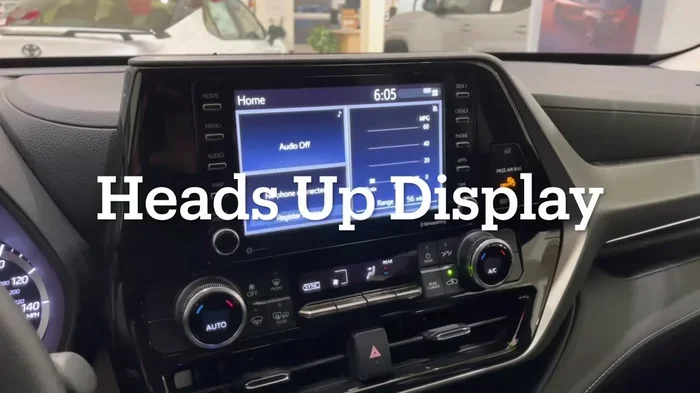
A heads-up display, often called a HUD, is a transparent screen that projects driving information onto the windshield. This means you do not have to take your eyes off the road to check your speed, navigation directions, or audio settings. For many drivers, this is a game-changer. It makes driving safer and more convenient at the same time.
The Toyota Highlander is a three-row SUV that has earned a strong reputation for reliability, comfort, and smart technology. Toyota has been steadily adding more tech features across its lineup, and the HUD is one of the most sought-after additions. In this article, we will break down everything you need to know about the heads-up display in the Toyota Highlander. We will cover which trims offer it, what it displays, how it compares to competitors, and whether it is worth the upgrade.
Whether you are shopping for a new Highlander or just curious about what your current model offers, this guide has you covered. We will also talk about aftermarket options if your Highlander does not come with a factory HUD. So let us dive in and explore the world of Toyota Highlander heads-up displays in detail.
Key Takeaways
- Not all trims have it: The heads-up display is typically found on higher-end trims like Limited and Platinum.
- It shows essential data: Speed, navigation arrows, audio info, and safety alerts appear on the HUD.
- It improves safety: A heads-up display helps drivers stay focused by reducing the need to look at the dashboard.
- Model year matters: Newer Highlanders have more advanced HUD features than older models.
- It is not standard on every trim: Base and mid-level trims may require an optional package or upgrade.
- The Toyota Highlander competes well: Its HUD stacks up nicely against other SUVs in its class.
- Aftermarket options exist: If your Highlander lacks a HUD, you can add one through aftermarket solutions.
📑 Table of Contents
- What Is a Heads-Up Display and Why Does It Matter?
- Which Toyota Highlander Trims Offer a Heads-Up Display?
- Benefits of Having a Heads-Up Display in Your Highlander
- How the Toyota Highlander HUD Compares to Competitors
- Common Issues and Limitations of the Toyota Highlander HUD
- Can You Add a Heads-Up Display to a Highlander That Does Not Have One?
- How to Get the Most Out of Your Toyota Highlander HUD
- Is a Heads-Up Display Worth It on the Toyota Highlander?
- Conclusion
What Is a Heads-Up Display and Why Does It Matter?
A heads-up display is a small projection system built into the dashboard. It casts information onto the windshield or a transparent screen near the top of the dashboard. The idea is simple but powerful. Instead of looking down at the instrument cluster or infotainment screen, you see the same information right in your line of sight.
How Does a HUD Work?
Most HUD systems use a small projector mounted behind the dashboard. This projector sends light through a transparent section of the windshield or a dedicated combiner glass. The image appears to float in front of you, usually around the top of the dashboard area. The technology has been around for decades in luxury cars, but Toyota has brought it to the mainstream SUV market with the Highlander.
What Information Does a Toyota Highlander HUD Show?
The Toyota Highlander heads-up display typically shows the following information:
- Vehicle speed: Your current speed in miles per hour is the most basic and essential HUD element.
- Navigation directions: Arrow prompts and next-turn indicators help you follow GPS routes without looking away from the road.
- Audio information: Song titles, radio station names, and audio controls appear on the display.
- Cruise control settings: Your set speed and distance to the vehicle ahead are shown when adaptive cruise control is active.
- Safety alerts: Lane departure warnings, forward collision warnings, and other safety notifications can appear on the HUD.
- Trip computer data: Average fuel economy, range remaining, and trip distance information.
Having all of this information right in your sightline makes a huge difference. You stay more aware of your surroundings, and you spend less time glancing at the dashboard. This is especially helpful during long road trips or in heavy traffic where distractions can be dangerous.
Which Toyota Highlander Trims Offer a Heads-Up Display?
Not every Toyota Highlander trim comes with a heads-up display. Toyota has structured its trim levels so that the HUD is reserved for the higher-end configurations. Let us look at the current trim lineup and where the HUD fits in.
XLE Trim
The base XLE trim is a solid starting point for the Toyota Highlander. It comes with a good set of standard features, including a touchscreen infotainment system and Toyota Safety Sense. However, the heads-up display is not standard on the XLE. It may be available as part of an optional convenience or technology package depending on the model year.
XSE Trim
The XSE trim adds a sportier feel with updated styling and a few extra features. The HUD may be available on the XSE, but it is not guaranteed on every configuration. Checking the specific build and package options is important when shopping for this trim.
Limited Trim
The Limited trim is where the heads-up display becomes more standard. Most Limited trims come with the HUD as part of the premium feature set. This trim also includes leather seating, a power liftgate, and upgraded audio, making it a popular choice for families who want a well-rounded SUV.
Platinum Trim
The Platinum trim is the top-of-the-line Highlander. It comes with the most premium features, and the HUD is standard. The Platinum trim also includes advanced safety features, a panoramic moonroof, and premium audio. If you want the full Toyota Highlander experience with a heads-up display, the Platinum is the trim to target.
| Trim Level | Heads-Up Display | Standard or Optional |
|---|---|---|
| XLE | Not standard | Optional (package dependent) |
| XSE | May be available | Optional |
| Limited | Yes | Standard |
| Platinum | Yes | Standard |
Keep in mind that Toyota occasionally updates its trim offerings and feature availability between model years. Always check the specific year and build when shopping. You can also visit the Toyota website or a local dealer to confirm the exact features included in each trim.
Benefits of Having a Heads-Up Display in Your Highlander
Adding a heads-up display to your Toyota Highlander brings several real-world benefits. Let us explore why this feature is worth considering.
Improved Safety
The biggest benefit of a HUD is improved safety. When you do not have to look down at the dashboard, your eyes stay on the road. Studies have shown that taking your eyes off the road for even two seconds can significantly increase crash risk. A heads-up display reduces those glance-away moments and keeps you more aware of your driving environment.
Better Navigation Experience
Navigation arrows and turn-by-turn directions on the windshield are incredibly helpful. Instead of squinting at a small screen in the center console, you see clear directional prompts right in your line of sight. This is especially useful in unfamiliar areas or when driving in complex traffic situations.
Reduced Eye Strain
Constantly shifting your focus between the road and the dashboard can cause eye fatigue over long drives. A HUD eliminates this problem because the displayed information is at optical infinity. Your eyes do not need to refocus, which reduces strain during long highway trips.
Enhanced Driving Experience
There is something undeniably satisfying about a modern HUD. It gives the Toyota Highlander a more premium feel and makes the driving experience more connected. You feel more in control when all the key information is right where you can see it easily.
How the Toyota Highlander HUD Compares to Competitors
The Toyota Highlander faces competition from several other SUVs in the three-row segment. Let us see how its heads-up display stacks up against a few key rivals.
Highlander vs. Honda Pilot
The Honda Pilot also offers a heads-up display on its higher trims. Both SUVs provide similar information on their HUDs. However, the Highlander often receives praise for its cleaner display and brighter projection. The Pilot’s HUD can sometimes appear faint in bright sunlight, while the Highlander’s system tends to hold up better.
Highlander vs. Ford Explorer
The Ford Explorer offers a heads-up display on its higher trims as well. Ford’s system includes color display options and can show more detailed navigation graphics. However, the Explorer’s HUD can sometimes feel cluttered with too much information. The Toyota Highlander keeps its display clean and easy to read, which many drivers appreciate.
Highlander vs. Chevrolet Traverse
The Chevrolet Traverse also includes a HUD on select trims. Its display is functional but not as refined as Toyota’s. The Traverse HUD sometimes struggles with brightness and clarity. The Highlander’s system is generally considered more polished and easier to read at a glance.
Overall, the Toyota Highlander holds its own when it comes to HUD technology. It may not have the most advanced system on the market, but it is reliable, clear, and well-integrated into the driving experience. If you also care about Toyota Highlanders towing capacity, the Highlander holds its own in that area too, making it a versatile family SUV.
Common Issues and Limitations of the Toyota Highlander HUD
While the heads-up display is a great feature, it is not without its limitations. Being aware of these issues can help you set realistic expectations.
Brightness Issues in Direct Sunlight
Some owners report that the HUD can be difficult to see in bright, direct sunlight. The projection may wash out and become hard to read. Toyota has improved this over the years, but it is still something to be aware of if you live in a very sunny climate.
Limited Customization Options
The Toyota Highlander HUD does not offer extensive customization. You cannot change the color, size, or position of the display. Some competitors allow more personalization, but Toyota keeps the interface simple and straightforward. This is a trade-off that some drivers appreciate and others find limiting.
Not Available on Lower Trims
As mentioned earlier, the HUD is not available on the base trims without an optional package. This means that buyers on a tighter budget may have to settle for the instrument cluster and infotainment screen instead. If you are shopping on a budget, you might also want to check out how much you should put down on a car to make the most of your purchase.
Windshield Compatibility
The HUD requires a specific type of windshield to project correctly. If you ever need to replace your windshield, make sure the replacement has the correct optical properties. A standard windshield without the HUD-compatible coating can cause the display to appear blurry or distorted.
Can You Add a Heads-Up Display to a Highlander That Does Not Have One?
If you own a Toyota Highlander that does not come with a factory heads-up display, you are not out of luck. Aftermarket HUD solutions exist and can be installed relatively easily. Let us look at your options.
Aftermarket HUD Units
Aftermarket HUDs are a great option if you want the benefits of a heads-up display without buying a higher trim. Prices range from around $50 to $300 depending on the brand and features. Keep in mind that aftermarket units may not look as clean or integrated as a factory-installed HUD.
Professional Installation
Some specialty shops offer professional HUD installation services. They can integrate an aftermarket unit into your dashboard for a more seamless look. This option costs more but can provide a better overall experience than a DIY setup.
Things to Consider Before Buying an Aftermarket HUD
- Compatibility: Make sure the aftermarket HUD works with your specific Highlander model year.
- Brightness: Look for a unit with adjustable brightness so it is readable in all lighting conditions.
- Mounting location: Consider where the unit will sit on your dashboard and whether it obstructs your view.
- Warranty: Check whether the aftermarket unit comes with a warranty for peace of mind.
If you are also interested in the overall value of your vehicle, it can be helpful to learn how to find out the fair market value of a car before making any upgrades or modifications.
How to Get the Most Out of Your Toyota Highlander HUD
Once you have a heads-up display in your Toyota Highlander, there are a few tips to help you get the most from it.
Adjust the Brightness
Most Toyota Highlanders allow you to adjust the HUD brightness. In darker conditions, turn it down to avoid glare. In bright sunlight, increase it for better visibility. Finding the right balance makes a big difference in readability.
Keep Your Windshield Clean
A dirty windshield can make the HUD image appear blurry or faded. Clean your windshield regularly, especially the area where the HUD projects. Use a streak-free glass cleaner for the best results.
Set Up Navigation Before Driving
While the HUD makes navigation easier, it is still best to set your destination before you start driving. This keeps you from fiddling with the system while on the road.
Use the HUD Alongside Toyota Safety Sense
The Toyota Highlander comes with Toyota Safety Sense, a suite of active safety features. When you combine the HUD with safety alerts like lane departure warnings and forward collision warnings, you get a comprehensive driving assistance setup. The HUD shows you the alerts right in your line of sight, making them impossible to miss.
Toyota has built a strong reputation for reliability across its entire lineup. If you are curious about how long your Toyota can last, you might enjoy reading about the average life of a Toyota Sequoia, another popular Toyota SUV.
Is a Heads-Up Display Worth It on the Toyota Highlander?
So, is the heads-up display worth it on the Toyota Highlander? The answer depends on your driving habits and budget.
If you drive frequently, especially on highways or in unfamiliar areas, the HUD is a valuable addition. It keeps your eyes on the road and reduces distractions. The navigation and safety features it provides add real everyday value.
However, if you mostly drive short distances around town and rarely use navigation, you might find the HUD less essential. In that case, you could save money by choosing a lower trim and adding features that matter more to you.
For families who spend a lot of time in the car, the HUD is a nice-to-have feature that enhances comfort and safety. It is one of those features that you do not realize you need until you have it, and then you wonder how you ever drove without it.
Insurance costs are another factor to consider when choosing a trim. The Toyota Highlander insurance rates can vary depending on the trim level and features, so it is wise to factor that into your decision. You can learn more about whether Toyota Highlanders are expensive to insure to make a more informed choice.
The Toyota Highlander is also a popular choice for families who need to transport lots of people comfortably. If you are curious about seating capacity, you might want to explore whether 8 people can fit in a Toyota Sienna as an alternative option.
Conclusion
The Toyota Highlander is an excellent SUV, and the heads-up display adds a nice touch of convenience and safety to an already impressive package. The HUD is available on higher trims like the Limited and Platinum, and it projects essential driving information right onto your windshield. This feature helps you stay focused, reduces eye strain, and makes the overall driving experience more enjoyable.
If you are in the market for a new Highlander and the HUD is important to you, aim for the Limited trim or above. If you already own a Highlander without a HUD, aftermarket options can bring this feature to your vehicle at a reasonable cost. Either way, the heads-up display is a feature that enhances both safety and convenience on every drive.
Toyota continues to innovate and improve its technology offerings, and the Highlander benefits from these advancements. Whether you are using the HUD for navigation, speed monitoring, or safety alerts, this feature proves that small technology additions can make a big difference in your daily driving experience.
Frequently Asked Questions
Do all Toyota Highlanders come with a heads-up display?
No, not all Toyota Highlanders come with a heads-up display. The HUD is typically standard on the Limited and Platinum trims but may be optional or unavailable on lower trims like the XLE and XSE. Always check the specific trim and model year for exact feature availability.
What does the Toyota Highlander heads-up display show?
The Toyota Highlander HUD typically displays vehicle speed, navigation directions, audio information, cruise control settings, and safety alerts. It projects this information onto the windshield so you can keep your eyes on the road while staying informed.
Can I add a heads-up display to my Toyota Highlander after purchase?
Yes, you can add an aftermarket heads-up display to your Toyota Highlander. Several aftermarket HUD units are available that connect to your phone or vehicle systems. Professional installation is also an option for a more seamless look and better integration.
Is the heads-up display hard to read in bright sunlight?
The Toyota Highlander HUD can sometimes be difficult to read in very bright direct sunlight. The display may appear washed out or faint. However, most units have adjustable brightness settings that help improve visibility in different lighting conditions.
Does the Toyota Highlander HUD work with Apple CarPlay and Android Auto?
Yes, the Toyota Highlander HUD can display navigation information from Apple CarPlay and Android Auto on supported models. The specific features depend on the model year and trim level, so it is best to confirm compatibility with your specific vehicle.
How does the Toyota Highlander HUD compare to other Toyota models?
The Toyota Highlander HUD is similar in design and functionality to other Toyota models that offer the feature, such as the Camry and RAV4. The display is clear and easy to read, though the information shown may vary slightly depending on the vehicle’s technology package and features.