How Do I Check My Toyota Warranty by VIN and Save Money
Checking your Toyota warranty by VIN is simple, fast, and can save you hundreds on unexpected repairs. You can look up your warranty status online, call a Toyota dealer, or use the Toyota website with your vehicle identification number. This guide walks you through every method so you know exactly what your Toyota warranty covers and when it expires.
Have you ever wondered what your Toyota warranty actually covers? Maybe you bought a used Toyota and want to know if it still has coverage. Or perhaps you just want to make sure you are not missing out on free repairs. Either way, checking your Toyota warranty by VIN is the fastest and most reliable way to get answers.
Your vehicle identification number holds a treasure trove of information. It tells you the manufacturing date, trim level, and most importantly, the status of your warranty. In this guide, we will show you exactly how to look up your warranty details using your VIN. You will learn the different types of Toyota coverage, where to find the information, and how to use it to save real money.
Whether you drive a brand-new Tacoma or a pre-owned Camry, this guide applies to you. We keep things simple and practical. No jargon, no confusing steps. Just clear instructions that help you get the most from your Toyota ownership experience.
Key Takeaways
- Your VIN unlocks everything: The vehicle identification number is the key to finding your full warranty details instantly.
- Multiple free methods exist: You can check online, through the Toyota app, by phone, or at any dealership at no cost.
- Know your coverage types: Understanding the difference between bumper-to-bumper and powertrain warranties helps you plan repairs.
- Save money proactively: Checking your warranty early lets you schedule covered services and avoid surprise bills.
- Certified pre-owned matters: CPO Toyota vehicles often carry extended warranty coverage worth verifying.
- Act before expiration: Don’t let warranty coverage lapse without using the benefits you’ve already paid for.
📑 Table of Contents
- Why Checking Your Toyota Warranty by VIN Matters
- What Is a VIN and Where to Find It
- How to Check Toyota Warranty by VIN Online
- Types of Toyota Warranty Coverage
- Using Your VIN to Check Warranty at a Toyota Dealership
- How to Save Money Using Your Toyota Warranty
- Checking Warranty on Used and Certified Pre-Owned Toyotas
- Common Toyota Warranty Lookup Problems and Solutions
- Quick Tips for Maximizing Your Toyota Warranty
- Final Thoughts on Checking Your Toyota Warranty by VIN
Why Checking Your Toyota Warranty by VIN Matters
Your Toyota came with a warranty when you bought it. But many owners forget the details or never fully understand what is covered. Checking your warranty by VIN gives you clarity and control over your vehicle maintenance.
Without knowing your warranty status, you might pay for repairs that Toyota should cover. That is money straight out of your pocket. On the other hand, understanding your coverage helps you plan services at the right time and avoid unnecessary expenses.
Here is why this matters so much:
- Peace of mind: You know exactly what is protected and for how long.
- Cost savings: Covered repairs mean you pay nothing out of pocket.
- Resale value: A vehicle with active warranty coverage is more attractive to buyers.
- Maintenance planning: You can schedule services before problems become expensive.
The VIN is your gateway to all of this. Every Toyota has a unique VIN, and every VIN links to a specific warranty record. That is why learning how to look up your warranty by VIN is one of the smartest things you can do as a Toyota owner.
What Is a VIN and Where to Find It
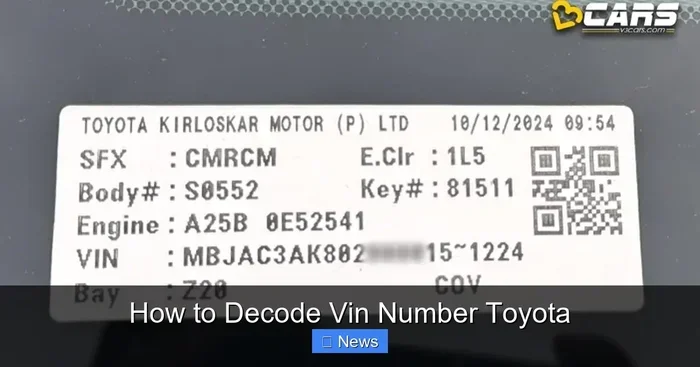
Before you check your warranty, you need to know where to find your VIN. The vehicle identification number is a 17-character code that acts like a fingerprint for your car. No two vehicles share the same VIN.
Common Places to Find Your VIN
You can find your Toyota VIN in several easy locations:
- Dashboard: Look through the windshield on the driver’s side. The VIN is printed on a small metal plate near the bottom of the dashboard.
- Driver’s side door jamb: Open the driver’s door and look for a sticker on the door frame. It lists the VIN along with tire pressure and other details.
- Vehicle title and registration: Your paperwork always includes the VIN.
- Insurance documents: Your auto insurance card or policy lists the VIN.
- Engine bay: Some Toyota models stamp the VIN on the engine block itself.
Once you have your VIN ready, you are ready to look up your warranty. Keep this number handy because you will use it multiple times throughout this process.
How to Check Toyota Warranty by VIN Online
The easiest way to check your Toyota warranty is through the official Toyota website. Toyota offers a free VIN lookup tool that pulls up your warranty information in seconds.
Step-by-Step Guide
Follow these simple steps to look up your warranty online:
- Go to the Toyota official website. Navigate to the Toyota owner or support section.
- Locate the VIN lookup tool. Look for a section labeled “Warranty Lookup” or “Vehicle Information.”
- Enter your VIN. Type in all 17 characters carefully. Double-check for typos.
- Submit the form. Click the search button and wait for the results.
- Review your warranty details. You will see your coverage type, start date, and expiration date.
The online tool is free and available 24/7. You do not need to visit a dealership or make a phone call. It is the quickest method for most Toyota owners.
If the online tool does not return results, try the Toyota mobile app. The app often syncs with the same database and may display your warranty information more clearly. You can also try looking up your warranty using your VIN through third-party vehicle history services, which sometimes include warranty status in their reports.
Types of Toyota Warranty Coverage
Toyota offers several types of warranty coverage. Each one protects different parts of your vehicle and lasts for different time periods. Understanding these types helps you know what to expect from your warranty lookup results.
Bumper-to-Bumper Warranty
The bumper-to-bumper warranty is the most comprehensive coverage Toyota provides. It covers almost all factory-installed components, from your audio system to your air conditioning. This warranty typically lasts for 3 years or 36,000 miles, whichever comes first.
Powertrain Warranty
The powertrain warranty covers the major components that make your vehicle move. This includes the engine, transmission, and drivetrain. Toyota’s powertrain warranty generally extends to 5 years or 60,000 miles. This is the longest coverage period in most Toyota warranty plans.
ToyotaCare Maintenance Plan
ToyotaCare is a complimentary maintenance plan that comes with new Toyotas. It covers routine maintenance services like oil changes, tire rotations, and multi-point inspections. ToyotaCare typically lasts for 2 years or 25,000 miles, whichever comes first.
Corrosion Warranty
Toyota also provides corrosion coverage against rust and perforation. This warranty lasts for 5 years with no mileage limit. It protects your vehicle’s body panels from rust-related damage.
Hybrid Battery Warranty
If you drive a hybrid Toyota like the Prius, you get special coverage for the hybrid battery. Toyota warranties hybrid batteries for 8 years or 100,000 miles in most states. In states with strict emissions laws, the coverage extends to 10 years or 150,000 miles.
Using Your VIN to Check Warranty at a Toyota Dealership
Not everyone feels comfortable with online tools. That is perfectly fine. You can always visit or call a Toyota dealership to check your warranty by VIN. Dealership service departments have access to Toyota’s internal database, which provides the most detailed and accurate warranty information.
When you visit a dealership, bring your VIN and your vehicle registration. The service advisor can pull up your full warranty history and tell you exactly what is covered. They can also schedule any warranty repairs you may need.
One great advantage of checking at a dealership is that you can ask questions in person. You can clarify what specific repairs are covered and get advice on maintaining your warranty. The staff can also help you understand if your Toyota warranty is transferable if you plan to sell the vehicle.
Keep in mind that you can take your Toyota to any dealership for warranty work. You are not limited to the dealer where you purchased the vehicle. Any authorized Toyota dealer can access your warranty records and perform covered repairs.
How to Save Money Using Your Toyota Warranty
Checking your warranty is only the first step. The real value comes from using that information to save money. Here are practical ways to maximize your Toyota warranty benefits.
Schedule Covered Services Early
Do not wait until something breaks. Use your warranty period to schedule all covered maintenance services. This keeps your vehicle in top shape and ensures you do not miss out on any benefits.
Keep Detailed Service Records
Toyota requires proof of regular maintenance to honor warranty claims. Keep every service receipt and record. Store them digitally or in a folder. When you need to file a warranty claim, these records prove you followed the maintenance schedule.
Address Warning Lights Promptly
If a warning light appears on your dashboard, get it checked right away. Ignoring warning signs can void your warranty. Dealerships can diagnose issues quickly, and many repairs are covered at no cost during the warranty period.
Know What Is Not Covered
Every warranty has exclusions. Common items not covered include wear-and-tear parts like brake pads, wiper blades, and light bulbs. Understanding these exclusions helps you budget for out-of-pocket expenses and avoid frustration.
Consider an Extended Warranty
If your factory warranty is about to expire, consider an extended warranty. Toyota offers extended coverage plans that can protect your vehicle for years beyond the original warranty. This is especially valuable if you plan to keep your Toyota for a long time or plan to upgrade your vehicle in the near future.
Checking Warranty on Used and Certified Pre-Owned Toyotas
Buying a used Toyota does not mean you lose all warranty coverage. Certified pre-owned Toyotas come with their own warranty programs. These programs vary depending on the vehicle’s age and mileage.
When you check the warranty on a used Toyota using the VIN, the results may show remaining coverage from the original factory warranty. If the vehicle is certified pre-owned, the results may also show additional CPO warranty coverage. This can include extended powertrain protection and roadside assistance.
Always verify the warranty status before purchasing a used Toyota. A VIN check gives you transparency and helps you negotiate confidently. You may discover that the vehicle still has significant coverage remaining, which adds value to the purchase.
If you are considering a lease and want to understand your options, you can also learn about what happens when you want to end your Toyota lease early, as warranty status can play a role in lease decisions.
Common Toyota Warranty Lookup Problems and Solutions
Sometimes the warranty lookup process does not go smoothly. Here are common issues and how to solve them.
VIN Not Recognized Online
If the Toyota website does not recognize your VIN, double-check for typos. Make sure you entered all 17 characters correctly. If the problem persists, try using the Toyota mobile app or call a dealership directly.
No Warranty Information Found
This usually means the vehicle’s warranty has expired or was never registered. If you recently purchased the Toyota, the previous owner may not have transferred the warranty information. Contact Toyota customer service with your VIN for assistance.
Confusing Coverage Details
Warranty documents can be hard to understand. If the lookup results show terms you do not recognize, ask a dealership service advisor to explain them. They are trained to walk you through every detail.
Discrepancy Between Online and Dealer Records
Occasionally, online records and dealership records do not match. This can happen due to data entry errors or system delays. Always trust the dealership records as the most authoritative source.
Quick Tips for Maximizing Your Toyota Warranty
Here are some quick tips to keep in mind:
- Check your warranty status within the first month of ownership.
- Set a calendar reminder for your warranty expiration date.
- Always use genuine Toyota parts for repairs to maintain warranty validity.
- Keep your vehicle maintained according to the Toyota-recommended schedule.
- Read your warranty booklet thoroughly to understand all coverage details.
- Save all documentation related to your vehicle purchases and services.
These small habits make a big difference over time. They protect your investment and ensure you get the full value from your Toyota warranty.
Final Thoughts on Checking Your Toyota Warranty by VIN
Checking your Toyota warranty by VIN is one of the simplest and most valuable things you can do as a vehicle owner. It takes just a few minutes and costs nothing. The information you gain can save you hundreds or even thousands of dollars in repair costs.
Whether you use the online Toyota tool, the mobile app, or visit a dealership, the process is straightforward. Your VIN is the key that unlocks your complete warranty history and coverage details. Use it wisely and often.
Remember, your Toyota warranty is a benefit you have already paid for. Do not let it go to waste. Take a few minutes today to look up your warranty status. You might be surprised by what you find and how much money it can save you.
Stay proactive about your vehicle maintenance. Keep your records organized. And never hesitate to reach out to a Toyota dealer if you have questions. They are there to help you get the most from your Toyota ownership experience.
Frequently Asked Questions
Can I check my Toyota warranty by VIN for free?
Yes, checking your Toyota warranty by VIN is completely free. Toyota’s official website and mobile app both offer free VIN lookup tools. You can also visit any Toyota dealership at no cost to have them pull up your warranty information.
What information do I need to check my Toyota warranty?
You only need your VIN to check your Toyota warranty. The VIN is a 17-character code unique to your vehicle. You can find it on your dashboard, driver’s door jamb, vehicle title, or insurance documents. Having your VIN ready makes the lookup process quick and seamless.
Does a used Toyota still have warranty coverage?
It depends on the vehicle’s age and mileage. If the original factory warranty has not expired, the coverage transfers to the new owner. Certified pre-owned Toyotas may also have additional extended warranty coverage. You can always check the current status by entering the VIN on Toyota’s website or at a dealership.
How long does Toyota warranty last?
Toyota’s bumper-to-bumper warranty lasts 3 years or 36,000 miles. The powertrain warranty extends to 5 years or 60,000 miles. Hybrid battery coverage lasts 8 years or 100,000 miles. ToyotaCare maintenance coverage lasts 2 years or 25,000 miles. Your exact coverage depends on your specific vehicle and plan.
Can I look up my Toyota warranty if I lost my paperwork?
Absolutely. You do not need your original paperwork to check your warranty. Your VIN is all you need. Toyota’s database stores all warranty information linked to your vehicle’s VIN. Simply enter the VIN on the Toyota website or ask any dealership service advisor to look it up for you.
Will checking my warranty by VIN affect my vehicle’s history?
No, checking your warranty by VIN has no impact on your vehicle’s history or records. It is a purely informational lookup. You can check your warranty as many times as you want without any negative consequences. It is a safe and helpful tool for all Toyota owners.