How Do I Cancel My Toyota Remote Connect Subscription
Cancelling your Toyota Remote Connect subscription is simple and can be done online, by phone, or at your local dealer. This guide walks you through every method, explains what happens after cancellation, and covers refund policies. You will also learn about alternatives like pausing or downgrading your plan before making a final decision.
So you have decided to cancel your Toyota Remote Connect subscription. Maybe you are not using the features anymore, or perhaps you want to cut down on monthly expenses. Whatever your reason, you are in the right place. This guide will show you exactly how to cancel your Toyota connected services without any hassle. You will find step-by-step instructions for every method available, plus answers to common questions that can make the process smoother.
Many Toyota owners sign up for Toyota Remote Connect without fully understanding the commitment. The subscription often comes bundled with a new vehicle purchase or a free trial period. Once that trial ends, the charges start rolling in. If you have not been actively using features like remote start, vehicle tracking, or emergency assistance, it makes sense to reassess. Canceling your subscription can save you money every month, and the process is simpler than most people think.
In this article, we cover everything you need to know. From understanding what Toyota Remote Connect actually includes to the exact steps for canceling, we have you covered. We also explain what happens to your features after cancellation, whether you can get a refund, and what alternatives exist if you do not want to fully cancel. Let us dive in.
Key Takeaways
- Multiple cancellation methods: You can cancel online, by phone, or in person at your Toyota dealer.
- No impact on vehicle warranty: Canceling Remote Connect does not affect your Toyota warranty coverage.
- Refunds may be possible: Depending on when you cancel, you could receive a partial refund for unused services.
- Alternatives exist: You can pause, downgrade, or switch plans instead of fully canceling your subscription.
- Act before your billing cycle: Canceling early in your billing cycle gives you the best chance of avoiding charges.
- Keep confirmation records: Always save emails and documentation as proof of your cancellation request.
📑 Table of Contents
Understanding Toyota Remote Connect
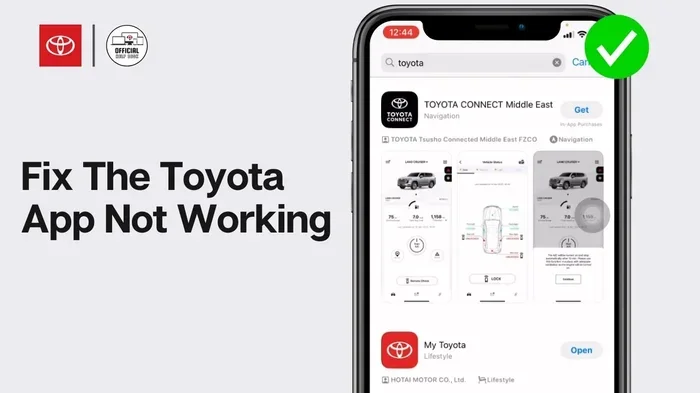
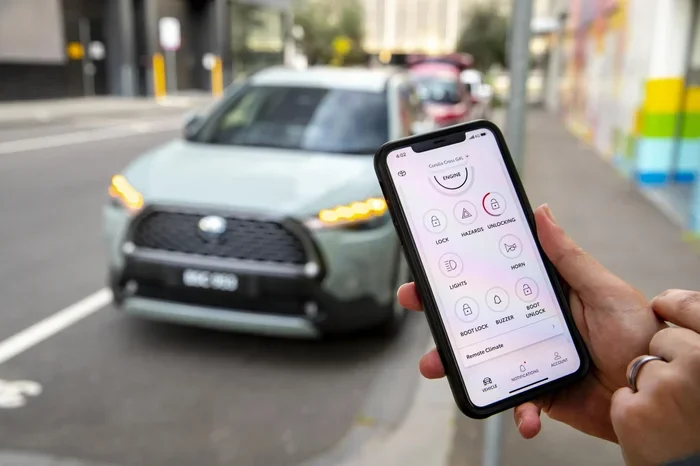
Toyota Remote Connect is a subscription-based service that lets you interact with your vehicle remotely. Through the Toyota app on your phone, you can lock and unlock doors, start the engine, check fuel levels, and even locate your car. It also includes features like emergency assistance and maintenance alerts. These services rely on a built-in cellular connection inside your vehicle.
What Does Toyota Remote Connect Include?
The Toyota connectivity plan typically offers several key features. Remote start lets you warm up or cool down your car before you get in. You can also lock and unlock doors from your phone. The service provides vehicle health reports, so you know about issues before they become expensive repairs. Emergency roadside assistance is also included, giving you peace of mind on long trips. Some plans even offer GPS tracking and stolen vehicle location services.
However, not every Toyota owner uses all of these features. Many people only use remote start during winter months. Others forget about the service entirely after the first few months. This is exactly why many drivers look into how to cancel Toyota services they are not actively using. Understanding what is included helps you decide whether canceling makes sense for your situation.
Reasons to Cancel Your Toyota Remote Connect Subscription
There are many valid reasons why drivers choose to end their Toyota Remote Connect subscription. Some are financial, while others are simply about convenience. Let us look at the most common reasons people decide to cancel.
You Are Not Using the Features
This is the number one reason. If you have not opened the Toyota app in months, you are likely paying for services you do not need. Think about how often you actually use remote start, vehicle tracking, or emergency assistance. If the answer is rarely or never, keeping the subscription does not make much sense. Canceling your subscription frees up money for things you actually use.
The Subscription Cost Adds Up
Toyota Remote Connect is not free after the trial period ends. Depending on your plan, you could be paying between $80 and $150 per year. Over three or four years, that adds up to hundreds of dollars. For budget-conscious drivers, this is a significant expense. If you are also trying to manage your vehicle costs, cutting unnecessary subscriptions is a smart move. You can always upgrade your vehicle later if you decide you want these features back.
You No Longer Drive the Vehicle
Maybe you sold the car or gave it to a family member. Perhaps you switched to a different vehicle altogether. In any case, if you are no longer driving the Toyota equipped with Remote Connect, there is no reason to keep paying. Ending the subscription ensures you are not wasting money on a vehicle you no longer use.
You Prefer Alternative Solutions
Some drivers find that aftermarket remote start systems work better for their needs. Others use their phone’s built-in features or third-party apps. If you have found a solution that works better for you, canceling the Toyota subscription is the logical next step. Just make sure to look up your warranty with your VIN before making changes that could affect your coverage.
How to Cancel Toyota Remote Connect
Canceling your Toyota Remote Connect subscription is straightforward, but the method you choose matters. Toyota offers several ways to cancel, and each has its own process. Here is a detailed breakdown of every option available to you.
Cancel Online Through Your Toyota Account
The fastest way to cancel is through your online Toyota account. Follow these steps to get it done in just a few minutes.
- Go to the Toyota website and sign in to your account.
- Navigate to the “My Account” or “My Services” section.
- Find your Toyota Remote Connect subscription under the active services list.
- Click on “Manage Subscription” or “Cancel Subscription.”
- Follow the on-screen prompts to confirm your cancellation.
- Save or print the confirmation page for your records.
Make sure you are logged in with the same account you used when you originally signed up. If you forget your login details, you can reset your password through the Toyota website. Once you submit the cancellation, you should receive a confirmation email within 24 hours. Keep that email as proof of your cancellation request.
Cancel by Calling Toyota Customer Service
If you prefer speaking with a real person, calling Toyota customer service is a reliable option. The phone number is usually found on your subscription confirmation email or on the Toyota website. Have your vehicle identification number and account details ready before you call.
When you reach a representative, clearly state that you want to cancel your Toyota Remote Connect subscription. They will likely ask you a few questions about your reason for canceling. This is normal and does not mean they are trying to talk you out of it. Politely confirm your decision and ask for a confirmation number. You should also request an email confirmation of the cancellation for your records.
Customer service hours vary, so check the Toyota website for the most current information. Calling during off-peak hours, like early morning or late afternoon, can reduce your wait time significantly.
Cancel Through Your Local Toyota Dealer
Another option is to visit your local Toyota dealer and handle the cancellation in person. This method works well if you prefer face-to-face communication or if you are already planning a service visit. Call ahead and schedule an appointment so you do not have to wait.
When you arrive, ask the service advisor to help you cancel your Toyota Remote Connect subscription. They can usually process the request right at the service desk. Make sure to get written confirmation before you leave the dealership. This is especially important if you are also considering ending your Toyota lease early or making other changes to your vehicle account.
What Happens After You Cancel
Understanding what happens after cancellation is just as important as the cancellation process itself. Here is what you can expect once your Toyota Remote Connect subscription ends.
Features You Will Lose
Once your subscription is canceled, you will lose access to all Toyota connected services tied to your Remote Connect plan. This means remote start, door lock and unlock, vehicle tracking, and emergency assistance will no longer work. Your Toyota app will still function for basic features, but the premium connected features will be disabled.
Some drivers worry about losing emergency features like roadside assistance. If this concerns you, consider alternative coverage options before canceling. You may also want to check if your vehicle manufacturer warranty or insurance policy covers any of these services independently.
Will You Get a Refund?
Refund policies vary depending on when you cancel and how you signed up. If you cancel during a free trial period, you typically will not be charged at all. If you cancel mid-cycle, Toyota may or may not issue a partial refund. This depends on your specific subscription terms and the region where you live.
To maximize your chances of getting a refund, cancel as early as possible in your billing cycle. Keep all confirmation emails and documentation. If Toyota does not issue a refund you believe you are entitled to, you can escalate the issue through their customer service or file a complaint with your state’s consumer protection agency.
Does Cancellation Affect Your Vehicle Warranty?
Canceling your Toyota Remote Connect subscription does not affect your vehicle warranty. Your warranty coverage is separate from connected services. However, if you are concerned about your warranty status, you can always look up your warranty with your VIN through the Toyota website or by contacting your dealer directly. This gives you peace of mind that your warranty remains intact regardless of your subscription status.
Alternatives to Canceling
Before you finalize your decision, consider whether canceling is truly the best option. Toyota offers a few alternatives that might meet your needs without fully ending your subscription.
Pause or Downgrade Your Plan
Some Toyota subscription plans allow you to pause or downgrade instead of canceling entirely. A pause lets you temporarily suspend services, which is useful if you only need Toyota Remote Connect during certain months. A downgrade reduces your monthly or annual cost while keeping some basic features active.
Contact Toyota customer service or visit your local dealer to ask about pause and downgrade options. This can be a great middle ground if you are not sure you want to fully commit to canceling. You might find that a reduced plan still gives you the features you care about most.
Switch to a Different Toyota Plan
Toyota occasionally offers different tiers of connected services. If your current plan is too expensive but you still want some features, ask about other available plans. Sometimes switching plans is cheaper than canceling and rejoining later. This is especially true if you are considering whether to upgrade your vehicle in the near future, as new Toyota models often come with different connectivity packages.
Turn Off Unused Features
While this does not reduce your subscription cost, turning off features you do not use can prevent accidental activations and unnecessary data usage. For example, if you do not use the voice assistant, you can turn off voice assistant mode in your Toyota settings. This simple step can help you feel more in control of your connected services even before you make a final decision about canceling.
Tips to Avoid Unwanted Subscription Charges
Prevention is always better than cure when it comes to subscription management. Here are some practical tips to help you avoid unwanted charges from Toyota Remote Connect or any other vehicle subscription service.
- Set a calendar reminder. Mark the end of your free trial period on your calendar. This gives you time to decide whether to continue or cancel before charges begin.
- Check your statements regularly. Review your credit card or bank statements monthly to catch any unexpected charges early.
- Read the fine print. Before signing up for any subscription, read the terms and conditions carefully. Look for auto-renewal clauses and cancellation policies.
- Use calendar alerts. Set a reminder 30 days before your subscription renews. This gives you ample time to evaluate whether you still need the service.
- Keep documentation. Save all confirmation emails, receipts, and correspondence related to your subscription. This protects you in case of billing disputes.
Taking these small steps can save you a significant amount of money over time. Subscription creep is real, and many drivers end up paying for services they forgot they signed up for. Staying proactive keeps your finances in check and your vehicle expenses manageable.
Conclusion
Canceling your Toyota Remote Connect subscription is a straightforward process with several options to choose from. Whether you cancel online, over the phone, or in person at your dealer, the key is to act before your next billing cycle begins. You now know exactly what Toyota Remote Connect includes, why people cancel, how to cancel, and what happens after cancellation.
Remember, your vehicle warranty is not affected by canceling this subscription. And if you change your mind later, you can always reactivate or explore alternative plans that better suit your needs. The most important takeaway is that you have full control over your Toyota subscription management. Do not let unwanted charges sneak up on you. Take action today if Toyota Remote Connect is not delivering the value you expected.
Frequently Asked Questions
Can I cancel my Toyota Remote Connect subscription at any time?
Yes, you can cancel your Toyota Remote Connect subscription at any time. There are no long-term contracts that lock you in. However, the best time to cancel is before your next billing cycle starts to avoid being charged for another month or year. Check your subscription terms for specific cancellation policies.
Will canceling Toyota Remote Connect affect my vehicle warranty?
No, canceling your Toyota connected services does not affect your vehicle warranty. Warranty coverage and subscription services are completely separate. Your powertrain, bumper-to-bumper, and other warranty protections remain intact regardless of whether you have an active Remote Connect subscription.
How long does it take to cancel Toyota Remote Connect?
If you cancel online, the process takes just a few minutes. Phone cancellations may take a bit longer depending on wait times. In-person cancellations at a dealer are typically handled during your visit. You should receive a confirmation email within 24 hours of submitting your cancellation request through any method.
Can I get a refund after canceling my Toyota Remote Connect subscription?
Refund eligibility depends on when you cancel and your specific subscription terms. If you cancel during a free trial, you will not be charged. Mid-cycle cancellations may qualify for a partial refund. Contact Toyota customer service directly to inquire about your refund options and be sure to keep all cancellation documentation.
What happens to the Toyota app after I cancel Remote Connect?
The Toyota app will still work for basic functions after you cancel. However, premium features like remote start, vehicle tracking, and emergency assistance will no longer be available. You can still use the app for basic vehicle information and non-connected features. Reactivating your subscription at any time will restore full access to all connected services.
Is there a fee to cancel my Toyota Remote Connect subscription?
Toyota does not charge a cancellation fee for ending your Toyota Remote Connect subscription. You simply stop paying the recurring subscription amount. Be aware that any charges already billed for the current cycle are typically non-refundable. Always confirm the specific terms of your plan before canceling.