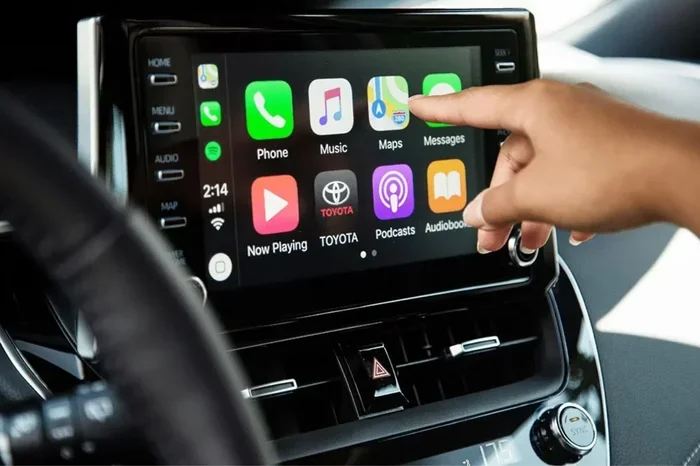
Does the Toyota Sienna Have Wireless Apple CarPlay
Yes, the Toyota Sienna does offer wireless Apple CarPlay on select model years and trims. The wireless feature became available starting with the 2021 refresh and is standard on higher trims like the XSE and Limited. If you own a Sienna or are shopping for one, understanding which versions include wireless Apple CarPlay can save you time and frustration at the dealership.
Let us get straight to the point. If you are asking whether the Toyota Sienna has wireless Apple CarPlay, the answer is yes. But it is not that simple. The availability depends on your model year, trim level, and the specific infotainment system your Sienna came with. In this guide, we will walk you through everything you need to know about wireless Apple CarPlay in the Toyota Sienna. We will cover which years have it, how to set it up, and why it matters for your daily driving experience.
The Toyota Sienna has long been a favorite among families. With seating for up to eight passengers, it is a practical choice for road trips, school runs, and everything in between. If you are curious about how many people actually fit comfortably, we have covered that too. But today, our focus is on the tech side of things. Specifically, whether your Sienna can connect to your iPhone without a cable.
Wireless Apple CarPlay has become a must-have feature for many drivers. It lets you access your phone’s apps, maps, music, and messages right through your car’s screen. No fumbling with cables. No disconnections when you hit a bump. Just a seamless connection that makes driving safer and more convenient. Let us dive into the details.
Key Takeaways
- Wireless Apple CarPlay is available: The Toyota Sienna offers wireless Apple CarPlay on 2021 and newer models with the updated infotainment system.
- Not all trims include it: Lower trims may only have wired Apple CarPlay, while higher trims like XSE and Limited include wireless as standard.
- Setup is simple: You just connect your iPhone and follow a few prompts to pair wirelessly each time you start the car.
- Wired vs wireless matters: Wireless CarPlay offers more convenience, but wired connections can be more stable in some cases.
- Older Sienna models lack wireless: Pre-2021 Sienna models only support wired Apple CarPlay through a USB cable.
- Keep your iPhone updated: Software updates on both your phone and the Sienna’s system help ensure smooth wireless CarPlay performance.
📑 Table of Contents
- What Is Apple CarPlay and Why Does It Matter?
- Does the Toyota Sienna Have Wireless Apple CarPlay?
- How Wireless Apple CarPlay Works in the Toyota Sienna
- Wired vs Wireless Apple CarPlay: Which Is Better?
- How to Set Up and Troubleshoot Wireless Apple CarPlay
- Why Wireless Apple CarPlay Matters for Daily Driving
- Can You Add Wireless Apple CarPlay to an Older Sienna?
- Final Thoughts on Toyota Sienna Wireless Apple CarPlay
What Is Apple CarPlay and Why Does It Matter?
Apple CarPlay is a feature that mirrors your iPhone’s interface onto your car’s infotainment screen. It gives you access to Phone, Messages, Music, Maps, and many third-party apps. You can make calls, send texts, get directions, and listen to podcasts all without taking your hands off the wheel.
The wireless version of Apple CarPlay does all of this without a USB cable. Your phone connects to the car through Bluetooth and Wi-Fi. This means less clutter and more convenience. You just hop in, and your phone is already connected.
For Toyota Sienna owners, wireless Apple CarPlay transforms the driving experience. It is especially helpful for families who rely on their phones for navigation and communication throughout the day. Whether you are driving the kids to school or taking a long road trip, wireless CarPlay keeps you connected safely.
Does the Toyota Sienna Have Wireless Apple CarPlay?
The short answer is yes, but with some important details. The Toyota Sienna has gone through several updates over the years, and the availability of wireless Apple CarPlay depends largely on the model year and trim level.
Model Years That Support Wireless Apple CarPlay
Starting with the 2021 model year, Toyota introduced an updated infotainment system in the Sienna. This new system brought wireless Apple CarPlay and wireless Android Auto to the table. If you have a 2021, 2022, 2023, or 2024 Toyota Sienna, there is a good chance it has wireless CarPlay. But the exact availability depends on the trim.
Here is a quick breakdown:
- 2020 and earlier: These models only support wired Apple CarPlay. You will need a USB cable to connect your iPhone.
- 2021 and newer (base trims): Some base trims may still offer wired CarPlay only, depending on the audio system installed.
- 2021 and newer (higher trims): The XSE, Limited, and Platinum trims typically include wireless Apple CarPlay as standard.
Which Trims Include Wireless Apple CarPlay?
The Toyota Sienna comes in several trim levels. The higher you go, the more tech features you get. Here is what you can expect:
- LE trim: May only have wired Apple CarPlay depending on the audio package. Check with the dealer to confirm.
- SE trim: Often includes wireless Apple CarPlay, especially with the upgraded audio system.
- XLE trim: Wireless Apple CarPlay is typically standard on the XLE.
- XSE trim: Wireless Apple CarPlay comes standard on the XSE.
- Limited and Platinum trims: These top-tier trims include wireless Apple CarPlay along with premium audio and other luxury features.
If you are unsure about your specific Sienna, you can check the infotainment settings. Look for the Apple CarPlay icon. If it says “Wireless,” you are all set. If not, a USB cable will get the job done.
How Wireless Apple CarPlay Works in the Toyota Sienna
Setting up wireless Apple CarPlay in a Toyota Sienna is straightforward. Here is how it works step by step:
- Make sure your iPhone is running the latest version of iOS.
- Ensure your Sienna’s infotainment system is updated to the latest software version.
- Turn on Bluetooth and Wi-Fi on your iPhone.
- Start your Sienna and tap the Apple CarPlay icon on the screen.
- Select “Wireless” when prompted.
- Your iPhone will connect automatically each time you start the car.
Once paired, your Sienna remembers your iPhone. You do not need to re-pair every time. The connection is seamless and almost instant. You can access Siri, use Maps, listen to Apple Music, and reply to messages through the car’s touchscreen or steering wheel controls.
One thing to keep in mind is that wireless CarPlay uses both Bluetooth and Wi-Fi. The Bluetooth handles the initial handshake, while Wi-Fi handles the data transfer. This dual-connection approach ensures a stable and fast experience. It also means that your phone battery may drain slightly faster while connected, though most modern iPhones handle this well.
Wired vs Wireless Apple CarPlay: Which Is Better?
Both wired and wireless Apple CarPlay get the job done. But they have different strengths. Let us compare them side by side.
| Feature | Wired Apple CarPlay | Wireless Apple CarPlay |
|---|---|---|
| Connection Method | USB cable | Bluetooth and Wi-Fi |
| Setup | Plug in the cable | Automatic after pairing |
| Stability | Very stable | Stable, but can occasionally glitch |
| Convenience | Requires a cable | No cables needed |
| Phone Charging | Yes | No (unless using a wireless charger) |
| Audio Quality | Slightly better in some cases | Excellent |
| Availability in Sienna | All model years | 2021 and newer, select trims |
Most drivers prefer wireless Apple CarPlay for its convenience. You just get in the car, and everything is ready to go. No digging for a cable. No worrying about a loose connection. However, some people still prefer wired connections for their reliability and the fact that the phone charges while driving.
If you are someone who uses Apple Maps or Google Maps constantly, wireless CarPlay is a game changer. You get real-time navigation without draining your battery or dealing with tangled cables. And if you are someone who cares about keeping your car looking clean and uncluttered, going wireless means fewer cables on your dashboard.
It is also worth noting that wireless CarPlay can sometimes experience slight delays when first connecting. A quick restart of your iPhone or the infotainment system usually fixes this. Keeping both devices updated helps minimize these minor issues.
How to Set Up and Troubleshoot Wireless Apple CarPlay
Setting up wireless Apple CarPlay in your Toyota Sienna is easy. But like any technology, you may run into occasional hiccups. Here is how to get it working and what to do if something goes wrong.
Setting It Up
First, make sure your iPhone is compatible with Apple CarPlay. Most iPhones from the iPhone 5s and newer support it. Next, check that your Sienna’s infotainment system is up to date. You can do this by going to the settings menu and checking for system updates.
Once everything is ready, follow these steps:
- Start your Sienna and make sure Bluetooth is enabled on your iPhone.
- Tap the Apple CarPlay icon on the Sienna’s touchscreen.
- Choose the wireless option when prompted.
- Confirm the connection on your iPhone if a prompt appears.
- Your CarPlay interface should now appear on the screen.
Troubleshooting Common Issues
If wireless Apple CarPlay is not working, try these steps:
- Restart your iPhone: A simple restart often fixes connection issues.
- Restart the infotainment system: Hold the power button on the Sienna’s screen until it reboots.
- Check for software updates: Both your iPhone and the Sienna’s system should be running the latest software.
- Delete and re-pair: Go to your iPhone’s Bluetooth settings, forget the Sienna, and reconnect.
- Check Wi-Fi: Wireless CarPlay uses Wi-Fi for data transfer. Make sure Wi-Fi is turned on.
One thing that can trip people up is the maintenance light on the dashboard. If you notice warning lights, they are usually unrelated to Apple CarPlay. The maintenance light may stay on for other reasons, such as routine service reminders or sensor alerts. It is always good to double-check if something seems off.
Why Wireless Apple CarPlay Matters for Daily Driving
Wireless Apple CarPlay is more than just a nice-to-have feature. It genuinely improves your daily driving experience. Here is why it matters:
- Safer driving: You can use Siri to send messages, make calls, and get directions without touching your phone. This keeps your eyes on the road and your hands on the wheel.
- Seamless integration: Your favorite apps, playlists, and contacts are always right there when you get in the car.
- Less cable clutter: A wireless connection means a cleaner dashboard and less hassle with cables that can wear out over time.
- Better for families: The Toyota Sienna is a family hauler. Wireless CarPlay makes it easy for any passenger with an iPhone to connect and share music or navigation.
- Future-proofing: Wireless CarPlay is the direction the automotive industry is heading. Having it in your Sienna ensures you stay compatible with the latest technology.
For those who also care about fuel economy, it is worth noting that tech features like wireless CarPlay do not significantly impact gas mileage. However, if you are looking to maximize efficiency, using eco mode can help. Eco mode can save a noticeable amount of fuel over time, especially during city driving.
Keeping your Sienna well-maintained also helps it run at its best. Regular maintenance, fresh air filters, and proper tire pressure all contribute to a smoother and more efficient driving experience. Wireless Apple CarPlay is just one piece of the puzzle when it comes to making your Sienna the best it can be.
Can You Add Wireless Apple CarPlay to an Older Sienna?
If you own a pre-2021 Toyota Sienna and wish you had wireless Apple CarPlay, you are not alone. Many owners of older models wonder if they can add this feature. The answer depends on your current infotainment system.
Some aftermarket solutions exist. You can install an aftermarket wireless CarPlay adapter that plugs into your existing infotainment system. These adapters typically cost between $100 and $300. They connect to your car’s USB port and create a wireless CarPlay bridge. Popular brands include AAWireless, Carlinkit, and AutoDet.
However, aftermarket adapters may not offer the same seamless experience as factory-installed wireless CarPlay. They can sometimes have connection delays or compatibility issues. If you are considering this route, read reviews carefully and choose a reputable brand.
Another option is to upgrade your Sienna’s infotainment head unit. Some shops specialize in replacing factory head units with newer models that support wireless CarPlay. This can be a more expensive route, but it gives you a brand-new experience with better resolution and more features.
Before spending money on any upgrade, it is worth checking if your current Sienna has a hidden wireless CarPlay option. Sometimes the feature is present but not activated. A visit to the dealership or a trusted mechanic can help you figure this out.
Final Thoughts on Toyota Sienna Wireless Apple CarPlay
The Toyota Sienna is a versatile and family-friendly minivan that keeps up with modern technology. Wireless Apple CarPlay is available on most 2021 and newer Sienna models, especially in the mid-range and higher trims. If you are shopping for a used Sienna or already own one, knowing whether your specific model and trim include wireless CarPlay can make a big difference in your daily driving experience.
Setting up wireless Apple CarPlay is simple, and the convenience it offers is hard to beat. No cables, no clutter, and a seamless connection every time you start the car. If you have an older Sienna without wireless CarPlay, aftermarket adapters and head unit upgrades can bring this feature to your vehicle.
Take a moment to check your Sienna’s infotainment settings. If wireless Apple CarPlay is there, take full advantage of it. If not, explore your options for adding it. Either way, staying connected and safe on the road is what matters most.
And remember, your Sienna is about more than just tech features. It is about getting your family where you need to go safely and comfortably. Wireless Apple CarPlay is a great tool to help with that mission.
Frequently Asked Questions
Which Toyota Sienna model years have wireless Apple CarPlay?
The 2021, 2022, 2023, and 2024 Toyota Sienna models offer wireless Apple CarPlay on select trims. Pre-2021 models only support wired Apple CarPlay through a USB cable connection.
Can I get wireless Apple CarPlay on the base Toyota Sienna LE trim?
The base LE trim may only include wired Apple CarPlay depending on the audio system package. Higher trims like the SE, XLE, XSE, Limited, and Platinum typically include wireless Apple CarPlay as standard. Always confirm with the dealer before purchasing.
How do I know if my Toyota Sienna has wireless Apple CarPlay?
Check your infotainment screen for the Apple CarPlay icon. If it says “Wireless,” your Sienna supports wireless Apple CarPlay. You can also go to your iPhone’s CarPlay settings to see if the wireless option is available when connected.
Does wireless Apple CarPlay work with Android phones?
No, wireless Apple CarPlay is designed specifically for iPhones. However, the Toyota Sienna with wireless Apple CarPlay also supports wireless Android Auto for Android phone users.
Can I add wireless Apple CarPlay to an older Toyota Sienna?
Yes, you can add wireless Apple CarPlay to older Sienna models using aftermarket wireless CarPlay adapters or by upgrading the infotainment head unit. These solutions range from affordable adapters to more expensive head unit replacements.
Does wireless Apple CarPlay drain my iPhone battery faster?
Wireless Apple CarPlay can cause slightly faster battery drain because it uses both Bluetooth and Wi-Fi. However, most modern iPhones handle this well. If battery drain is a concern, you can use a wireless charging pad in your Sienna to keep your phone powered.