How to Activate i-Stop on Mazda – Simple Step-by-Step
Activating i-Stop on your Mazda is a simple process that can significantly improve your fuel economy and reduce emissions. This guide walks you through every step, from understanding what i-Stop does to troubleshooting common issues. Whether you drive a Mazda 3, CX-5, or another model, you will find clear instructions to get your auto stop-start system running smoothly.
Have you ever noticed your Mazda engine turning off automatically when you stop at a red light? That is the i-Stop system doing its job. How to activate i-Stop on Mazda is a question many new Mazda owners ask, and the answer is simpler than you might think.
The i-Stop system is Mazda’s version of auto stop-start technology. It shuts off your engine when your car comes to a complete stop, like at a traffic light or in heavy traffic. Then, it restarts the engine the moment you take your foot off the brake pedal. This small feature can make a big difference in your fuel efficiency Mazda driving experience.
In this guide, we will walk you through every step to activate i-Stop on your Mazda. We will also cover which models support it, common problems you might face, and tips to get the most out of the system. Whether you are a new Mazda owner or have been driving one for years, this guide has something useful for you.
Key Takeaways
- Easy Activation: Turning on i-Stop takes just a few seconds and works across most Mazda models.
- Fuel Savings: The system shuts off your engine at idle, helping you save gas over time.
- Model Compatibility: Not every Mazda has i-Stop, so it is important to confirm your vehicle supports it first.
- Troubleshooting Tips: Common issues like a dead battery or wrong settings can prevent i-Stop from working properly.
- Maintenance Matters: Regular care keeps your i-Stop system functioning reliably for years.
- Smart Driving Habits: Pairing i-Stop with good driving practices maximizes your fuel efficiency gains.
📑 Table of Contents
What Is i-Stop and How Does It Work?
The i-Stop system is Mazda’s intelligent idle stop technology. When you come to a full stop, the system automatically shuts off the engine. This prevents your car from burning fuel while idling. When you are ready to move again, the engine restarts quickly and smoothly.
Why i-Stop Matters for Fuel Economy
Idling wastes a surprising amount of fuel. Studies show that a car can burn between a quarter and a half gallon of fuel per hour while idling. Over a long commute or a busy day in city traffic, this adds up fast.
Here is how i-Stop helps:
- Reduces idle fuel waste: The engine turns off automatically at stops.
- Cuts emissions: Less idling means fewer harmful exhaust gases.
- Improves overall mileage: You may notice better fuel economy over time.
- Smooth restarts: Mazda engineered the system for quick, quiet restarts.
The beauty of Mazda i-Stop technology is that it works in the background. You do not need to do anything special once it is activated. The system handles everything automatically based on driving conditions.
How the Auto Stop-Start Process Works
When i-Stop is active, here is what happens step by step:
- You bring your Mazda to a complete stop.
- The system checks conditions like battery charge and engine temperature.
- If conditions are right, the engine shuts off automatically.
- When you release the brake pedal, the engine restarts instantly.
- You drive away without ever touching a switch.
This entire process happens in just a few seconds. It is seamless and designed to feel completely natural. The Mazda SkyActiv engine technology pairs perfectly with i-Stop to make restarts fast and efficient.
Which Mazda Models Support i-Stop?
Not every Mazda comes equipped with i-Stop. The system is available on select models, primarily those with the SkyActiv engine lineup. Before trying to activate it, you need to confirm your vehicle supports the feature.
Models That Typically Include i-Stop
The following Mazda models commonly feature the i-Stop system:
- Mazda 3: Both the sedan and hatchback versions often include i-Stop, especially in higher trims.
- Mazda CX-5: This popular compact SUV comes with i-Stop on most trim levels with the SkyActiv engine.
- Mazda CX-30: Many CX-30 models include the i-Stop feature as standard or optional equipment.
- Mazda6: The midsize sedan offers i-Stop on certain trim packages.
- Mazda CX-50: The newer CX-50 also supports i-Stop on compatible trims.
How to Check if Your Mazda Has i-Stop
If you are unsure whether your Mazda has i-Stop, here are a few ways to find out:
- Check your owner’s manual: Look for “i-Stop” or “idle stop-start” in the features section.
- Look for the dashboard button: Many Mazdas have a dedicated i-Stop button near the steering column or on the center console.
- Check your trim level: Lower trims sometimes do not include i-Stop as standard.
- Visit your dealer: A Mazda dealership can confirm whether your specific vehicle has the feature.
If your Mazda does not have i-Stop, you can still improve fuel economy Mazda through other driving habits and maintenance practices. For more on vehicle upgrades, check out our guide on how to upgrade your vehicle for better performance and efficiency.
Step-by-Step Guide to Activating i-Stop
Now for the part you have been waiting for. Activating i-Stop on your Mazda is straightforward. Follow these steps carefully, and you will be saving fuel in no time.
Step 1: Start Your Mazda and Let It Warm Up
Before activating i-Stop, make sure your engine is fully warmed up. Start your car and let it idle for a minute or two. The system will not activate if the engine temperature is too low. This is a safety feature designed to protect your engine.
While the engine warms up, check your dashboard for any warning lights. If you see a check engine light or any other alert, address that first. A warning light could indicate a problem that prevents i-Stop from working correctly.
Step 2: Press the i-Stop Button
Locate the i-Stop button in your Mazda. On most models, you will find it:
- Near the steering column on the left side
- On the center console near the gear shift
- On the dashboard area near the climate controls
The button usually has an “A” with a circular arrow around it. This is the universal symbol for auto stop-start systems. Press the button once to activate i-Stop. You should see an indicator light on your dashboard turn green or white.
If the indicator light is off, i-Stop is deactivated. The system will not shut off your engine at stops. Press the button again to turn it back on.
Step 3: Verify the Indicator Light
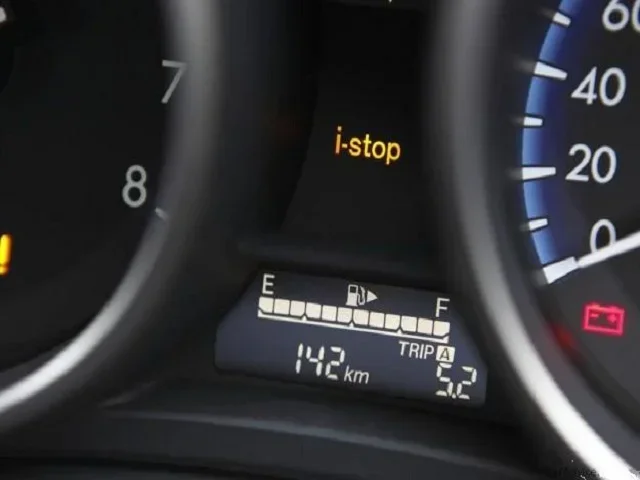
After pressing the button, look at your dashboard for confirmation. A green or white i-Stop indicator light means the system is active. This light may appear as an “A” inside a circle, similar to the button symbol.
Here is what different indicator lights mean:
- Green or white light: i-Stop is active and ready to work.
- No light: i-Stop is turned off.
- Flashing or amber light: The system has detected an issue and is not available.
Step 4: Test the System
To test i-Stop, find a safe spot where you can stop completely, like a parking lot or a quiet intersection. Come to a full stop and keep your foot on the brake pedal. After a few seconds, you should feel the engine shut off.
When you are ready to move, simply release the brake pedal. The engine should restart quickly and smoothly. If this happens, congratulations, your i-Stop system is working perfectly.
Remember, i-Stop only activates under the right conditions. The system will not shut off the engine if the battery is low, the cabin is too hot or cold, or the steering wheel is turned. These are all normal protective behaviors.
Step 5: Adjust Your Settings (If Needed)
Some Mazda models allow you to customize i-Stop behavior through the infotainment system. You may be able to adjust settings like:
- How long the engine stays off before restarting
- Whether i-Stop activates in all driving modes
- How the system responds in extreme temperatures
Access these settings through your Mazda’s infotainment screen. Look for a “Vehicle Settings” or “Driving Assistance” menu. If you cannot find the options, your model may not support custom i-Stop settings, and that is perfectly fine.
Common i-Stop Issues and How to Fix Them
Even with proper activation, you might run into issues with your i-Stop system. Do not worry, most problems are easy to fix. Here are the most common issues Mazda owners face and how to resolve them.
i-Stop Does Not Activate at All
If i-Stop is not working, the first thing to check is whether the system is turned on. It sounds simple, but the button may have been accidentally pressed. Look for the indicator light on your dashboard.
Other reasons i-Stop might not activate include:
- Low battery charge: The i-Stop system needs a healthy battery to operate. If your battery is old or weak, it may not support the frequent restarts.
- Extreme temperatures: Very hot or very cold weather can disable i-Stop temporarily.
- Air conditioning demand: If the cabin needs significant heating or cooling, the system may keep the engine running.
- Steering input: Turning the steering wheel will prevent i-Stop from activating for safety reasons.
If you have checked all of these and i-Stop still does not work, it might be time for a diagnostic check. You can learn more about how long a full car diagnostic takes to help you plan your visit to the shop.
i-Stop Keeps Turning Off by Itself
Some Mazda owners report that i-Stop deactivates unexpectedly. This usually happens when one of the system’s conditions is not met. For example, if the battery voltage drops slightly, the system will disable itself to protect the electrical system.
To address this issue:
- Check your battery health regularly. A weak battery is the most common cause.
- Make sure your alternator is charging properly.
- Keep your battery terminals clean and free of corrosion.
If the problem persists, consider having a professional inspect your electrical system. Regular maintenance goes a long way in keeping your i-Stop system reliable.
i-Stop Light Flashing or Showing Warning
A flashing or amber i-Stop warning light means the system has detected a fault. Common causes include:
- A faulty brake light switch
- Low battery voltage
- Engine temperature issues
- A problem with the starter motor
When you see a warning light, do not ignore it. Have your Mazda diagnosed as soon as possible. Clearing car codes manually can sometimes help reset the system, but it is important to address the root cause first.
Tips to Maximize i-Stop Benefits
Once you have i-Stop activated, you can take additional steps to maximize the benefits. These simple tips will help you get the most out of your Mazda’s fuel-saving technology.
Drive Smoothly and Anticipate Stops
The i-Stop system works best when you drive smoothly. Avoid sudden braking and aggressive acceleration. When you see a red light ahead, ease off the gas pedal early and let your car coast down gradually.
This driving style gives i-Stop more opportunities to activate. The more stops you make, the more fuel you save. Over a long commute, these small savings really add up.
Keep Your Battery in Good Condition
The i-Stop system relies heavily on your battery. It needs enough power to restart the engine quickly every time. A weak or aging battery will cause the system to disable itself frequently.
Tips for battery health:
- Have your battery tested at least twice a year.
- Replace your battery every 4 to 5 years, or as recommended by Mazda.
- Avoid leaving electrical accessories on when the engine is off.
- Keep battery terminals clean and tight.
Maintain Regular Service Intervals
Regular maintenance keeps your i-Stop system running smoothly. Follow your Mazda’s recommended service schedule for oil changes, filter replacements, and inspections.
Using the right oil matters too. Does it really matter what oil I put in my car? Absolutely. Using the correct grade of oil helps your engine run efficiently and supports the i-Stop system’s demanding restart cycles.
Use the Right Driving Mode
Some Mazda models offer different driving modes, such as Normal, Sport, and Eco. The i-Stop system may behave differently depending on the mode you select. Eco mode often prioritizes fuel savings and may keep i-Stop active more frequently.
Experiment with different modes to see how they affect your fuel economy. You might be surprised at how much difference a simple mode change can make.
i-Stop Maintenance and Long-Term Care
Like any car system, i-Stop needs proper care to last. With regular attention, your i-Stop system can work reliably for the life of your vehicle.
Battery Maintenance
Your battery is the heart of the i-Stop system. Since i-Stop uses the battery to power the engine restart, a healthy battery is essential. Consider investing in a battery maintainer if you park your car for extended periods.
If you notice your engine struggling to start or your i-Stop system becoming unreliable, the battery is often the first thing to check. For more on how long different car components last, see our article on how long car floor mats last for a general idea of maintenance timelines.
Starter Motor Care
The i-Stop system uses your starter motor more frequently than a conventional car. This extra use means the starter motor may wear out faster. Pay attention to any unusual sounds when your engine starts, and have it inspected if anything seems off.
Software Updates
Mazda occasionally releases software updates that improve i-Stop performance. These updates can refine how the system decides when to shut off and restart the engine. Ask your dealer if any updates are available for your model.
When to Seek Professional Help
Most i-Stop issues can be resolved with simple checks. However, some problems require professional diagnosis. If you have tried all the basic troubleshooting steps and i-Stop still does not work, take your Mazda to a qualified technician. They have the tools and expertise to identify and fix complex issues.
Dealers and independent shops can both handle i-Stop repairs. For warranty-related concerns, you might want to check if your local dealer can help. If you have a Toyota, you can read our article on taking your Toyota to any dealership for warranty work for general warranty guidance.
Conclusion
Activating i-Stop on your Mazda is one of the easiest ways to improve your fuel economy and reduce your environmental impact. The system works automatically once turned on, and it requires no extra effort from you. Simply press the i-Stop button, confirm the indicator light, and let your Mazda do the rest.
Remember to keep your battery healthy, maintain regular service intervals, and drive smoothly to get the most out of i-Stop. If you run into any issues, the troubleshooting tips in this guide should help you resolve most problems quickly.
The Mazda i-Stop system is a smart feature that pays for itself over time through fuel savings. Whether you drive a Mazda 3, CX-5, or another compatible model, activating i-Stop is a small change that makes a big difference. Start enjoying better fuel economy today with just the push of a button.
Frequently Asked Questions
Can I activate i-Stop on any Mazda model?
No, i-Stop is only available on select Mazda models that come equipped with the feature. Most commonly, it is found on Mazda 3, CX-5, CX-30, Mazda6, and CX-50 models with the SkyActiv engine. Check your owner’s manual or look for the i-Stop button in your vehicle to confirm compatibility.
Does i-Stop damage my engine over time?
No, Mazda designed the i-Stop system to handle frequent engine restarts without causing extra wear. The system uses a specialized starter motor and monitors engine conditions to ensure safe operation. Regular maintenance, especially battery care, helps keep everything running smoothly.
Why does my i-Stop system turn off in extreme weather?
i-Stop automatically disables itself in extreme heat or cold to protect your engine and battery. The system prioritizes engine health and cabin comfort over fuel savings. Once conditions improve, i-Stop typically reactivates on its own.
How much fuel can I save with i-Stop activated?
Fuel savings vary depending on your driving conditions. In heavy city traffic, i-Stop can improve fuel economy by 5 to 10 percent. On highways and open roads, the benefit is minimal since you do not stop as often. Overall, the savings add up over time, especially for city drivers.
What should I do if my i-Stop button does not work?
First, check that the system is not already activated by looking at your dashboard indicator light. If the button seems stuck or unresponsive, try restarting your vehicle. If the problem persists, the button or the system’s electrical connection may need professional inspection.
Can I turn off i-Stop if I find it annoying?
Yes, you can turn off i-Stop at any time by pressing the i-Stop button again. The system will remain off until you choose to reactivate it. Some drivers prefer to turn it off in heavy traffic where frequent restarts feel uncomfortable. You have full control over the feature.