How to Turn On Traffic Sign Recognition on Your Audi
Traffic sign recognition is a smart Audi driver assistance feature that displays speed limits and road signs right on your dashboard. This guide walks you through the exact steps to turn on traffic sign recognition on your Audi, whether you drive an A4, A6, or Q5. You will learn how to access the MMI settings, adjust your preferences, and get the most out of this handy technology.
Key Takeaways
- Easy to Enable: Turning on traffic sign recognition takes just a few taps in the MMI menu on your Audi.
- Works on Most Models: This feature is available on the Audi A4, A6, Q5, and many other newer Audi vehicles.
- Boosts Safety: The system helps you stay aware of speed limits and road signs without taking your eyes off the road.
- Customizable Settings: You can adjust how signs are displayed and set up warnings that match your driving style.
- Camera Matters: Keeping the road sign camera clean ensures the system works accurately at all times.
- Part of a Bigger Package: Traffic sign recognition works best alongside other Audi driver assistance features like adaptive cruise control and lane departure warning.
📑 Table of Contents
- Understanding Traffic Sign Recognition on Your Audi
- Which Audi Models Support Traffic Sign Recognition?
- Step-by-Step Guide to Turn On Traffic Sign Recognition
- Customizing Your Traffic Sign Display Preferences
- Troubleshooting Common Issues
- Benefits of Using Traffic Sign Recognition
- Maximizing Your Traffic Sign Recognition Experience
- Conclusion
Understanding Traffic Sign Recognition on Your Audi
Traffic sign recognition is one of the most useful car technology features you will find in a modern Audi. This system uses a small camera mounted near your rearview mirror to read road signs as you drive. It then displays important information on your dashboard display or Audi virtual cockpit screen.
The system can pick up speed limit signs, no-overtaking signs, and other important road warnings. It works in the background while you focus on driving. Think of it as a helpful co-pilot that never gets tired.
What Is Traffic Sign Recognition?
Traffic sign recognition is a camera-based system built into many Audi models. It uses image recognition software to identify common road signs. Once it reads a sign, it sends that information to your driver information display.
The system can show you:
- Current speed limit
- No passing zones
- Distance to upcoming signs
- Temporary speed limits from road work zones
This is part of the broader Audi driver assistance package that includes features like adaptive cruise control and lane departure warning. Together, these systems make your drives safer and more relaxed.
How Does the System Work?
The road sign camera sits at the top of your windshield, near the rearview mirror. It constantly scans the road ahead for signs. When it spots a relevant sign, it processes the image and sends the data to your car’s computer.
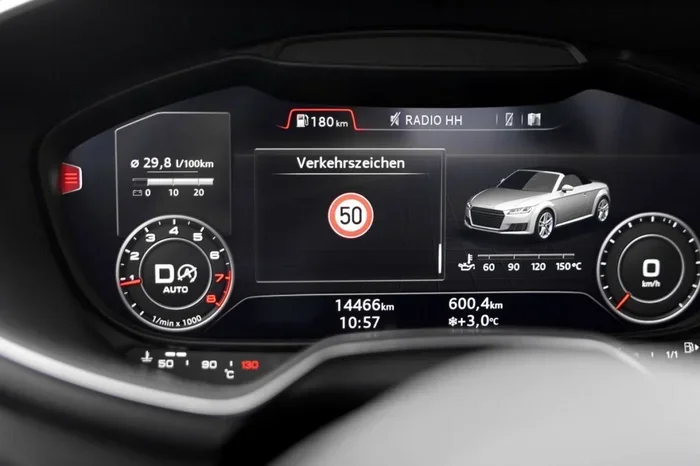
The information then appears on your dashboard display in a clear, easy-to-read format. Some Audi models even show a small icon of the sign itself. The system works during the day and at night, though very poor weather can sometimes affect accuracy.
Audi pre sense technology also connects with traffic sign recognition in some models. This means the car can prepare for upcoming road conditions based on the signs it reads. It is a great example of how Audi active safety features work together.
Which Audi Models Support Traffic Sign Recognition?
Not every Audi has traffic sign recognition, but most newer models do. The feature is especially common in mid-range and luxury trim levels. If you are not sure whether your car has it, check your vehicle settings or consult your owner’s manual.
Audi A4 Traffic Sign Recognition
The Audi A4 is one of the most popular models with this feature. Whether you have the sedan or the wagon (Avant), the A4 offers traffic sign recognition as part of the driver assistance package. You will find the option in the MMI settings under the driver assistance menu.
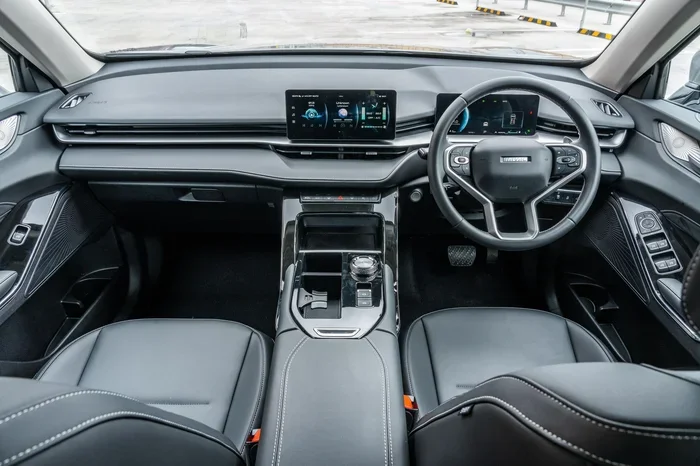
The A4’s Audi virtual cockpit makes the sign display very clear. The digital screen replaces the old analog gauges, giving you a modern and easy-to-read interface. The sign information shows up right in your line of sight.
Audi A6 and Q5 Capabilities
The Audi A6 and Audi Q5 also support traffic sign recognition. These models come with larger display screens, which makes the sign information even easier to read. The Q5, being a SUV, offers a higher driving position that gives the camera a better view of the road ahead.
Both models support the full range of driver assistance features. You can pair traffic sign recognition with adaptive cruise control for a very comfortable highway driving experience. The combination helps you maintain the right speed and stay aware of changing limits.
Step-by-Step Guide to Turn On Traffic Sign Recognition
Turning on traffic sign recognition is straightforward. The exact menu paths may vary slightly depending on your model year and MMI version. But the general process is the same across most Audi vehicles.
Accessing the MMI Menu
Start by pressing the menu button on your MMI infotainment system controller. The MMI system is the central brain of your Audi’s technology features. It controls everything from navigation to audio to driver settings.
If your Audi has the MMI touch display, you can simply tap the screen to access the menu. Older models use a rotary dial and a few buttons on the center console. Either way, the process is simple and intuitive.
Before you dive into the settings, make sure your phone is connected if you plan to use any connectivity features. For example, if you need help putting your phone on pairing mode, check out our guide on Bluetooth setup first. A connected phone can enhance your overall Audi experience.
Navigating to the Driver Assistance Settings
Once you are in the MMI menu, follow these steps:
- Go to the Vehicle or Car settings icon
- Select Driver Assistance or Driver Aid Systems
- Look for Traffic Sign Recognition in the list
- Tap or select it to enter the settings page
On some models, you may need to scroll through a submenu. Look for sections labeled Safety or Assistance Systems. The exact wording depends on your MMI version.
Enabling the Feature
When you find the traffic sign recognition option, toggle it on. The system will start scanning immediately. You should see a small sign icon appear on your dashboard display to confirm it is active.
Here is what to do next:
- Confirm the icon shows on your screen
- Drive a short distance and watch for sign readings
- Check that the speed limit display matches the actual signs you pass
If the system does not turn on, try restarting the MMI system. You can do this by holding down the power button on the infotainment screen for about 10 seconds. The system will reboot and the settings should be retained.
If you are using an iPhone and having trouble with connectivity, you might want to check how to pair your iPhone to your car for a seamless experience with your Audi’s Bluetooth and Apple CarPlay features.
Customizing Your Traffic Sign Display Preferences
Once you have the feature turned on, you can fine-tune how it works for you. Audi offers several customization options that let you control the behavior of traffic sign recognition.
Adjusting Sign Display Sensitivity
Some Audi models let you adjust how sensitive the system is to different signs. You can choose to show only speed limit signs or include all road signs. This is useful if you find the display too busy during your drives.
Go to the traffic sign recognition settings page and look for Display Preferences. From there, you can select which types of signs you want to see. Keeping the display minimal can reduce distractions while still giving you the key information you need.
Setting Speed Limit Warnings
Most Audi models let you set up speed limit warnings. This feature alerts you when you exceed the posted speed limit. You can choose to get a visual warning, an audible beep, or both.
The warning threshold is usually adjustable. You might set it to alert you at 2 mph over the limit, or at 5 mph over. This is a personal preference, and you can change it anytime in the same settings menu.
Keep in mind that this is a driver assistance feature, not a replacement for paying attention to the road. Always follow posted speed limits and drive safely.
Troubleshooting Common Issues
Traffic sign recognition is a reliable system, but it can sometimes have issues. Here are the most common problems and how to fix them.
Why Is My Traffic Sign Recognition Not Working?
If the system is not turning on or not displaying signs, try these steps:
- Check that the feature is enabled in the MMI settings
- Make sure the camera lens is clean and not covered by snow or dirt
- Restart the MMI system by holding the power button
- Check for any software updates available for your Audi
- Verify that your vehicle trim level includes this feature
The most common reason for issues is a dirty camera lens. The road sign camera sits near the top of the windshield. If it is covered by snow, mud, or even a dirty windshield, the system cannot read signs properly.
Camera Maintenance Tips
Keeping the camera lens clean is simple. Here are a few tips:
- Wipe the area near the rearview mirror regularly
- Use a soft microfiber cloth to avoid scratching the lens
- Clear snow or ice before driving in winter
- Avoid placing stickers or accessories near the camera area
A clean camera means accurate sign recognition every time. This small habit can make a big difference in how well the system works.
If you are experiencing issues with other vehicle electronics, sometimes a dead key fob battery can cause unexpected problems. If you are having trouble with your key fob, check out our guide on whether replacing your key fob is easy and affordable.
Benefits of Using Traffic Sign Recognition
Turning on traffic sign recognition gives you several real-world benefits. It is not just a cool tech feature. It genuinely makes your driving experience better and safer.
Safety Advantages
The biggest benefit is improved safety. The system keeps you informed about speed limits and road conditions without you having to scan every sign. This reduces the chance of accidentally speeding or missing an important road warning.
When combined with other Audi active safety features, traffic sign recognition creates a comprehensive safety net. For example, if the system detects a sharp curve sign, it can work with your adaptive cruise control to adjust your speed automatically.
The oncoming vehicle alert and lane departure warning features also complement traffic sign recognition. Together, they help you stay focused and aware of your surroundings at all times.
Convenience While Driving
Traffic sign recognition also adds convenience. You do not have to constantly watch the speedometer and look for speed limit signs. The system does the work for you.
This is especially helpful on long road trips or when driving in unfamiliar areas. The dashboard display keeps you informed at a glance. You can keep your eyes on the road and your hands on the wheel.
The feature also works well with the Audi virtual cockpit. This high-resolution display makes all sign information crisp and clear, even in bright sunlight. It is a premium experience that adds real value to your daily commute and weekend drives alike.
Maximizing Your Traffic Sign Recognition Experience
To get the best results from traffic sign recognition, there are a few things you should keep in mind. These tips will help you use the feature to its full potential.
First, always make sure your software is up to date. Audi regularly releases updates that improve the accuracy of the sign recognition system. You can check for updates through the MMI menu or visit your local Audi dealer.
Second, be aware that the system works best in good weather conditions. Heavy rain, fog, or snow can sometimes reduce the camera’s ability to read signs. This is normal and not a malfunction. The system will resume normal operation once visibility improves.
Third, remember that traffic sign recognition is a driver assistance feature. It is designed to help you, not replace your attention. Always stay alert and follow the actual road signs. The system is a helpful supplement, not a substitute for safe driving.
If you are also interested in other car maintenance topics, such as understanding warning lights on your dashboard, check out our article on whether a check engine light can turn off on its own. Understanding your car’s alerts helps you stay on top of maintenance and keep your vehicle running smoothly.
Conclusion
Turning on traffic sign recognition on your Audi is a simple process that pays off every time you get behind the wheel. Whether you drive an A4, A6, or Q5, this feature adds a valuable layer of awareness and convenience to your drives. The step-by-step process involves accessing your MMI menu, navigating to the driver assistance settings, and toggling the feature on.
Once enabled, you can customize the display preferences and set up speed limit warnings to match your driving style. Keep the camera lens clean, update your software regularly, and remember that this system works best as part of a broader approach to safe driving.
Traffic sign recognition is a great example of how modern car technology features make driving easier and safer. Take a few minutes today to turn it on and experience the difference. Your future drives will be more informed, more relaxed, and more enjoyable.
Frequently Asked Questions
Can I turn on traffic sign recognition on older Audi models?
Traffic sign recognition is available on most Audi models from around 2015 onward. Older models may not have this feature at all. Check your owner’s manual or consult your Audi dealer to confirm whether your specific model year supports it.
Does traffic sign recognition work in all weather conditions?
The system works best in clear or mildly cloudy conditions. Heavy rain, fog, snow, or glare from the sun can sometimes reduce the camera’s accuracy. This is normal and the system resumes normal function once conditions improve.
Can I turn off traffic sign recognition if I do not like it?
Yes, you can turn it off at any time through the same MMI settings menu where you enabled it. Simply toggle the switch to off, and the system will stop displaying road sign information on your dashboard.
Does traffic sign recognition work with the Audi virtual cockpit?
Yes, the feature displays seamlessly on the Audi virtual cockpit. The digital screen shows sign information clearly and integrates it into your main instrument cluster for easy viewing while driving.
Is traffic sign recognition the same as a speed limiter?
No, they are different features. Traffic sign recognition simply displays the speed limit on your screen. A speed limiter actively controls your vehicle’s speed to prevent you from exceeding a set limit. Some Audi models offer both features together.
How often should I clean the traffic sign recognition camera?
It is a good idea to wipe the camera lens area near your rearview mirror once a week or whenever you notice the system is not reading signs accurately. A quick wipe with a soft cloth keeps the camera working at its best.