How to Turn Off the Rear Occupant Alert on a Hyundai
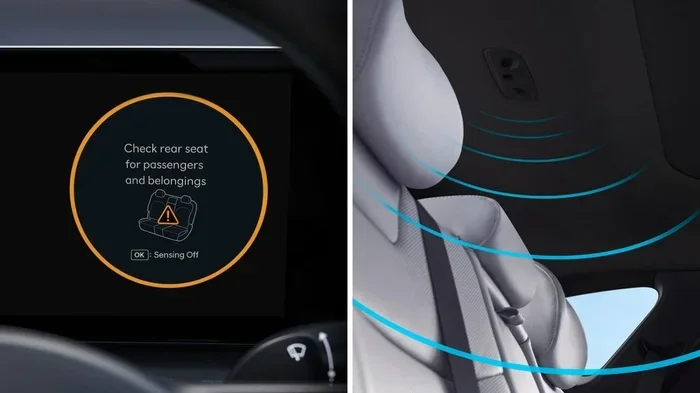
The rear occupant alert on a Hyundai is a safety feature designed to remind drivers to check the back seat. However, if you frequently need to disable it, the process is straightforward on most Hyundai models. This guide walks you through the exact steps to turn off the rear occupant alert on a Hyundai, covers model-specific differences, and answers common questions about the system.
You have been driving your Hyundai for a while, and you keep seeing that annoying notification on the dashboard. It is the rear occupant alert, and it keeps reminding you to check the back seat. If you are someone who frequently has passengers in the rear or you simply find the alert unnecessary, you might be wondering how to turn it off.
Good news. You can turn off the rear occupant alert on a Hyundai, and it is not as complicated as you might think. In this guide, we will walk you through every step, model by model, so you can get that alert silenced in no time.
The rear occupant alert is a safety feature. It is designed to prevent drivers from forgetting children or pets in the back seat. But sometimes, the alert goes off even when there is no one back there, or you simply do need the reminder. Whatever your reason, this article will help you find the right settings on your Hyundai.
Key Takeaways
- Easy Access: The rear occupant alert setting is typically found in the vehicle settings menu on the infotainment screen.
- Model Variations: Different Hyundai models may have slightly different steps to disable the alert.
- Safety First: Even if you turn it off, always make it a habit to check the rear seat before leaving the vehicle.
- Reset Options: Some Hyundai models allow you to reset the alert through a simple button combination on the dashboard.
- Related Alerts: Understanding how other Hyundai alerts work can help you manage your vehicle’s notification system more effectively.
- Model Year Matters: Newer Hyundai models may have updated menus or additional options for managing alerts.
📑 Table of Contents
- Understanding the Rear Occupant Alert System
- How to Turn Off the Rear Occupant Alert on a Hyundai Tucson
- How to Turn Off the Rear Occupant Alert on a Hyundai Santa Fe
- How to Turn Off the Rear Occupant Alert on a Hyundai Sonata
- How to Turn Off the Rear Occupant Alert on a Hyundai Elantra
- What If the Rear Occupant Alert Keeps Coming Back?
- Is It Safe to Turn Off the Rear Occupant Alert?
- Comparing the Rear Occupant Alert Across Hyundai Models
- Related Hyundai Alerts and How to Manage Them
- Tips for Managing Alerts on Your Hyundai
- Frequently Asked Questions
- Conclusion
Understanding the Rear Occupant Alert System
Before you learn how to turn off the rear occupant alert on a Hyundai, it helps to understand what the system does and why it exists. The rear occupant alert uses sensors and software to detect when the rear doors have been opened before a trip. If the system senses that the rear door was opened and then closed but the vehicle is parked without the rear doors being reopened, it assumes something may have been left behind.
How the System Works
The Hyundai rear occupant alert system is part of the broader Hyundai SmartSense safety suite. When you open a rear door before starting your drive, the system takes note. After you turn off the engine and open the driver door, the system checks whether the rear door was reopened. If it was not, the alert triggers.
This feature was introduced to reduce the number of children and pets being accidentally left in hot vehicles. It is a well-intentioned system, but not everyone needs it. Some drivers find it overly sensitive or unnecessary for their daily routine.
Which Hyundai Models Have This Feature?
Most modern Hyundai models come equipped with the rear occupant alert. This includes popular vehicles like the Hyundai Tucson, Hyundai Santa Fe, Hyundai Sonata, and Hyundai Elantra. However, the exact steps to disable the alert may vary depending on your model and the model year of your vehicle.
If you are unsure whether your Hyundai has this feature, check your owner manual or look for the alert notification on your dashboard. The system has been standard in most Hyundai vehicles since around 2019, so if you have a newer model, there is a good chance it is there.
How to Turn Off the Rear Occupant Alert on a Hyundai Tucson
The Hyundai Tucson is one of the most popular compact SUVs on the market, and many Tucson owners want to know how to manage their rear occupant alert. Here is the step-by-step process for the Tucson.
Step-by-Step Instructions for the Tucson
- Start your Hyundai Tucson and make sure the engine is running.
- Press the Home button on the infotainment system to go to the main menu.
- Navigate to Settings. This is usually represented by a gear icon on the screen.
- Select Driver Assistance or Vehicle Settings, depending on your model year.
- Look for Rear Occupant Alert in the list of options.
- Toggle the switch to Off. The alert should now be disabled.
Some Tucson models may have a slightly different menu layout. If you do not see the Rear Occupant Alert option under Driver Assistance, try looking under Vehicle Settings or Safety Settings. The menu structure can change between model years, but the option is always there.
Quick tip: If you are having trouble finding the setting, try using the search function on the infotainment screen. Simply type “rear occupant” or “alert,” and the system should direct you to the right menu.
How to Turn Off the Rear Occupant Alert on a Hyundai Santa Fe
The Hyundai Santa Fe is a mid-size SUV with a slightly different infotainment system than the Tucson. Here is how you can disable the rear occupant alert on this model.
Step-by-Step Instructions for the Santa Fe
- Turn on your Hyundai Santa Fe and access the main infotainment screen.
- Tap the Settings icon on the bottom or side of the screen.
- Scroll down to Vehicle Settings or SmartSense Settings.
- Select Rear Occupant Alert.
- Switch the toggle to Off.
- Confirm the change if prompted by the system.
On some Santa Fe models, particularly those with the larger infotainment screen, you may need to swipe left or right to find the full settings menu. The system is designed to be intuitive, but it can take a few tries to find the right path.
One thing to keep in mind: the Santa Fe has a more advanced safety suite than the Tucson, so there may be additional alert settings you can customize. Take a few minutes to explore the Driver Assistance menu and see what other notifications you can adjust.
How to Turn Off the Rear Occupant Alert on a Hyundai Sonata
The Hyundai Sonata is a reliable sedan, and disabling the rear occupant alert on this model follows a similar process. Here is what you need to do.
Step-by-Step Instructions for the Sonata
- Start the Sonata and let the infotainment system fully boot up.
- Press the Settings button on the dashboard or touchscreen.
- Go to the Vehicle tab or the Safety tab.
- Find Rear Occupant Alert in the list of settings.
- Turn it off by tapping the toggle switch.
The Sonata’s infotainment system is slightly different from the SUV models, but the process is just as simple. If you have trouble locating the setting, use the search bar at the top of the settings menu. Typing “rear occupant” should bring up the right option quickly.
How to Turn Off the Rear Occupant Alert on a Hyundai Elantra
The Hyundai Elantra is a compact sedan that also features the rear occupant alert system. Here is how to turn it off.
Step-by-Step Instructions for the Elantra
- Power on your Elantra and access the infotainment screen.
- Tap the Settings gear icon.
- Navigate to the Safety or Driver Assistance section.
- Select Rear Occupant Alert.
- Disable the alert by switching the toggle to Off.
On older Elantra models, the infotainment system may be slightly less responsive, and the menu options might be organized differently. If you cannot find the Rear Occupant Alert setting, check the owner manual for your specific model year. The system has evolved over the years, and newer models have a more streamlined menu.
What If the Rear Occupant Alert Keeps Coming Back?
Sometimes, even after you turn off the rear occupant alert, it keeps coming back. This can be frustrating, but there are a few reasons why this might happen and simple fixes you can try.
Common Reasons the Alert Returns
- System Reset: Some Hyundai models reset the alert settings after a battery disconnect or a system update.
- Sensor Malfunction: If the rear door sensor is not working properly, the system may keep triggering the alert.
- Software Glitch: Occasionally, the infotainment system may have a minor software issue that causes settings to revert.
- Door Switch Issue: A faulty rear door switch can trick the system into thinking the door was opened.
If the alert keeps returning, try the following steps:
- Restart your infotainment system by holding down the power button for 10 seconds.
- Re-check the settings and make sure the toggle is still set to Off.
- Inspect the rear door sensors for any debris or damage.
- Update your vehicle software if a firmware update is available.
In some cases, you may need to visit a Hyundai dealership to have the system diagnosed. The alert is a safety feature, and the system is designed to prioritize safety over user preferences. However, you should still have the option to disable it if you choose.
Is It Safe to Turn Off the Rear Occupant Alert?
This is an important question, and the answer depends on your personal situation. The rear occupant alert was designed to save lives. It prevents drivers from accidentally leaving children or pets in a parked vehicle, which can be extremely dangerous in hot weather.
Weighing the Pros and Cons
On one hand, the alert can be annoying if you do not have children or pets and the system keeps triggering false alarms. On the other hand, the alert serves as an important safety net. It is a simple reminder that could prevent a tragic accident.
If you decide to turn off the rear occupant alert, make sure you have your own system for checking the back seat before you leave the vehicle. Some drivers place a personal item like a phone or wallet in the back seat as a reminder. This simple habit can serve the same purpose as the electronic alert.
It is also worth noting that if you ever sell or transfer your vehicle, the alert settings will reset to default in most cases. The next owner will have the alert enabled, which is a good safety practice for any vehicle.
Alternative Solutions
If you do not want to fully disable the rear occupant alert but find it too sensitive, there are a few alternative approaches you can try:
- Adjust the sensitivity: Some Hyundai models allow you to adjust how sensitive the rear occupant alert is, rather than turning it off completely.
- Use a reminder app: Instead of relying on the car’s alert system, use your phone to set a reminder to check the back seat.
- Place a visual cue: Keep a stuffed animal or other object in the front seat when the back seat is empty, and move it to the back when someone is riding back there.
These alternatives can help you stay safe without dealing with constant alerts. They are simple, effective, and do not require you to dig through your vehicle settings.
Comparing the Rear Occupant Alert Across Hyundai Models
Not all Hyundai models handle the rear occupant alert the same way. The table below compares the alert system across some of the most popular Hyundai models.
| Model | Alert Location in Menu | Can It Be Turned Off? | Default Behavior |
|---|---|---|---|
| Hyundai Tucson | Settings > Driver Assistance | Yes | On by default |
| Hyundai Santa Fe | Settings > SmartSense Settings | Yes | On by default |
| Hyundai Sonata | Settings > Safety | Yes | On by default |
| Hyundai Elantra | Settings > Driver Assistance | Yes | On by default |
| Hyundai Kona | Settings > Vehicle Settings | Yes | On by default |
As you can see, the rear occupant alert is a standard feature across the Hyundai lineup. The good news is that it can be turned off on all models, though the exact path to the setting varies slightly. The table above should help you find the right menu for your specific Hyundai model.
Related Hyundai Alerts and How to Manage Them
The rear occupant alert is just one of many alerts and notifications on your Hyundai vehicle. Understanding how to manage these alerts can help you keep your dashboard clean and your driving experience more pleasant.
For example, if you are dealing with a check engine light that keeps coming on, you might want to learn how to diagnose the issue or understand whether it is safe to drive. Similarly, if you have a maintenance required light, you can often continue driving for a while, but it is important to understand what that light means for your vehicle’s health.
Some drivers also wonder about resetting warning lights after they have been addressed. Knowing how to manually clear car codes can save you a trip to the dealership and help you stay on top of your vehicle’s maintenance needs.
Every alert on your dashboard serves a purpose, but not every alert needs to be on at all times. Taking the time to understand your vehicle’s notification system gives you more control over your driving experience.
Tips for Managing Alerts on Your Hyundai
Here are some quick tips to help you manage all the alerts and notifications on your Hyundai vehicle:
- Review your owner manual regularly. It contains detailed information about every alert and notification on your vehicle.
- Customize your settings to match your driving habits and preferences.
- Keep your infotainment system updated to ensure you have the latest features and bug fixes.
- Do not ignore persistent alerts. If a warning light stays on, have it checked by a professional as soon as possible.
- Take advantage of the search function in your settings menu to quickly find specific options.
Managing your vehicle’s alerts is an important part of being a responsible car owner. It keeps you informed, safe, and in control of your driving experience.
Frequently Asked Questions
Can I turn off the rear occupant alert on all Hyundai models?
Yes, the rear occupant alert can be turned off on all Hyundai models that have the feature. The exact steps vary by model, but the option is always available in the vehicle settings menu. Check your owner manual if you are unsure where to find the setting on your specific model.
Will turning off the rear occupant alert affect my warranty?
No, turning off the rear occupant alert will not affect your Hyundai warranty. The feature is a convenience setting, and disabling it is perfectly within your rights as a vehicle owner. However, it is always a good idea to check with your dealership if you have specific concerns about your warranty coverage.
Does the rear occupant alert come back after a car battery replacement?
In most cases, yes. After a battery replacement or a power loss, the rear occupant alert settings may reset to their default state, which means the alert will be turned back on. You will need to go into the settings menu and disable it again.
Can I adjust the sensitivity of the rear occupant alert instead of turning it off?
Some Hyundai models allow you to adjust the sensitivity of the rear occupant alert rather than turning it off completely. Check your vehicle settings menu for options related to alert sensitivity. If your model does not have this option, you can only turn the alert fully on or fully off.
Is the rear occupant alert the same as a check engine light?
No, the rear occupant alert is not the same as a check engine light. The rear occupant alert is a reminder system designed to prompt you to check the back seat. A check engine light indicates a mechanical or electrical issue with the vehicle. If your check engine light is on, you should address it promptly, as it could signal a problem that needs professional attention.
What should I do if the rear occupant alert will not turn off?
If the rear occupant alert will not turn off even after you have disabled it in the settings menu, try restarting your infotainment system. If the problem persists, check for any software updates for your vehicle. You can also consult your owner manual or contact a Hyundai dealership for assistance. In rare cases, a faulty sensor may need to be replaced.
Conclusion
Turning off the rear occupant alert on a Hyundai is a simple process that can be done in just a few minutes. Whether you drive a Tucson, Santa Fe, Sonata, Elantra, or any other Hyundai model, the steps are similar and easy to follow. Just remember that the rear occupant alert exists for a reason, and if you choose to disable it, you should have your own system in place to check the back seat before you leave the vehicle.
Take a few minutes today to explore your vehicle settings and customize the alerts to suit your needs. A well-managed notification system makes for a better driving experience and helps you stay in control of your vehicle. And if you ever need help with other vehicle alerts or maintenance questions, there are plenty of resources available to guide you through the process.
Stay safe, stay informed, and enjoy the full capabilities of your Hyundai vehicle.