How to Check the BSD System on Your Hyundai Vehicle
Checking the BSD system on your Hyundai is essential for safe driving. The Blind Spot Detection system uses sensors near the rear quarter panels to alert you of vehicles in your blind spots. This guide walks you through everything from understanding how the system works to performing a basic check at home and knowing when to seek professional help.
Driving a Hyundai comes with a lot of modern safety tech. One of the most important systems is the Blind Spot Detection, or BSD system. This system keeps you aware of vehicles lurking beside your car when you change lanes. But what happens when it stops working? How do you check the BSD system on your Hyundai? This guide covers everything you need to know in plain, simple language.
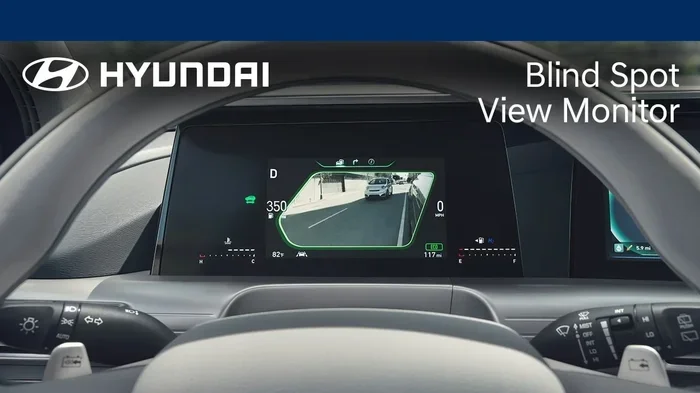
The BSD system uses sensors mounted near the rear quarter panels. These sensors watch the areas beside and slightly behind your vehicle. When a car enters your blind spot, the system warns you with a light on the side mirror. Some Hyundais also beep or vibrate the steering wheel. It is a great feature. But like any tech, it can have problems. Knowing how to check it helps you stay safe.
In this article, we will walk you through each step. You will learn what the BSD system does, how to spot warning signs, and how to run a basic check yourself. We also cover common problems and when to visit a mechanic. By the end, you will feel confident about your Hyundai’s safety systems.
Key Takeaways
- The BSD system is a critical safety feature that helps prevent lane-change collisions on Hyundai vehicles.
- Warning lights on your dashboard are the first sign that your BSD system needs attention.
- You can perform basic BSD checks at home by inspecting sensors and testing the system through your vehicle’s settings.
- Common problems include dirty sensors, blown fuses, and wiring issues that are often easy to fix.
- Regular maintenance keeps your BSD system functioning properly and extends its lifespan.
- Professional diagnostics are recommended if basic troubleshooting does not resolve BSD warnings.
- Understanding your Hyundai’s BSD features helps you drive more confidently and safely every day.
📑 Table of Contents
- What Is the BSD System on a Hyundai?
- Warning Signs That Your BSD System Needs Checking
- How to Check the BSD System on Your Hyundai
- Common BSD System Problems and Solutions
- Maintaining Your Hyundai BSD System
- When to Seek Professional Help
- Cost of BSD System Repairs
- Frequently Asked Questions
- Final Thoughts
What Is the BSD System on a Hyundai?
The Blind Spot Detection system is a driver assistance feature. It is designed to reduce accidents during lane changes. The system relies on radar sensors placed in the rear bumper area. These sensors scan the blind spots on both sides of the vehicle. When they detect a car in those zones, they send a warning to the driver.
How the BSD Sensors Work
Each sensor sits on the left and right sides of the rear bumper. They use radar waves to detect moving objects. The waves bounce off nearby vehicles and return to the sensor. The system then calculates the distance and speed of the approaching car. If a vehicle is too close, the warning light activates on the corresponding side mirror.
Most Hyundai models with BSD also include a lane change assist feature. This means the system becomes more sensitive when you turn on your turn signal. If you flip on your blinker and there is a car beside you, the warning will alert you. Some models even apply a subtle steering correction to keep you safe.
Which Hyundai Models Have BSD?
Not every Hyundai comes with BSD standard. It is often found on higher trim levels. Here are some common Hyundai models that offer the BSD system:
- Hyundai Tucson – Available on SEL and above trims.
- Hyundai Santa Fe – Standard on most trims.
- Hyundai Sonata – Available on Limited and Touring trims.
- Hyundai Tucson Hybrid – Includes BSD as part of the safety package.
- Hyundai Santa Fe Hybrid – Comes with BSD on most configurations.
- Hyundai Elantra – Available on higher trims.
- Hyundai Kona – Offers BSD on select trims.
Check your owner’s manual to confirm if your specific model and trim include BSD. The system may be part of a larger safety package called Hyundai SmartSense. This package bundles several driver-assist features together.
Warning Signs That Your BSD System Needs Checking
Your car tells you when something is wrong. The BSD system is no different. Paying attention to warning signs can save you from bigger problems later. Here are the most common signals that your BSD needs attention.
BSD Warning Light on the Dashboard
The most obvious sign is a BSD warning light on your dashboard. It usually looks like a car with curved lines on the side. When this light stays on, it means the system has detected a fault. Sometimes the light appears as a yellow or amber icon. Other times it may be red, which means a more serious issue.
If you see the BSD warning light, do not ignore it. The system may not be working at all. Or it may be working partially. Either way, you are losing an important safety feature. You should check it as soon as possible.
Side Mirror Indicators Not Working
The side mirror indicators are the small lights on your side mirrors. They flash when a vehicle is detected in your blind spot. If these lights stop working, the BSD system may be malfunctioning. Sometimes the bulbs burn out. Other times the issue is with the sensor or the wiring.
False Alerts or No Alerts at All
A healthy BSD system gives accurate warnings. If you start getting false alerts with no cars nearby, something is off. On the flip side, if a car is clearly in your blind spot and you get no warning, the system has failed. Both situations are dangerous. You should investigate the cause right away.
System Turns Off Randomly
Some drivers report that their BSD system turns off by itself. This can happen after a bump or a rough drive. If the system keeps shutting down, there is likely an underlying issue. It could be a loose connection, a faulty sensor, or a problem with the control module.
How to Check the BSD System on Your Hyundai
Now let us get into the practical part. You do not need to be a mechanic to check your BSD system. With a few simple steps, you can run a basic inspection at home. Here is how to do it.
Step 1: Check the Warning Lights
Start by turning the ignition on without starting the engine. Look at your dashboard for any warning lights. If the BSD warning light is on, the system has flagged an issue. Note the color of the light. Yellow usually means a minor fault. Red means a serious problem that needs immediate attention.
Next, start the engine and let the car warm up for a minute. Watch the dashboard. The BSD light should turn off after the system completes its self-check. If it stays on, the system has a problem that needs diagnosis.
Step 2: Inspect the BSD Sensors
The BSD sensors are located on the rear bumper, one on each side. Walk around your car and look at these areas. Check for any visible damage like cracks, dents, or dirt buildup. The sensors need a clear path to work properly. Mud, snow, or debris can block them and cause false readings.
Use a soft cloth to gently clean the sensor areas. Do not use harsh chemicals. A simple wipe with a damp cloth is usually enough. After cleaning, drive a short distance and see if the warning light goes away. Sometimes dirt alone is the culprit.
Step 3: Test the System Through Vehicle Settings
Most Hyundai models let you check the status of safety systems through the infotainment screen. Here is how to access it:
- Press the Settings button on your touchscreen.
- Navigate to the Driver Assistance or Safety menu.
- Look for Blind Spot Detection or BSD settings.
- Check if the system is turned on and active.
- Look for any error messages or notifications.
If the settings show that BSD is disabled, try turning it back on. Sometimes the system gets toggled off accidentally. If it will not turn on or shows an error code, you may need to dig deeper.
Step 4: Check the Fuse Box
A blown fuse can disable your BSD system. Open your fuse box cover, which is usually under the dashboard on the driver’s side. Look for the fuse labeled BSD or ADAS (Advanced Driver Assistance Systems). Use a fuse tester or visual inspection to check if the fuse is intact.
If the fuse is blown, replace it with one of the same amperage. You can find the correct fuse rating in your owner’s manual. If the new fuse blows right away, there is a deeper electrical issue that needs professional attention.
Step 5: Clear Error Codes
If your BSD system has stored error codes, clearing them can sometimes reset the system. You can do this a couple of ways. One option is to disconnect the car battery for about 15 minutes. This resets the electrical system and clears temporary codes.
Another option is to use an OBD-II scanner. Plug the scanner into the diagnostic port under your dashboard. The scanner reads the error codes stored in your car’s computer. You can then decide whether the issue is something you can fix or if you need a mechanic. Some owners also try to manually clear car codes using the vehicle’s built-in controls.
After clearing the codes, drive the car and see if the BSD warning light returns. If it does, the problem is persistent and needs further diagnosis. If it stays off, the issue was likely temporary.
Step 6: Perform a Road Test
The best way to verify that your BSD system is working is to test it on the road. Find a safe area with light traffic. Drive at highway speed and check your blind spot manually. Then, have a friend drive slowly past you in the adjacent lane while you watch your side mirrors.
If the mirror indicator lights up and you hear a beep, the system is working. If nothing happens, the system is still malfunctioning. Repeat the test on both sides to check both sensors. A road test confirms whether your troubleshooting efforts were successful.
Common BSD System Problems and Solutions
Even with regular care, BSD systems can develop issues. Understanding the most common problems helps you troubleshoot faster. Here are the top issues Hyundai owners face with their BSD systems.
Dirty or Covered Sensors
This is the most common cause of BSD problems. The sensors sit on the rear bumper and are exposed to road grime. Dirt, mud, ice, and snow can block the radar waves. When the sensors cannot read properly, the system may give false alerts or no alerts at all.
The fix is simple. Clean the sensor areas with a soft, damp cloth. Avoid high-pressure washers directly on the sensors. After cleaning, the system should return to normal operation.
Faulty Wiring or Connectors
The sensors connect to the car’s computer through wiring harnesses. Over time, these wires can become loose, corroded, or damaged. Road debris and moisture can cause corrosion at the connection points. A loose wire means the sensor cannot send data to the control module.
Inspect the wiring connections if you have access to the rear bumper area. Look for frayed wires or greenish corrosion on the connectors. If you find damage, a professional repair is recommended. Wiring repairs require precision and knowledge of the car’s electrical system.
Failed BSD Control Module
The BSD control module is the brain of the system. It processes data from both sensors and sends commands to the warning lights. If the module fails, the entire BSD system goes down. This is a less common issue but more expensive to fix.
Symptoms of a failed control module include persistent warning lights, no alerts from either side, and error codes that do not clear after resetting. A mechanic can diagnose a faulty module using specialized diagnostic tools.
Software Glitches
Modern cars run on software. Sometimes a software glitch causes the BSD system to behave oddly. The system might give false alerts, or the warning light might stay on even when everything is working fine. Software glitches are more common after a battery disconnect or a power surge.
A software update from the dealership can usually fix this. You can also try resetting the system by disconnecting the battery for 15 minutes. If the problem persists, a dealership visit may be needed to flash the software.
Aftermarket Accessories Interference
Adding aftermarket accessories like tow bars, bike racks, or aftermarket bumpers can interfere with BSD sensors. These accessories can block the radar signals or disrupt the sensor calibration. If you installed any new accessories before the BSD issues started, consider removing them temporarily to test.
If removing the accessories fixes the problem, you may need to have the sensors recalibrated. Some accessories require professional installation to avoid interfering with safety systems.
Maintaining Your Hyundai BSD System
Prevention is always better than repair. Regular maintenance keeps your BSD system working reliably. Follow these tips to protect your blind spot detection system for the long haul.
Keep the Sensors Clean
Make it a habit to clean the rear bumper area when you wash your car. Pay special attention to the sensor locations. A quick wipe during your regular car wash can prevent most sensor-related issues. This is one of the simplest things you can do to maintain your BSD system.
Address Warning Lights Promptly
Never ignore a warning light on your dashboard. Even if the car seems to drive fine, a lit warning light means something is wrong. The BSD system might be partially functional, but you are still losing protection. The longer you wait, the worse the problem can get.
Sometimes a warning light comes on after a minor electrical glitch. If the light goes away after a few drives, you may be fine. But if it stays on, get it checked. You can also try clearing the check engine light yourself if it is related, but be cautious and understand what codes you are clearing.
Schedule Regular Vehicle Inspections
Include your BSD system in your regular vehicle inspection routine. During oil changes or scheduled maintenance, ask the technician to check the blind spot sensors. Many service centers can run a quick diagnostic check on the ADAS systems during a routine visit.
Regular inspections catch small problems before they become big ones. A sensor that is slightly misaligned today can become a full failure next month. Catching it early saves you money and keeps you safe.
Protect the Rear Bumper Area
The BSD sensors are mounted on the rear bumper. Any damage to this area can affect the system. Avoid parking too close to walls or other cars. Be careful when driving through tight spaces where the rear bumper might get scraped or bumped.
If you do get a bump or dent near the sensor area, get it inspected. Even a small dent can misalign the sensor or damage the wiring underneath. A quick check after any rear-end incident can save you from BSD system problems down the road.
When to Seek Professional Help
There is a limit to what you can do at home. Some BSD issues require professional tools and expertise. Here are signs that it is time to visit a mechanic or dealership.
- The BSD warning light stays on after you have cleaned the sensors and checked the fuses.
- Error codes keep returning after you clear them.
- Both side sensors are not working at the same time.
- You hear unusual sounds from the rear bumper area when the system is active.
- The system triggers random alerts even when no other vehicles are nearby.
- You have been in an accident that affected the rear of the vehicle.
Professional diagnostics use specialized scanners that can read ADAS-specific codes. These tools go beyond what a basic OBD-II scanner can do. A trained technician can pinpoint the exact issue and recommend the right repair. It is always better to get a proper diagnosis than to keep guessing.
If you are wondering about other warning lights on your Hyundai, you might want to learn more about whether a check engine light can go off by itself. Understanding how warning systems behave can help you make better decisions about when to act.
Cost of BSD System Repairs
The cost of fixing a BSD system varies depending on the problem. Here is a rough breakdown of what you might expect:
- Sensor cleaning – Free if you do it yourself. Around $50 to $100 if done at a shop.
- Fuse replacement – Very affordable, usually under $10 for the part.
- Wiring repair – Typically $100 to $300 depending on the extent of damage.
- Sensor replacement – Can range from $200 to $500 per sensor including labor.
- Control module replacement – The most expensive option, ranging from $500 to $1,200.
- Software update – Usually free or low-cost at a dealership.
These costs can vary by region and model year. Always get a quote before approving any repair. Some issues, like a simple sensor cleaning, cost nothing. Others, like a control module replacement, can be significant. Knowing the potential costs helps you budget for repairs.
Frequently Asked Questions
Can I drive my Hyundai safely if the BSD light is on?
You can still drive your Hyundai with the BSD light on, but you lose an important safety feature. The blind spot system will not alert you when vehicles are beside you. Be extra cautious when changing lanes and always check your mirrors manually. Have the system checked as soon as possible to restore full functionality.
How often should I clean the BSD sensors on my Hyundai?
Cleaning the BSD sensors once a month is a good practice. You should also clean them after driving through muddy or snowy conditions. Regular cleaning prevents dirt buildup that can block the radar signals. A quick wipe with a damp cloth takes only a few minutes and can prevent many BSD issues.
Can a low battery cause BSD problems?
Yes, a low or weak car battery can cause BSD system malfunctions. The BSD system relies on a stable electrical supply to operate correctly. If your battery is old or failing, it may not provide consistent power to the sensors and control module. Consider testing your battery if you experience intermittent BSD warnings.
Does weather affect the BSD system?
Yes, severe weather can temporarily affect the BSD system. Heavy rain, snow, or ice on the sensors can block radar signals. The system may give false alerts or no alerts during extreme weather. This is normal and usually resolves once the sensors are clear. However, persistent issues after weather clears should be investigated.
Can I reset the BSD system myself?
You can try resetting the BSD system by disconnecting the battery for 15 minutes. This clears temporary error codes and resets the electrical system. However, if the underlying problem is not fixed, the warning light will come back. A reset is a temporary solution, not a permanent fix. Use it as a first step before seeking professional help.
Is BSD the same as a rear cross-traffic alert?
No, BSD and rear cross-traffic alert are different systems. BSD monitors the sides of your vehicle when you are driving in a lane. Rear cross-traffic alert monitors behind your vehicle when you are backing up. Both are part of the blind spot safety family, but they cover different areas and serve different purposes.
Final Thoughts
Your Hyundai’s BSD system is a valuable safety feature that deserves your attention. Checking it regularly keeps you and your passengers safe on the road. The steps in this guide give you everything you need to run a basic inspection at home. From cleaning the sensors to testing the system through your settings, you can catch problems early and save money on repairs.
Remember to pay attention to warning lights and never ignore them. Keep the sensors clean and protect the rear bumper area. When problems go beyond basic troubleshooting, do not hesitate to visit a professional. A properly functioning BSD system gives you confidence every time you change lanes.
Take a few minutes today to check your Hyundai’s BSD system. It is one of the best things you can do for your safety. Stay alert, stay informed, and drive with confidence knowing your blind spot detection is working the way it should.