How Do I Turn Off Voice Assistant Mode on Android and iPhone
Turning off voice assistant mode is easier than you think, whether you use an Android phone or an iPhone. This guide walks you through every step to disable Google Assistant, Siri, and other voice controls on your device. You will learn quick settings tweaks, automotive tips, and expert fixes for common problems.
Have you ever been driving down the road and suddenly your phone starts listening to everything you say? Maybe you said something that sounded like a wake word, and your voice assistant mode kicked in out of nowhere. It can be frustrating, distracting, and even a little scary when you realize your phone is always “on.”
The good news is that you can turn off voice assistant mode on both Android and iPhone devices. It only takes a few minutes, and once you do, you will have more privacy and fewer interruptions. Whether you are dealing with accidental activations in your car or just want a quieter phone, this guide has you covered.
We will walk you through every step, from basic settings to automotive-specific tips. By the end, you will know exactly how to disable voice commands, stop unwanted wake-ups, and take full control of your device. No tech degree required. Just simple, clear instructions that actually work.
Key Takeaways
- Quick Access: You can turn off voice assistant mode in just a few taps on both Android and iPhone.
- Android Flexibility: Google Assistant settings give you full control over voice wake words and hands-free activation.
- iPhone Simplicity: Siri can be disabled through the Settings app with clear, straightforward steps.
- Automotive Awareness: Voice assistant mode in your car works differently and needs specific steps to turn off.
- Troubleshooting Help: Common issues like persistent voice activation have simple fixes you can try right away.
- Smart Usage: There are good reasons to keep voice assistant on, so know when it helps versus when it annoys.
📑 Table of Contents
- What Is Voice Assistant Mode and Why Turn It Off?
- How to Turn Off Voice Assistant Mode on Android
- How to Turn Off Voice Assistant Mode on iPhone
- Voice Assistant in Your Car: Automotive Considerations
- Common Problems When Turning Off Voice Assistant
- When Should You Keep Voice Assistant On?
- Final Thoughts on Turning Off Voice Assistant Mode
What Is Voice Assistant Mode and Why Turn It Off?
Voice assistant mode is a feature on smartphones that listens for specific wake words. On Android, it is usually “Hey Google” or “OK Google.” On iPhone, it is “Hey Siri.” When the assistant hears these words, it wakes up and waits for your command. This hands-free voice control is designed to make life easier, but it can also cause problems.
Many people want to disable voice assistant because of accidental triggers. You might be talking to a passenger, singing in the car, or watching a movie, and suddenly your phone jumps in. This is called a false activation, and it happens more often than you might think. The assistant is always listening, which raises privacy concerns for some users.
Why People Choose to Turn Off Voice Commands
There are several real reasons people look for ways to turn off voice assistant mode. Let us look at the most common ones:
- Privacy concerns: You may not want your phone always listening to your conversations.
- Accidental triggers: Watching a movie or TV show can cause your phone to activate randomly.
- Battery drain: The always-listening feature uses extra power, especially on Android devices.
- Distractions: In the car, unwanted voice prompts can pull your attention away from the road.
- Annoyance: Sometimes the assistant just gets in the way when you do not want it there.
No matter which reason applies to you, the fix is simple. The next few sections will show you exactly how to do it on both platforms.
How to Turn Off Voice Assistant Mode on Android
Android phones give you a lot of control over your voice assistant settings. Google Assistant is built into most Android devices, and you can customize or completely disable it. Here is how to do it step by step.
Step-by-Step Guide to Disable Google Assistant
Follow these steps to turn off voice assistant mode on your Android phone:
- Open the Settings app on your phone.
- Scroll down and tap on Google or Apps, depending on your device.
- Look for Google Assistant and tap on it.
- Find the section labeled Hey Voice Match or Voice Match.
- Toggle off the switch next to Hey Google.
- Confirm your choice when prompted.
Once you do this, your phone will no longer respond when you say “Hey Google.” The voice recognition feature will be turned off, and you will not get random activations anymore.
Alternative Methods for Android Devices
Some Android phones have slightly different menus, but the process is similar. Here are a few other ways to disable voice assistant on Android:
- Long-press the home button: Go to settings for the Google app and turn off voice search.
- Use Do Not Disturb mode: This silences all voice triggers and notifications temporarily.
- Disable the Google App: Go to Settings, then Apps, find Google, and disable it entirely.
Each method works well, but the first one is the most direct. If you want to completely remove the assistant, disabling the Google App is the most thorough approach.
Quick Tips for Android Users
- Restart your phone after making changes to ensure the new settings take effect.
- Check for updates to make sure your settings menu looks the latest version.
- Test your changes by saying “Hey Google” out loud to confirm it no longer responds.
These small tips save a lot of headaches. You will know right away if the voice wake word has been successfully disabled.
How to Turn Off Voice Assistant Mode on iPhone
If you use an iPhone, the process to turn off voice assistant mode is just as straightforward. Apple’s Siri is deeply integrated into iOS, but you can turn it off whenever you want. Here is everything you need to know.
Disabling Siri on Your iPhone
Follow these steps to disable voice assistant on your iPhone:
- Open the Settings app on your iPhone.
- Scroll down and tap on Siri & Search.
- Toggle off Listen for “Hey Siri”.
- Also toggle off Press Side Button for Siri.
- If you want to go further, turn off Allow Siri When Locked as well.
That is it. Your iPhone will no longer listen for the wake phrase “Hey Siri.” The voice control feature will be fully disabled, and you will not get any accidental activations.
Additional iPhone Settings to Consider
There are a few more settings you should check if you want a completely quiet phone:
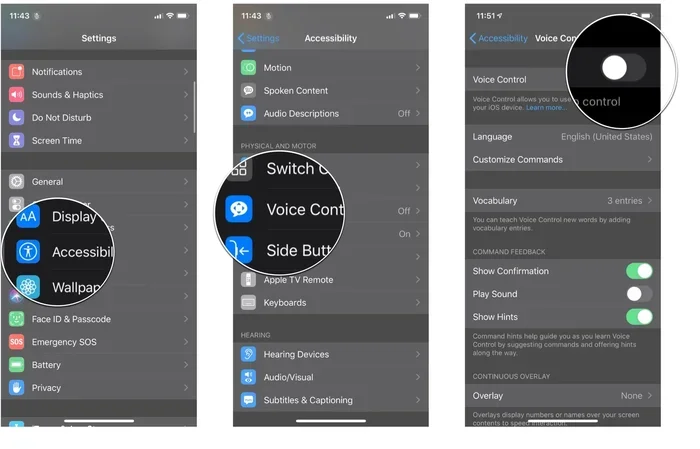
- Turn off Voice Control: Go to Settings, then Accessibility, then Voice Control, and toggle it off.
- Disable Siri Suggestions: In the Siri & Search menu, turn off suggestions for each app individually.
- Remove Siri from the Car: If your car supports CarPlay, go to CarPlay settings and disable Siri voice prompts.
These extra steps ensure that voice activation settings on your iPhone are fully turned off. You will notice the difference right away.
Quick Tips for iPhone Users
- Reset all settings if Siri keeps coming back after you turn it off.
- Update your iOS to the latest version for the most accurate settings menu.
- Test by saying “Hey Siri” to make sure the assistant no longer responds.
Apple makes it easy to manage Siri, but sometimes settings can get reset after a software update. Always double-check after updating your phone.
Voice Assistant in Your Car: Automotive Considerations
When it comes to the automotive world, voice assistant mode works a bit differently. Many modern cars come with built-in voice control systems. These systems use hands-free voice commands to control navigation, music, phone calls, and more. While this is helpful, it can also cause distractions while driving.
How Car Voice Assistants Work
Most cars today have a digital assistant built into the infotainment system. Some cars use Android Auto or Apple CarPlay, which bring your phone’s voice assistant into the car. Others have their own built-in systems from brands like Ford, BMW, or Toyota. These systems listen for voice commands and respond accordingly.
The problem is that these assistants can sometimes activate when you do not want them to. Maybe you are talking to your passenger, or maybe a song on the radio contains a phrase that sounds like a wake word. Either way, it can be distracting and even dangerous when you are behind the wheel.
How to Turn Off Voice Assistant in Your Vehicle
Here is how you can turn off voice assistant mode in most cars:
- Go to the infotainment settings: Look for the settings menu on your car’s display screen.
- Find the voice assistant section: This might be labeled “Voice Control,” “Assistant,” or “Voice Commands.”
- Toggle off the voice assistant: Turn off the switch for the assistant feature.
- Disable wake words: If your car uses “Hey [Brand Name]” wake words, turn those off too.
- Turn off microphone access: Some systems let you disable the microphone entirely.
Keep in mind that turning off the voice assistant in your car may also disable certain voice control features you use for navigation and music. You may need to use manual controls instead, but many drivers prefer that over constant accidental activations.
Automotive Brands and Their Voice Assistants
Different car brands use different voice assistant systems. Here is a quick look at some popular ones:
- Ford SYNC: Uses Ford’s own voice command system. You can disable it in the SYNC settings menu.
- BMW iDrive: BMW has a built-in assistant. Go to Settings, then Voice Control, to turn it off.
- Toyota Entune: Toyota’s system can be disabled through the audio or settings menu on the display.
- Android Auto: If you use Android Auto, you can turn off Google Assistant directly from the app settings.
- Apple CarPlay: CarPlay uses Siri. Disable Siri on your iPhone, and CarPlay voice commands will also turn off.
Knowing which system your car uses helps you find the right settings faster. Always refer to your car’s manual if you cannot find the voice settings.
Common Problems When Turning Off Voice Assistant
Even when you follow the steps carefully, things do not always go smoothly. Here are some common problems people face when trying to turn off voice assistant mode and how to fix them.
The Assistant Keeps Coming Back
Sometimes after you turn off the voice assistant, it turns back on after a software update or a phone restart. This is a known issue on both Android and iPhone. The fix is simple: go back into the settings and toggle it off again. To prevent this from happening, check your settings once a month to make sure everything is still disabled.
Accidental Activations Still Happen
If your phone is still activating when you do not want it to, try these fixes:
- Clear the voice recognition data: Go to Google Settings on Android and reset voice match.
- Remove re-enrolled voice models: This forces the assistant to forget your voice entirely.
- Check for third-party apps: Some apps have their own voice features that might still be active.
Voice Commands Still Work After Disabling
On some Android phones, the Google Search widget can still trigger voice search even after you disable the assistant. To fix this, go to the Google app settings and turn off “Voice Search.” On iPhone, make sure you also disable “Voice Control” in the Accessibility settings.
Expert Insight: Many users do not realize that disabling the voice assistant does not always turn off all voice-related features. Check for related settings like “Voice Search,” “Voice Access,” and “Voice Commands” to make sure everything is fully disabled.
When Should You Keep Voice Assistant On?
Even though we are showing you how to turn off voice assistant mode, there are times when keeping it on makes sense. Voice assistants can be genuinely helpful when used the right way.
If you use hands-free voice control a lot while driving, turning it off completely might not be the best idea. Instead, consider adjusting the sensitivity or changing the wake word to something less likely to trigger accidentally. You can also set your phone to “Do Not Disturb” while driving, which reduces activations without fully disabling the assistant.
People who rely on voice commands for accessibility also benefit from keeping the assistant active. If you have a disability that makes tapping and typing difficult, voice recognition can be a lifeline. In these cases, the solution is not to turn it off but to fine-tune it to work better for you.
The key is balance. You want your phone to help you, not distract you. Knowing how and when to use voice assistant settings gives you that control.
Final Thoughts on Turning Off Voice Assistant Mode
Turning off voice assistant mode on both Android and iPhone is a simple process that can make a big difference in your daily life. Whether you are tired of accidental activations, worried about privacy, or just want fewer distractions in the car, the steps in this guide will help you get there.
Remember that every device is a little different, but the general process is the same across Android and iPhone. Go to your settings, find the voice assistant or Siri section, and toggle it off. If you drive a car with a built-in system, check the infotainment settings as well.
Take a few minutes today to go through these steps. You will be surprised how much quieter and less distracting your phone becomes. Once you experience the difference, you will wonder why you did not do it sooner.
Stay in control of your device. Stay safe on the road. And most importantly, enjoy a phone that works the way you want it to.
Frequently Asked Questions
Can I turn off voice assistant mode on a Samsung phone?
Yes, Samsung phones use Google Assistant, so you can turn it off the same way as any other Android device. Go to Settings, then Google, then Google Assistant, and toggle off Hey Google. Samsung also has its own Bixby assistant, which you can disable separately in the Bixby settings.
Will turning off voice assistant save battery life?
Yes, it can. The always-listening feature uses extra battery power because your phone’s microphone stays active. Turning off voice assistant mode reduces this drain and can help your phone last longer between charges.
Can I still use voice commands after turning off the assistant?
You can still use voice commands manually by pressing and holding the home button or side button. However, the assistant will not wake up automatically when you say the wake word. This gives you control over when voice commands are used.
How do I turn off voice assistant mode in my car?
Go to your car’s infotainment settings and look for the voice assistant or voice control option. Toggle it off. If you use Android Auto or Apple CarPlay, you can also manage voice assistant settings through your phone’s settings before connecting to the car.
What is the difference between Siri and Google Assistant?
Siri is Apple’s voice assistant found on iPhones, while Google Assistant is Google’s voice assistant found on most Android phones. Both respond to wake words and voice commands, but they have different features, settings, and integration with other apps and devices.
Can I re-enable voice assistant mode after turning it off?
Absolutely. You can turn it back on anytime by going to the same settings where you turned it off. Simply toggle the switch back on and follow the setup prompts if needed. It only takes a few seconds to re-enable.