How Do I Pay My Toyota Financial Bill Right Now
Paying your Toyota Financial bill is simple once you know your options. You can make payments online through the Toyota Financial Services portal, by phone, by mail, or set up automatic payments. This guide walks you through every payment method, answers common questions, and helps you avoid late fees.
Have you just received your Toyota Financial bill and wondering how to get it paid? You are not alone. Thousands of Toyota owners face the same question every month. Whether you have a Toyota loan or a Toyota lease, understanding your payment options makes life much easier.
Paying your Toyota Financial bill does not have to be stressful. There are several straightforward ways to make your payment. You can do it online from your couch, call in your payment over the phone, or even mail a check. This guide covers every method in detail so you can pick what works best for you.
In this article, we will walk through each payment method step by step. We will also cover how to set up automatic payments, what to do if you miss a due date, and when it makes sense to consider refinancing your Toyota loan. Let us get started.
Key Takeaways
- Multiple Payment Options: Pay online, by phone, by mail, or set up automatic payments with Toyota Financial Services.
- Online Portal Is Fastest: Logging into your Toyota account lets you pay instantly and check your balance anytime.
- Avoid Late Fees: Knowing your payment due date and setting reminders keeps your account in good standing.
- Refinancing Is an Option: If payments feel too high, you can explore refinancing your Toyota loan with the same lender.
- Lease Payments Work Differently: If you have a Toyota lease, your payment structure and end-of-lease options differ from a loan.
📑 Table of Contents
- Understanding Your Toyota Financial Account
- How to Pay Your Toyota Financial Bill Online
- Other Ways to Pay Your Toyota Financial Bill
- Setting Up Automatic Payments
- What to Do If You Miss a Payment Due Date
- When to Consider Refinancing Your Toyota Loan
- Common Mistakes to Avoid When Paying Your Toyota Financial Bill
- Quick Tips for a Smooth Payment Experience
- Final Thoughts
Understanding Your Toyota Financial Account
Before you make a payment, it helps to understand what type of account you have. Toyota Financial Services handles both Toyota loans and Toyota leases. The payment process is similar for both, but there are some differences you should know about.
Toyota Loan vs. Toyota Lease Payments
When you finance a Toyota vehicle, you borrow money to buy the car. You make monthly payments until the loan is paid off. A Toyota lease works differently. You essentially rent the vehicle for a set period, usually two to four years. Lease payments are typically lower than loan payments because you are only paying for the vehicle’s depreciation.
Both loan and lease payments include a monthly amount due. Your bill may also include interest charges, fees, and any insurance-related costs if you rolled those into your financing. Understanding what is on your bill helps you pay correctly and avoid confusion.
How to Find Your Account Details
To pay your Toyota Financial bill, you need your account number and personal details. You can find this information on your monthly statement or in the Toyota Financial Services welcome packet you received when you signed your contract. If you cannot find it, you can contact Toyota Financial customer service for help.
How to Pay Your Toyota Financial Bill Online
The easiest and most popular way to pay is online. Toyota Financial Services offers a secure online portal where you can manage your account, view your balance, and make payments in just a few minutes.
Step-by-Step Guide to Online Payment
Here is how to pay your Toyota bill online:
- Visit the Toyota Financial Services website. Go to the official Toyota Financial Services payment page.
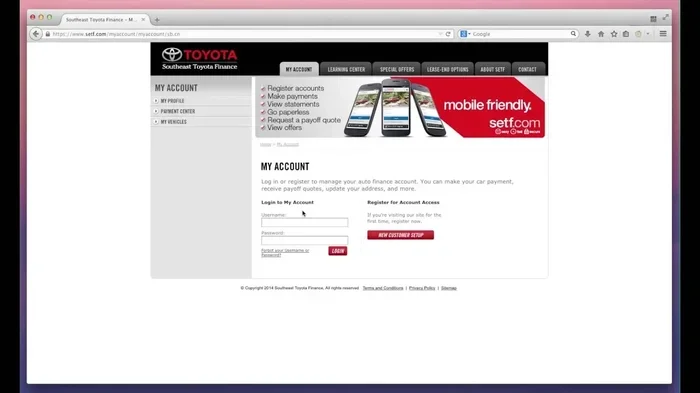
- Log in to your account. Enter your username and password. If you do not have an account yet, you can create one for free.
- Navigate to the payment section. Look for the “Make a Payment” or “Pay Bill” option on your dashboard.
- Enter your payment details. Input the amount you want to pay and select your payment method. You can link a bank account, debit card, or credit card.
- Confirm and submit. Review the details, confirm the payment, and you are done. You should receive a confirmation email right away.
Benefits of Paying Online
Online payments offer several advantages:
- Speed: Payments process quickly, often instantly.
- Convenience: Pay from anywhere with an internet connection.
- Record Keeping: Your payment history is saved and easy to access.
- No Stamps Needed: Skip the hassle of mailing a check.
Paying online also lets you set up reminders so you never miss a due date. This is one of the best ways to stay on top of your Toyota loan payment schedule.
Other Ways to Pay Your Toyota Financial Bill
Not everyone prefers paying online. That is perfectly fine. Toyota Financial Services offers several alternative payment methods to suit different preferences.
Paying by Phone
You can call Toyota Financial Services directly to make a payment over the phone. Have your account number and payment details ready. A customer service representative will walk you through the process. This method works well if you prefer speaking with a real person or need help resolving a billing issue.
Paying by Mail
If you prefer traditional methods, you can mail a check or money order to Toyota Financial Services. Make sure to include your account number on the memo line. Keep in mind that mail payments take longer to process, so send your payment well before the due date to avoid any late fees.
Paying Through Your Bank
Another option is to set up a payment through your own bank’s bill pay system. You will need your Toyota Financial account number and routing information. This method is free with most banks and gives you control over when the payment is sent.
| Payment Method | Speed | Convenience | Fees |
|---|---|---|---|
| Online Portal | Instant | Very High | None |
| Phone Payment | Same Day | Medium | None |
| Mail Check | 7-10 Days | Low | None |
| Bank Bill Pay | 2-5 Days | High | None |
Setting Up Automatic Payments
One of the smartest things you can do is set up automatic payments for your Toyota Financial bill. Automatic payments ensure you never miss a due date. This alone can save you from late fees and protect your credit score.
How to Set Up Auto Pay
Setting up automatic payments is simple through the online portal. Go to your account settings, look for “Auto Pay” or “Recurring Payments,” and follow the prompts. You can choose to pay the full balance, the minimum amount, or a custom amount each month.
Why Auto Pay Is Worth It
Here is why auto pay is a great choice:
- Peace of Mind: You never have to worry about forgetting a payment.
- On-Time Payments: Auto pay helps build a strong payment history.
- Time Saving: No need to log in and pay manually every month.
- Avoids Late Fees: You skip the extra charges that come with missed deadlines.
Just make sure you have enough funds in your linked account each month. A quick balance check before the payment date can prevent any issues.
What to Do If You Miss a Payment Due Date
Life gets busy. Sometimes a payment due date slips through the cracks. If you miss a payment on your Toyota Financial account, do not panic. Here is what you should do right away.
Step 1: Pay Immediately
The sooner you make your payment, the better. Log into your online portal or call Toyota Financial Services to submit your payment as soon as possible. Paying quickly reduces the impact of a missed payment.
Step 2: Check for Late Fees
Toyota Financial Services may charge a late fee if your payment is past due. The fee amount varies, so check your account or your most recent statement to see if one was applied. Paying the late fee along with your overdue balance clears the issue.
Step 3: Contact Customer Service
If you are facing financial hardship, reach out to Toyota Financial customer service. They may be able to offer payment arrangements or hardship programs. It is always better to communicate early rather than waiting until things get worse.
Missing one payment occasionally is not the end of the world. But repeated missed payments can affect your credit score and lead to more serious consequences. Staying on top of your Toyota lease payment or loan payment should always be a priority.
When to Consider Refinancing Your Toyota Loan
If your monthly Toyota Financial bill feels too high, refinancing might be a good option. Refinancing means replacing your current loan with a new one, usually with better terms like a lower interest rate or a longer repayment period.
Signs You Should Refinance
Consider refinancing if:
- Your credit score has improved since you got your loan.
- Interest rates have dropped since you signed your contract.
- Your current monthly payment stretches your budget too thin.
- You want to pay off your loan faster or reduce your monthly cost.
How to Refinance with Toyota Financial
You can explore refinancing options directly through Toyota Financial Services. You can also look into refinancing with other lenders. If you are wondering whether you can refinance with the same lender you currently use, the answer is often yes. Many owners successfully refinance their Toyota loan with the same lender to get better rates and terms.
Before refinancing, compare offers from multiple sources. Make sure the new terms genuinely save you money after accounting for any fees. Refinancing is a smart move when done right.
Common Mistakes to Avoid When Paying Your Toyota Financial Bill
Even with the simplest tasks, mistakes can happen. Here are some common errors to watch out for when paying your Toyota Financial bill:
Forgetting Your Due Date
Every month has a payment due date. If you forget it, you risk late fees and potential credit score damage. Mark your due date on your calendar or set a phone reminder. Most lenders also offer email or text alerts that can help you stay on track.
Paying the Wrong Amount
Always double-check the amount you are paying. Paying less than the full statement balance means you carry a balance forward and accrue more interest. Paying more than the balance is fine, but make sure it is intentional.
Not Keeping Payment Records
Always save confirmation emails or receipts after making a payment. These records protect you if there is ever a discrepancy. Toyota Financial Services keeps records too, but having your own backup is always wise.
Ignoring Your Mail Statements
Even if you pay online, keep an eye on your mailed statements. They contain important information about your account, including interest charges and payoff amounts. Ignoring them can lead to surprises you do not expect.
Quick Tips for a Smooth Payment Experience
Here are some quick tips to make paying your Toyota Financial bill effortless:
- Set up auto pay so you never miss a payment.
- Log in monthly to review your balance and transaction history.
- Keep your contact info updated so Toyota Financial can reach you with important alerts.
- Pay early if you can. Early payments reduce interest costs over time.
- Save your confirmation after every payment for your records.
- Call customer service if anything looks confusing or incorrect on your bill.
Final Thoughts
Paying your Toyota Financial bill does not have to be complicated. With online payments, phone options, mail payments, and automatic payment setups, you have plenty of ways to stay current. The key is finding the method that fits your lifestyle and sticking with it.
Remember, your payment history matters. On-time payments protect your credit score and keep your Toyota ownership experience positive. If you ever feel overwhelmed or unsure about your account, Toyota Financial customer service is always ready to help.
Whether you are managing a Toyota loan or a Toyota lease, taking control of your payments gives you peace of mind. Start today, set up the payment method that works for you, and enjoy the confidence that comes with staying on top of your finances.
And if you are ever considering changes to your financing, know that options like refinancing exist to help you manage your payments more comfortably. Taking a proactive approach to your Toyota loan payment strategy pays off in the long run.
Frequently Asked Questions
Can I pay my Toyota Financial bill using a credit card?
Yes, Toyota Financial Services accepts credit card payments through their online portal. Keep in mind that some credit card issuers may treat this as a cash advance, which could come with additional fees. It is best to check with your credit card company before using a card for your payment.
How do I find my Toyota Financial account number?
You can find your account number on your monthly statement or in the welcome packet you received when you signed your financing contract. If you cannot locate it, you can contact Toyota Financial customer service, and they will verify your identity and provide the number.
What happens if I pay my Toyota Financial bill late?
Late payments may result in a late fee being added to your account. Repeated late payments can also negatively impact your credit score. If you know you will be late, contact Toyota Financial Services right away to discuss your options and avoid additional penalties.
Is there a fee for setting up automatic payments?
No, Toyota Financial Services does not charge a fee for setting up automatic payments. Auto pay is a free and convenient way to ensure your payments are always made on time. You can choose the payment amount and frequency that works for your budget.
Can I make a partial payment on my Toyota Financial bill?
Toyota Financial Services typically requires full payment of the amount due each month. Partial payments may not be accepted and could still result in a late status on your account. If you are struggling to make your full payment, reach out to customer service to explore your options.
How can I check my Toyota Financial payment history?
You can view your complete payment history by logging into your Toyota Financial Services online portal. Your dashboard shows all past payments, including dates, amounts, and payment methods. You can also request a payment history report by contacting customer service.