How Do I Manually Reset My TPMS Sensor Fast and Easy
Manually resetting your TPMS sensor is something most drivers can do at home in under 15 minutes. Whether your tire pressure light stays on after you fix a flat or you just rotated your tires, this step-by-step guide walks you through every method. You will learn the button method, the driving method, and how to use a TPMS reset tool for a complete TPMS reset without visiting a mechanic.
That little yellow horseshoe icon with an exclamation point on your dashboard can really get under your skin. It is the tire pressure monitoring system, and it lights up for a reason. Sometimes it goes off on its own after you inflate your tires. Other times it just refuses to turn off no matter what you do. Either way, learning how to manually reset my TPMS sensor saves you time, money, and a lot of frustration.
You do not need to be a mechanic to handle this. In fact, most drivers can knock it out in their driveway with nothing more than a few minutes and a basic tire pressure gauge. This guide covers every method you might need. We will walk through the dashboard button method, the driving cycle approach, and the TPMS reset tool option. By the end, you will know exactly what to do for your specific vehicle.
The TPMS sensor is a small device inside each tire that monitors air pressure in real time. When pressure drops below the recommended level, the system triggers a warning on your dashboard. This is a safety feature. Underinflated tires can reduce fuel efficiency, cause uneven wear, and increase the risk of a blowout. So that little light is actually trying to help you.
But here is the thing. Sometimes the light stays on even after you have already fixed the problem. Maybe you added air, but the system has not caught up yet. Or maybe you replaced a tire and the sensor needs to be recalibrated. In those cases, a manual TPMS reset is all it takes to clear the warning. Let us get into the details.
Key Takeaways
- Multiple reset methods exist: You can use a dashboard button, a driving cycle, or a dedicated TPMS reset tool depending on your vehicle.
- Most resets take under 15 minutes: You do not need a dealership or expensive shop equipment to complete this simple maintenance task.
- Check your tire pressure first: Always verify your tire pressure with a tire pressure gauge before resetting the system to avoid a recurring warning.
- Reset after every tire change: Rotating tires, changing seasons, or replacing a sensor battery all require a fresh TPMS recalibration.
- Persistent lights may signal a deeper issue: If the tire pressure warning keeps coming back, your tire pressure sensor battery may need replacement or there could be a leak.
📑 Table of Contents
- Why Your TPMS Light Comes On in the First Place
- How to Manually Reset My TPMS Sensor Using the Dashboard Button
- The Driving Cycle Method for Resetting TPMS
- Using a TPMS Reset Tool for a Fast Reset
- When to Replace the TPMS Sensor Battery
- Common Mistakes People Make When Resetting TPMS
- How TPMS Reset Compares Across Different Vehicle Brands
- Preventing Future TPMS Issues
- Conclusion
Why Your TPMS Light Comes On in the First Place
Before you reset anything, it helps to understand why the light appeared. The tire pressure monitoring system activates for several reasons, and knowing the cause makes the reset process much smoother.
Temperature Changes
Cold weather is the number one sneaky trigger for the tire pressure warning. When temperatures drop, the air inside your tires contracts. This can lower pressure by one or two PSI for every 10-degree drop. If you live somewhere with harsh winters, you have probably seen this light flicker on during the first cold snap of the season.
Slow Leaks
A tiny puncture or a worn valve stem can cause a slow leak. You might not even notice the tire feels slightly soft. But your TPMS sensor picks up on it immediately. These slow leaks are frustrating because the tire looks fine to the naked eye, yet the system still flags a problem.
After Tire Maintenance
Have you ever rotated your tires, changed a flat, or swapped in a new set of wheels? If so, the TPMS reset light might come on because the system needs to relearn the tire positions. This is completely normal and easy to fix.
Sensor Battery Failure
Every tire pressure sensor has a small battery inside. These batteries typically last between five and ten years. When the battery dies, the sensor cannot communicate with your car’s computer. The result is a persistent check tire pressure light that no amount of inflating will fix.
How to Manually Reset My TPMS Sensor Using the Dashboard Button
The most common way to perform a TPMS reset is through a button on your dashboard or steering column. Nearly all vehicles made after 2007 come equipped with a TPMS reset button. The location varies by make and model, but it is almost always easy to find.
Step-by-Step Button Reset Method
Follow these steps carefully to reset your system using the dashboard button method:
- Turn the ignition to the ON position. Do not start the engine. Just turn the key or press the start button so the dashboard lights come on.
- Locate the TPMS reset button. It is usually found beneath the steering column, near the driver’s side door, or inside the glove box. Check your owner’s manual if you are unsure.
- Press and hold the button. Hold it down until the tire pressure light on the dashboard blinks three times. This confirms the system has entered reset mode.
- Release the button. Start the engine and let the car idle for about 20 minutes. During this time, the system recalibrates and learns the current pressure levels.
- Check the dashboard. If the reset was successful, the warning light should turn off. If it stays on, you may need to try a different method.
This method works for most Toyota, Honda, Ford, and Chevrolet models. It is quick, free, and requires no special tools. However, some vehicles do not have a physical reset button. In those cases, you will need to use the menu system on your infotainment display. Check your vehicle’s manual for the exact menu path, as it differs widely between brands.
The Driving Cycle Method for Resetting TPMS
Some vehicles do not have a dedicated reset button. Instead, they use a driving cycle to recalibrate the tire pressure monitoring system. This method relies on your driving patterns to teach the system that the tires are properly inflated.
How the Driving Cycle Works
The driving cycle method is straightforward but requires a bit of patience. Here is how to do it:
- Inflate all tires to the recommended PSI. You can find this number on the sticker inside the driver’s door frame. Do not use the number on the tire sidewall. That is the maximum pressure, not the recommended pressure.
- Drive at a steady speed of 50 mph or higher. Maintain this speed for at least 10 minutes. The system needs consistent data to recalibrate.
- Turn off the engine and wait 10 minutes. This gives the TPMS sensor time to process the new information.
- Restart the vehicle. The tire pressure warning light should be off if the reset was successful.
If the light still does not go off, try repeating the driving cycle two or three times. Some vehicles, especially older models, need multiple cycles to fully reset. This method is especially useful for how do I manually clear my car codes situations where the dashboard is holding onto old data.
Quick Tip
For the best results with the driving cycle method, make sure your tires are cold when you first check the pressure. Driving heats up the air inside the tires, which can give you a false reading on your tire pressure gauge.
Using a TPMS Reset Tool for a Fast Reset
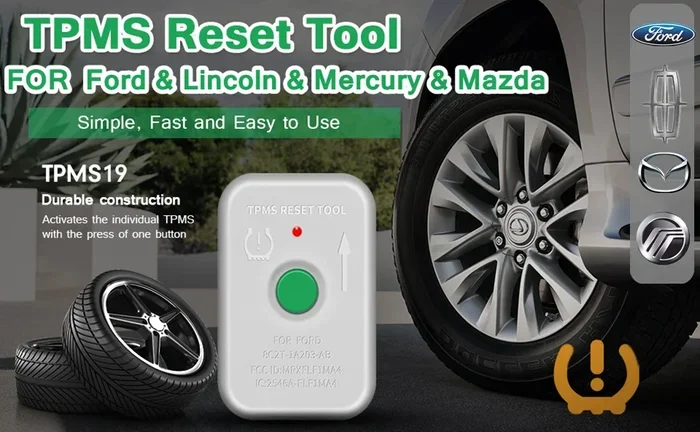
If the button method and the driving cycle both fail, a dedicated TPMS reset tool is your next best option. These tools connect directly to your vehicle’s OBD-II port and send a signal to the tire pressure sensors to recalibrate.
What Is a TPMS Reset Tool?
A TPMS reset tool is a small handheld device that communicates with your car’s computer system. You plug it into the OBD-II diagnostic port, which is usually located under the dashboard on the driver’s side. The tool sends a signal that tells all four TPMS sensors to relearn the current tire pressure values.
How to Use a TPMS Reset Tool
- Locate the OBD-II port. It is typically found under the steering column. You may need to look around a bit.
- Plug in the TPMS reset tool. The connection should be firm and secure.
- Turn the ignition to ON. Follow the tool’s on-screen instructions.
- Select the TPMS reset option. Most tools have a clear menu for this function.
- Wait for the confirmation signal. The tool will let you know when the reset is complete.
- Disconnect the tool and start the engine. The warning light should now be off.
You can find affordable TPMS reset tools online for under $30. They are a great investment if you do your own car maintenance. If you prefer not to buy one, many auto parts stores like AutoZone will perform the reset for free or for a small fee.
When to Replace the TPMS Sensor Battery
Sometimes resetting the system does not solve the problem. If the tire pressure light keeps coming back even after a successful TPMS reset, the sensor battery inside one or more tires may be dead. This is a very common issue, especially in vehicles that are seven years old or older.
Signs of a Dead Sensor Battery
- The TPMS warning light flashes for 60 to 90 seconds when you start the car and then stays solid.
- The light comes on even though all four tires are at the correct pressure.
- You recently replaced a tire and the sensor stopped working shortly after.
- Your vehicle is more than five years old and the light has never been reset successfully.
Replacing a tire pressure sensor battery is a job that most tire shops can handle quickly. The cost is usually between $5 and $10 per sensor for the battery alone, plus labor. Some people choose to replace the entire sensor unit instead, especially if the sensor is old or corroded. You can also fix your own tire pressure sensor if you have basic tools and a replacement sensor that matches your vehicle.
Can I Replace a TPMS Sensor Myself?
Yes, you can. It involves removing the tire from the wheel, taking out the old sensor, installing the new one, and then performing a TPMS recalibration. If you are comfortable with basic tire work, this is a manageable DIY project. Just make sure you purchase the correct sensor for your vehicle. Not all sensors are universal, and using the wrong one can cause compatibility issues.
Common Mistakes People Make When Resetting TPMS
Even though resetting a TPMS sensor is simple, people still make avoidable mistakes. Here are the most common ones and how to prevent them.
Skipping the Tire Pressure Check
The biggest mistake is resetting the system without first checking the actual tire pressure. If one tire is still low, the light will come right back on. Always use a reliable tire pressure gauge and inflate to the manufacturer’s recommended PSI before resetting.
Resetting Too Quickly
Some people press the reset button and immediately drive away. The system needs time to recalibrate. Give it at least 10 to 20 minutes of idle time after the reset. Rushing the process is the fastest way to end up with a light that keeps coming back.
Ignoring a Flashing Light
A solid tire pressure warning usually means low pressure. A flashing light, on the other hand, often signals a malfunction in the TPMS sensor itself. A flashing light should never be ignored. It typically means the sensor battery is dead or the sensor is damaged and needs replacement.
Forgetting to Reset After Tire Rotation
If you rotate your tires or change your wheels, you must reset the TPMS system. The sensors are tied to specific wheel positions, and moving them around confuses the system. A quick TPMS reset after any tire service prevents unnecessary dashboard warnings.
How TPMS Reset Compares Across Different Vehicle Brands
The TPMS reset process is not one-size-fits-all. Different brands use different methods, and knowing what works for your vehicle saves a lot of trial and error.
| Brand | Reset Method | Reset Location |
|---|---|---|
| Toyota | Dashboard button or menu | Under steering column or infotainment screen |
| Honda | Dashboard button | Below steering column or in glove box |
| Ford | Dashboard button or menu | Steering wheel controls or settings menu |
| Chevrolet | Dashboard button | Driver’s side door frame area |
| BMW | iDrive menu system | Infotainment display under Vehicle Settings |
| Ford | Infotainment menu | Settings > Vehicle > TPMS Reset |
Always refer to your vehicle’s owner manual for the exact reset procedure. If you do not have the manual, a quick online search for your specific make, model, and year will pull up the exact steps. Many forums and video tutorials also walk you through the process visually, which can be very helpful.
Preventing Future TPMS Issues
Once you have successfully completed your TPMS reset, you want to keep that system running smoothly. A few simple habits can prevent the light from coming back unnecessarily.
- Check your tire pressure monthly. A quick check with a tire pressure gauge takes less than five minutes and catches slow leaks early.
- Keep a portable air compressor in your trunk. This lets you top off your tires on the go without visiting a gas station.
- Replace sensor batteries on schedule. Most TPMS sensor batteries last around seven years. If your vehicle is approaching that age, consider proactively replacing the batteries.
- Reset after every tire change. Whether you rotated your tires, changed a flat, or put on seasonal wheels, always perform a TPMS recalibration afterward.
- Do not ignore the light. Even if your tires look fine, a persistent warning could indicate a sensor issue that will only get worse over time.
Taking care of your tire pressure monitoring system is one of the easiest ways to keep your car safe and efficient. Properly inflated tires improve fuel economy, extend tire life, and reduce the risk of accidents. A few minutes of attention each month goes a long way.
If you have ever wondered how do I manually clear my car codes or dealt with a stubborn warning light, the process is very similar. Most manual resets follow the same basic logic: enter reset mode, let the system relearn, and verify the light is off. Once you have done it a couple of times, it becomes second nature.
Conclusion
Learning how to manually reset my TPMS sensor is one of the simplest and most useful skills any driver can have. Whether you use the dashboard button, the driving cycle method, or a dedicated TPMS reset tool, the process is quick and does not require a trip to the dealership. Always start by checking your tire pressure with a tire pressure gauge, then follow the reset steps for your specific vehicle. If the light keeps coming back, check the tire pressure sensor battery or consider fixing your own tire pressure sensor to save money on labor costs.
Remember that the tire pressure monitoring system exists to keep you safe. Respect the warning, address the root cause, and perform a TPMS reset whenever needed. With the knowledge in this guide, you can handle any TPMS sensor issue confidently and keep your car running at its best.
And just like knowing when to reset after an oil change, understanding your TPMS reset process is part of being a proactive car owner. Small maintenance tasks like these add up to big savings over the life of your vehicle.
Frequently Asked Questions
How long does it take to manually reset a TPMS sensor?
Most manual resets take between 5 and 15 minutes. The button method is the fastest, while the driving cycle method may take up to 30 minutes including the drive time. Using a TPMS reset tool is also very quick, usually under 10 minutes from start to finish.
Why won’t my TPMS light turn off after I reset it?
If the light stays on after a reset, the most common cause is that one or more tires are still below the recommended pressure. Double-check all four tires with a tire pressure gauge and inflate to the correct PSI. If the pressure is fine, the TPMS sensor battery may be dead and need replacement.
Can I drive with the TPMS light on?
You can drive with the light on, but you should not ignore it. The light means your tire pressure is either too low or too high, both of which are unsafe. Low pressure can cause poor handling, reduced fuel economy, and increased tire wear. Check your tires as soon as possible and address the issue.
How often should I reset my TPMS sensor?
You should reset your TPMS sensor anytime you have done work on your tires. This includes after rotating tires, changing a flat, installing new tires, or swapping seasonal wheels. You should also reset the system after inflating tires to the correct pressure if the light was on.
Do I need a special tool to reset my TPMS sensor?
Not always. Many vehicles have a simple dashboard button or driving cycle method that requires no special equipment. However, some newer models and certain brands like BMW require a TPMS reset tool or a visit to a tire shop. A basic reset tool costs around $20 to $40 and works with most vehicles.
What is the difference between TPMS reset and TPMS recalibration?
A TPMS reset clears the warning light and tells the system to relearn current tire pressure values. TPMS recalibration is a more thorough process that involves re-teaching the system the exact position and ID of each sensor. Both terms are used interchangeably by most drivers and tire shops, but recalibration is the more technically accurate term for the full process.